Lite $59 · Pro $79 — Craft 5.3+
Watermarked everywhere, or not at all
A watermark applied by hand is applied inconsistently — somebody forgets, somebody picks the wrong corner, somebody uploads the unmarked original next Tuesday. One burned into the file cannot be taken back. And the mark has to survive a pipeline that keeps making new files from the source: Craft's transforms, ImageOptimize's variants, Imager-X. Waterfall is one profile, applied to all of it.

Two commands, then nothing
Install it, make a profile, and the images your templates already render come back watermarked. The Twig API is there for the cases that have to ask for something specific — a named profile, a URL from your CDN, or the reason an image was skipped.
composer require justinholtweb/craft-waterfall
php craft plugin/install waterfall

{# Nothing needs to change here. A profile set to watermark transforms
   marks whatever Craft generates: #}
<img src="{{ asset.getUrl({ width: 1200, height: 800, mode: 'crop' }) }}">

{# Ask for one profile by name — from its CDN provider, or Waterfall's own store #}
{{ craft.waterfall.url(asset, { width: 1200 }, 'copyright') }}

{# Would this asset be marked? Has its file been marked already? #}
{% if craft.waterfall.appliesTo(asset, 'copyright') %}…{% endif %}
{% if craft.waterfall.isWatermarked(asset) %}…{% endif %}

{# And when it is not, one verdict per profile, each with a sentence #}
{% for verdict in craft.waterfall.explain(asset) %}
    {{ verdict.profile.name }}: {{ verdict.applies ? 'yes' : verdict.message }}
{% endfor %}Features
Everything Easy Watermark does for WordPress, plus the half of the job a CMS with an image pipeline actually has.
Into the transforms you already render
The mark is composited while Craft generates a transform, so every image the site renders carries it and the stored original is untouched. No template changes anything, and clearing the transform cache is the undo.
- asset.getUrl() comes back watermarked
- Covers srcset, thumbnails and social images
Or into the file, with the original kept
Permanent mode rewrites the stored file — on upload, from the asset index, or in bulk — and copies the original to a backup store first. If the backup fails, nothing is written.
- Backed up once per asset, so a second mark cannot overwrite the original
- A ledger records which profile did it, and when
Counted first, and reversible after
A bulk run says how many images it would mark, how many it would skip, and the commonest reasons for the skips — before a single file changes. Restore puts the originals back in one action.
- Dry run in the control panel and on the command line
- Runs above your threshold are handed to the queue
Image marks, or text you can compose
Any asset as an image mark, or text rendered as an object template — the year, the site, the asset's own fields. Four fonts are bundled, and a profile can point at your own uploaded typeface.
- Nine anchors, exact offsets, or tiled across the image
- Sized against the image being marked, not the mark
It survives the rest of your image pipeline
ImageOptimize and Imager-X both make new files from the source, so a mark that only lives in one place is missing from the rest. Waterfall composites before ImageOptimize saves, and registers an effect Imager-X can use.
- The .webp and .avif variants carry the mark too
- Imager-X transforms get their own entry per profile
Or let your CDN do it
Some sites never process an image at all — the CDN does. imgix, Cloudinary, ImageKit and a URL template driver are drivers here, not a different plugin, and each says what it cannot do rather than quietly delivering something else.
- Signed imgix URLs, Cloudinary text overlays, ImageKit layers
- A token template for Bunny, Cloudflare Images or Thumbor
Waterfall in the control panel
A profile is one watermark: what it is, where it sits, how see-through it is, and which images get it.
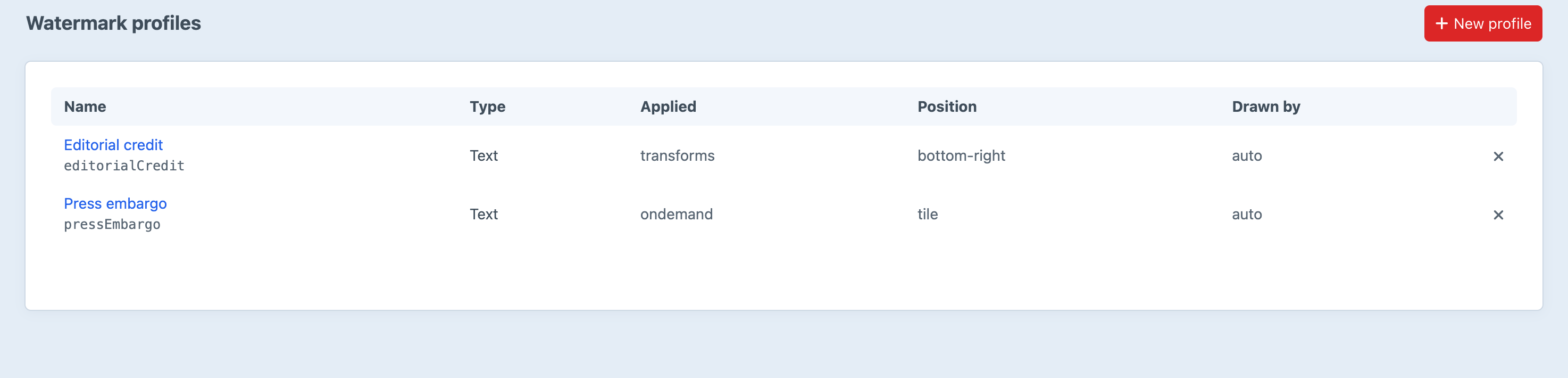
Screenshot from a live install, not a mockup.
Frequently Asked Questions
The questions worth answering before you point it at a volume.
Only if you ask it to. A profile set to transforms or on demand never touches the stored file — the mark is composited into the derivative Craft generates. A profile set to permanent rewrites the file itself, and copies the original to the backup store before it does, refusing to write at all if that copy fails.
Yes, in one action: Restore original, on a single asset, on a selection in the asset index, or from the console. The backup is written back through Craft, so dimensions and transforms refresh with it, and the ledger row that recorded the mark is dropped. Backups and restore are in Lite as well as Pro — charging for the undo of a destructive operation is not a business model.
Transform watermarking applies to every transform generated after you save the profile, so existing images are covered as their caches refill. Permanent watermarking marks images from that point on; Waterfall → Apply is what covers what is already there, and it counts and explains before it writes anything.
Both. ImageOptimize needs nothing configured: Waterfall composites before it saves, so its optimized file and its .webp/.avif variants all carry the mark. Imager-X gets a registered waterfall effect that any transform can name, and on Imager-X Pro matching profiles are folded in automatically.
Then nothing is transformed on your server and there is nothing to composite onto. Point the profile at imgix, Cloudinary, ImageKit or your own URL template instead, and craft.waterfall.url() returns a URL that service watermarks at delivery time. Waterfall's settings screen and waterfall/doctor both say when this is the situation you are in.
Transforms regenerate without the mark the next time they are cleared. Permanently marked files stay marked — the mark is in the pixels — so restore anything you want unmarked before uninstalling, while the ledger and the backups are still there. Uninstalling drops Waterfall's two tables and removes its profiles from project config; the backup files are left on disk for you.
Configure it once, and stop thinking about it
Lite is $59, Pro is $79, both for Craft CMS 5.3 and later. Backups and restore are in both, because the undo of a destructive operation is not a feature to charge for.