Free · Craft CMS 5
The next page, loaded before the click
Chromium browsers will happily fetch — or fully render — the page a reader is about to open, if you tell them which links are safe to open early. The telling is a small JSON document. The safety is the entire problem.

A prerender does not fetch a page. It runs one
That is the whole reason this is a plugin rather than a snippet. Point a naive rule at every link and it eventually opens the one that signs somebody out — from a hidden tab, before anybody clicked. So Speculatr assembles the exclusions first, and it assembles them out of Craft's own configuration rather than from a list of guesses.
{
  "prerender": [{
    "source": "document",
    "where": { "and": [
      { "href_matches": "/*", "relative_to": "document" },

      // read out of your Craft config, under whatever
      // names this site gives them
      { "not": { "href_matches": "/admin" } },
      { "not": { "href_matches": "/admin/*" } },
      { "not": { "href_matches": "/actions/*" } },
      { "not": { "href_matches": "/*\\?*(^|&)action=*" } },
      { "not": { "href_matches": "/logout" } },
      { "not": { "href_matches": "/*\\?*(^|&)token=*" } },

      { "not": { "selector_matches": ".no-speculation" } },
      { "not": { "selector_matches": "[rel~=nofollow]" } }
    ]},
    "eagerness": "moderate"
  }]
}Features
One feature that makes pages instant, and five that make the first one safe to leave on.
It asks Craft, not a list
The WordPress equivalent can hard-code /wp-admin. Craft's equivalents are all configurable, so Speculatr reads them out of your own config: the control-panel trigger, the action trigger, every account path, and the preview, site and CSRF token parameters. A site that moved its control panel — or renamed its logout — is covered without anybody remembering to say so.
Prefetch, prerender, or both at once
A prefetch downloads the HTML and stops: a few kilobytes, nothing runs. A prerender loads and executes the whole page in a hidden tab, so the navigation is genuinely instant. Run both and they layer — the browser prefetches on hover and upgrades to a prerender only once the reader commits, so the expensive half is never spent on a link the pointer merely crossed.
Signed-in visitors are the risky ones
A personalised page is both the most expensive one you serve and the likeliest to have something on it that should not happen twice. So signed-in users are off by default, admins are their own switch — try it on yourself first — and when you do turn them on, prerendering degrades to prefetching rather than running their page in a hidden tab.
Campaign links still hit the cache
A prefetch of /pricing is no use if the reader arrives at /pricing?utm_source=newsletter. Speculatr sends a No-Vary-Search header on your pages and mirrors it into the rules: the header is what makes the cached entry match, the rule is what stops the browser racing its own in-flight prefetch. Both halves, because either one alone does nothing.
A checker that names the reason
The question nobody asks is “what are my rules”. The question everybody asks is whether it is going to prerender the thing that signs people out. Paste a URL into the control panel — or run speculatr/rules/check on the command line — and it tells you, names the exclusion that stopped it, and admits what a URL on its own cannot settle.
Nothing stored, nothing sent
No database tables, no migrations, no cookies, no build step, and not one outbound HTTP request. The plugin's entire output is a script element and two response headers. Uninstall it and your pages are exactly what they were, with nothing left behind to clean up.
Speculatr in the control panel
The rules screen shows exactly what Speculatr is putting on the page for each audience — the real JSON, not a description of it.
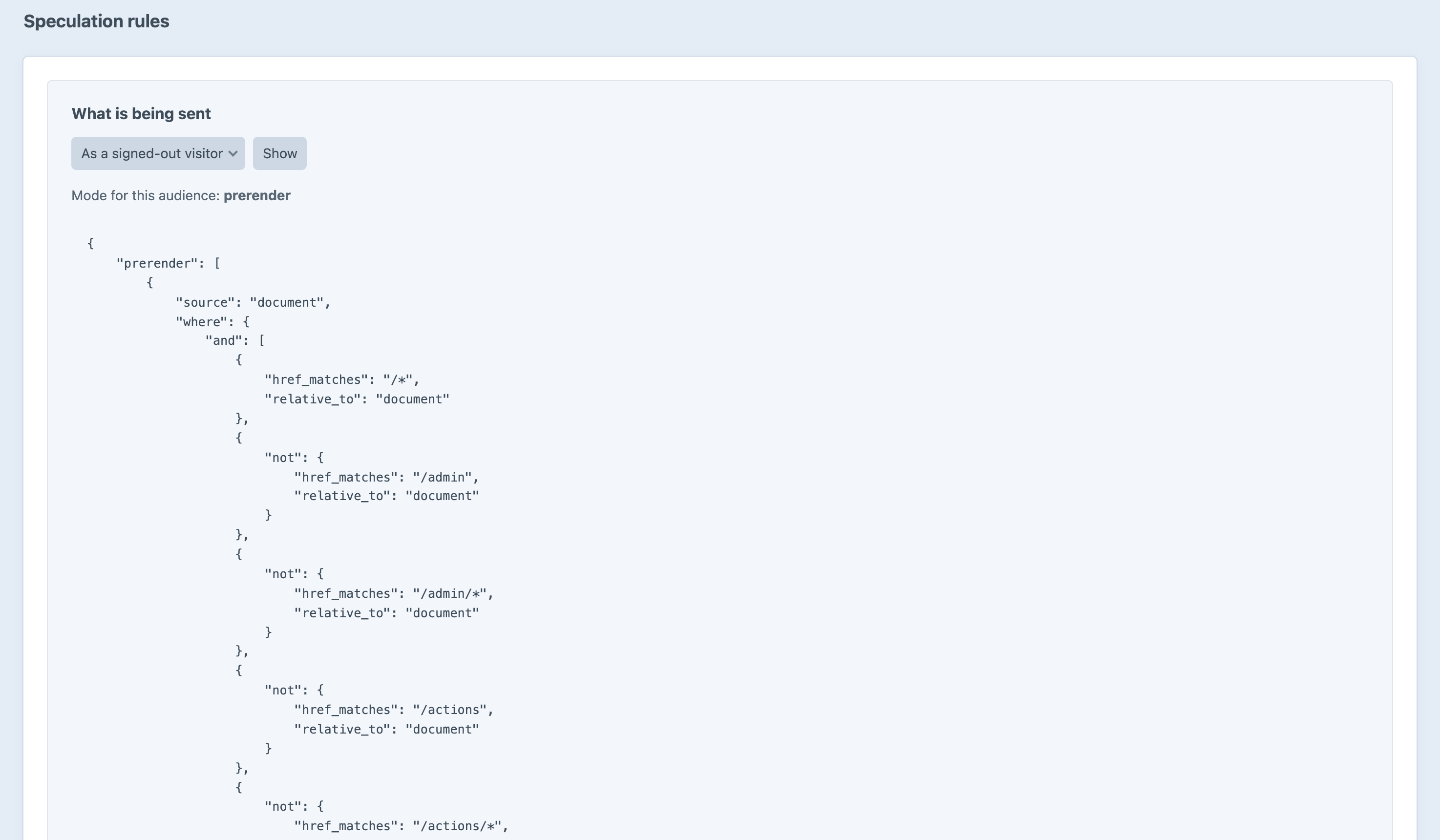
Screenshot from a live install, not a mockup.
Frequently Asked Questions
The questions worth answering before you switch it on.
Entirely, permanently, with no editions and no licence key. Every feature on this page is in the one version there is, and there is no licensing code in the plugin at all.
It will increase requests, and how much depends on the mode and eagerness you pick. Three things keep it bounded: Chrome holds only two speculations at a time at anything other than immediate; a prefetch is just the HTML, with no images, scripts or subresources; and every speculative request carries Sec-Purpose, so you can measure the real number before deciding it is a problem.
Start at prefetch + moderate if you are unsure. Move to prerender once you have looked at the traffic.
Not by default, and that is the part of this plugin worth caring about. The control panel, action requests — by path and by ?action= — every login, logout and password path, and any URL carrying a preview, site or CSRF token are all excluded, read out of your own configuration.
The one thing it cannot solve for you is a cart or checkout page with a URI of its own, because Speculatr has no way to know you called it /basket. Add it to the excluded paths; the Rules screen reminds you when Commerce is installed.
No. Speculatr stores nothing, has no database tables, sets no cookies, and makes no outbound requests. It reads your Craft configuration and writes a JSON block into your pages.
Worth being straight about: a prefetch or prerender is a real request, so your server logs a visit to a page the reader never opened, and third-party scripts on a prerendered page may fire.
Chrome sends Sec-Purpose on every such request so you and your third parties can tell the difference, and a prerendered page is hidden, so anything correctly gated on the Page Visibility API — Google Analytics 4 included — holds off until the reader actually arrives. Your own counters need a one-line guard. If "which page did this person load" is itself sensitive on your site, prefetch mode never runs the page at all.
GA4 handles this correctly on its own. Your own counters and some third-party scripts will not, so guard them:
{% if not craft.speculatr.isPrerender %}
    {% do entry.recordView() %}
{% endif %}
No, because they do not support the Speculation Rules API. They ignore the block entirely, which costs their visitors a couple of kilobytes of JSON and nothing else.
There is no fallback and none is wanted: a browser that does not speculate simply loads the page when the reader clicks it. Roughly two thirds of the web is Chromium, so this is a real improvement for most of your traffic and a no-op for the rest.
Those scripts listen for hover and inject <link rel="prefetch">. That works everywhere, and it is JavaScript you now ship and maintain.
Speculation Rules are declarative: the browser does the hover detection, applies its own limits and heuristics, and — crucially — can prerender, which no script can do. Speculatr also has the whole exclusion apparatus, which is the part a three-line script does not have and the part that eventually matters.
Yes, with one thing to get right. When a page fetched by a speculation is served without rules — the default — the response varies on the Sec-Purpose request header, and Speculatr sends Vary: Sec-Purpose to say so.
If your CDN strips that header, a rules-free copy can be cached and handed to real visitors, and it will look random because it depends which request populated the cache. Put it back, or turn off the skip-on-speculative setting instead.
Yes. Either allow 'inline-speculation-rules' in your script-src, or switch Delivery to the Speculation-Rules header — Speculatr then serves the rules as a JSON document at /speculatr/rules.json, fingerprinted so a change to your exclusions reaches everybody on their next page view, and no inline allowance is needed at all.
Yes. Rules match the origin of the page they are on, so each site speculates its own links, and the control panel's URL checker knows every origin your install serves.
Your pages go back to exactly what they were. There are no tables, no rows and no residue — the plugin's entire output is a script element and two response headers, and both stop the moment it is uninstalled.
Free, and it stays free
No editions, no licence key, no trial. Install it, and the next page your readers open is already loading.