Free · Craft CMS 5
Uploads too big for your server, in pieces small enough for it
Every hop between the browser and PHP has an opinion about how big one request may be — upload_max_filesize, post_max_size, nginx's client_max_body_size, Cloudflare's 100 MB cap — and the smallest of them is the real limit on what anybody can upload. Raising them all is somebody else's server and somebody else's plan. Chunky raises none of them. It never sends a request bigger than the smallest one, and hands Craft the finished file.

Decided per file, at the moment it is sent
A file at or under the chunk size goes to Craft's own upload action in one request, along the exact path it took before the plugin was installed. Only a file larger than that is sliced — so a bug in Chunky can only ever touch an upload that was going to be rejected anyway. And when a chunk is lost, the server — not the browser — says where to pick up.
logo.svg          38 KB  →  assets/upload        one request, as before

keynote-4k.mp4    24 MB  →  chunky/upload/chunk  six requests

  Content-Range: bytes        0-4194303/25165824   ←  Range: 0-4194303
  Content-Range: bytes  4194304-8388607/25165824   ←  Range: 0-8388607
  Content-Range: bytes  8388608-12582911/25165824  ←  ✕ connection reset
  chunky/upload/status                             ←  { uploadedBytes: 12582912 }
  Content-Range: bytes 12582912-16777215/25165824  ←  Range: 0-16777215
  Content-Range: bytes 16777216-20971519/25165824  ←  Range: 0-20971519
Content-Range: bytes 20971520-25165823/25165824 ← { assetId: 4812 }Features
Chunking is the easy half. These are what make it safe to leave on.
On entries, not just the Assets screen
The Assets screen, Assets fields on every element edit screen and slideout, and Replace file. The abandoned Craft 4 plugin only ever worked on the first of those; working on entries is the reason Chunky was written. Each of the three has its own switch.
Small files never touch it
The route is chosen per file at submit time. Anything at or under the chunk size posts to Craft's own assets/upload exactly as before, so installing Chunky cannot break an upload that already worked.
Resumes from what the server holds
A chunk that fails on the network is retried with a doubling delay — but first the browser asks how many bytes the server actually has. The request that failed may have landed in full, and resuming from the browser's guess would write the same bytes twice into the middle of the file.
Says no on the first chunk
A disallowed extension, a file past the maximum, a folder the user cannot save to — all refused before the second chunk is sent. Permission is checked on every chunk, so nobody spends the server's disk finding out they were never allowed.
Names the limit it cannot see
The settings screen reads every PHP limit and says whether the chunk size clears it — then names nginx, Apache, CDNs and load balancers, which reject a chunk before Craft runs. That failure leaves an empty log and a bare 413, so Chunky turns a 413 into a message that says what it means.
One copy on disk, and it cleans up
Each chunk is written in place at its own offset, so a 1 GB upload needs 1 GB of scratch space, not two. A tab closed halfway leaves a partial that Craft's garbage collection sweeps, and chunky/partials shows what is there.
Will this work here?
The settings screen answers the question before anyone uploads anything: every limit Chunky can read, measured against the chunk size, and the ones no PHP process can read, named rather than guessed at.
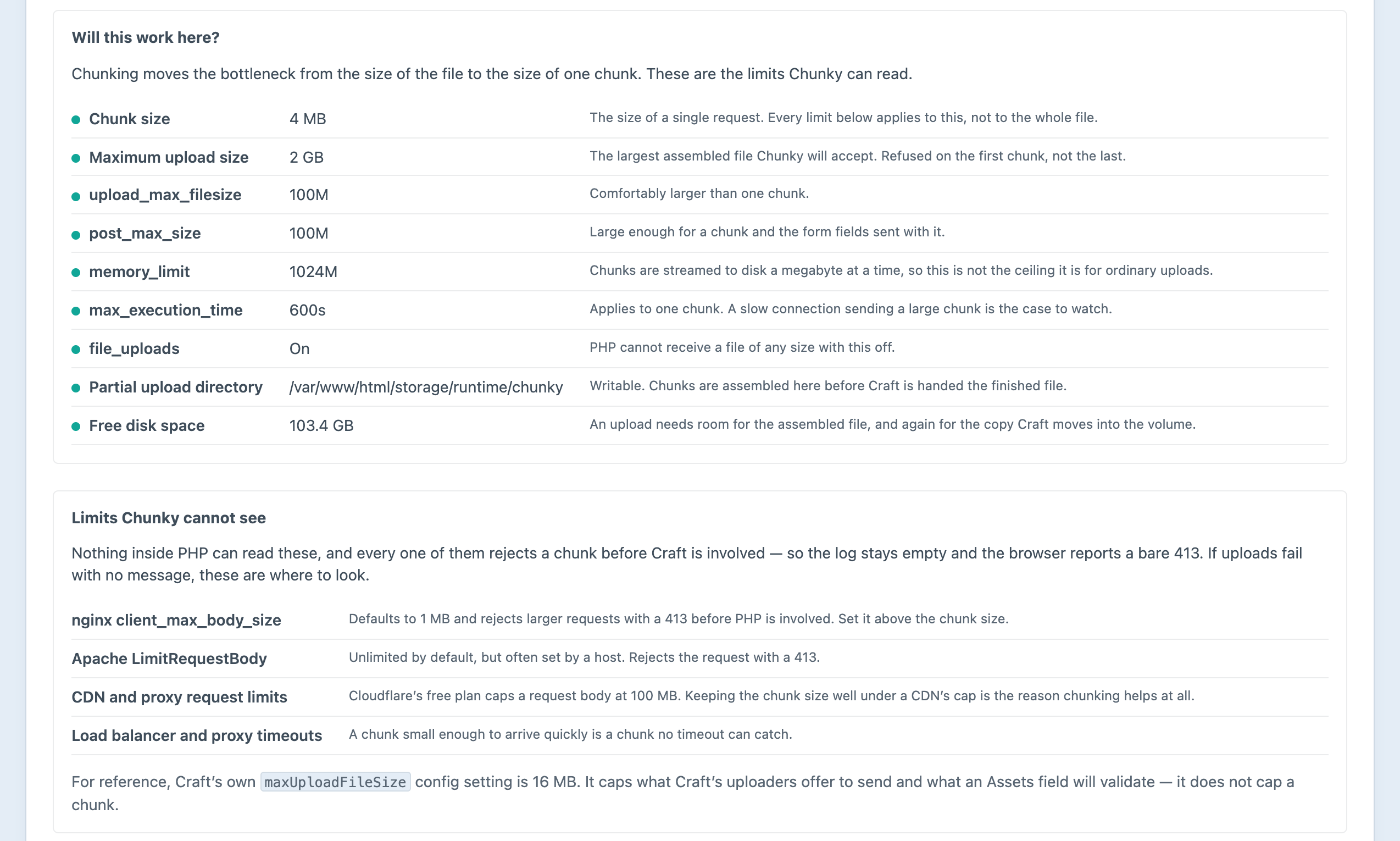
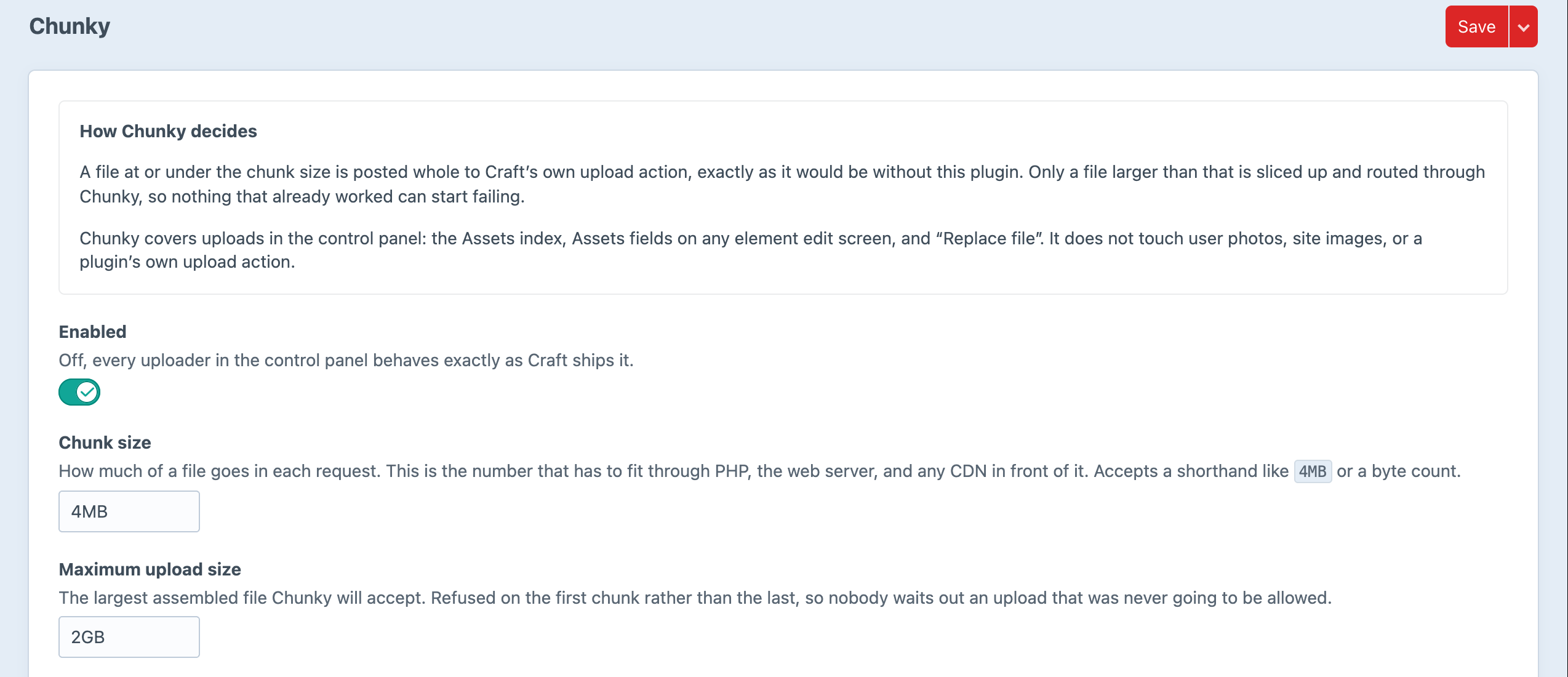
Screenshots from a live install, not mockups.
Frequently Asked Questions
The questions that come up before trusting a plugin with somebody's forty-minute upload.
Yes. One edition, everything switched on, no licence key and no licensing code in the plugin.
No. sebastianlenz/craft-chunked-uploads solved the same problem and was abandoned. Chunky is a fresh implementation against Craft 5, and it fixes that plugin's most-reported limitation: it works on Assets fields on entries, and on Replace file, not only on the Assets screen.
Only above the chunk size, not above the file size. On a stock PHP install with a 2 MB limit, set the chunk size to 1 MB and a 4 GB file will upload.
Yes, and that is one of the main reasons to install it. Cloudflare's free plan rejects any request body over 100 MB whatever your server allows. A 4 MB chunk never comes close.
It does not touch them. A file at or under the chunk size is posted whole to Craft's own upload action, along the exact code path it would have taken without the plugin.
Yes. Chunky's job ends when the file is complete on the server's own disk. From there it goes through Craft's normal asset creation, and the volume takes it exactly as it would a small upload. Plugins that upload straight from the browser to S3 register their own uploader, and Chunky leaves them alone.
A partial file is left in storage/runtime/chunky and Craft's garbage collection removes it after a day, or whatever lifetime you set. There are no rows, elements or project config to clean up.
No. Partials live in the owning user's own directory and every lookup is scoped to whoever is signed in, so an identifier belonging to somebody else simply does not resolve.
Not in this release. Chunky decorates the control panel's uploaders, and its script is only served to the control panel.
Neither. An upload in progress is two files on disk and a finished one is an ordinary Craft asset. No outbound requests, no telemetry, no build step, no runtime dependencies beyond Craft's own.
Install it and the next big file just goes
Free, no editions, no licence key. Install it, glance at the environment report, and large uploads start arriving in 4 MB pieces straight away.