Lite free · Pro $59 · Craft CMS 5
Who may see what, including the files
Bouncer gates sections, entries, categories and front-end URIs, and the asset files behind them. A plugin that only gates elements leaves the title in the listing and the PDF at its original URL.

A paywall in six lines
Most pages don't need to be all or nothing. Rules gate whole pages on their own; the Twig API gates part of a page. Protected assets need no template changes, because asset.url already returns the guarded route.
{% if craft.bouncer.can(entry) %}
    {{ entry.body }}
{% else %}
    {{ entry.body|teaser(55) }}
    <a href="/subscribe">Read the rest</a>
{% endif %}

{# Unchanged, and now checked on every request #}
<a href="{{ asset.url }}">Download the contract</a>

{# For someone with no account, for an hour #}
{{ craft.bouncer.signedUrl(asset, 3600) }}Features
Everything a rule can say, and everywhere the answer is enforced.
A rule reads like a sentence
This content, for these people, otherwise that. Target entries by section and type, categories by group, assets by volume, or URIs by glob pattern. Pro can narrow any target with Craft's own element condition builder.
- Login, user groups (any or all), Craft permissions
- Pro: shared password, date window, IP allow and deny lists
Rules combine with AND
Every rule that targets an element must pass, so adding a rule can only ever remove access. "Editors or subscribers" goes in one rule's group list. Rule order only decides which response a refused visitor gets.
Listings stop leaking
The query filter hooks every element query, which covers index pages, search, feeds, sitemaps and GraphQL. To list what a visitor can't open ("12 more articles for subscribers"), opt that query out with .bouncer(false).
Files served, not published
Protected assets go through a guarded route that checks access on every request and supports Range and conditional requests. Large files can be handed off to nginx or Apache.
- Transforms are generated outside the public transform filesystem
- Remote volumes take a local copy before answering a range
An audit that checks the files
For every volume a rule protects, the exposure audit reports a public filesystem, a public transform filesystem or a local root inside the web root. It gives you the .htaccess or nginx block that closes each one.
Signed links for outsiders
An HMAC-signed, expiring link to one protected file, for someone who has no account. The signature covers the asset, transform, expiry and optionally the user. Nothing is stored on the server.
Six ways to refuse
A refused visitor can be sent to login with a return URL, redirected, shown one of your templates in place, asked for the shared password, or given a plain 403 or 404.
Rules deploy with the site
Rules are stored in project config, so they deploy with the sections they protect and show up in pull-request diffs. Nobody has to re-enter them by hand in production.
It fails closed
An access plugin can't downgrade gracefully, because a lapsed licence that opened the members area would be a breach. On Lite, Pro-only conditions aren't evaluated, and a rule with nothing left to evaluate denies everyone. The control panel names each affected rule.
Check it before you deploy
A rewritten URL doesn't help if the original file can still be fetched, and that is the easiest way to deploy this wrong. The audit exits non-zero when a volume is still exposed or a rule can't be evaluated, so a pipeline that runs it catches both.
php craft bouncer/audit                               # non-zero on an exposed volume or unevaluable rule
php craft bouncer/audit/snippets nginx                # the block that seals each one

php craft bouncer/rules/test /members/handbook                # must refuse
php craft bouncer/rules/test /members/handbook --user-id=5 # must allowBouncer in the control panel
The rules in the order they're applied, and the exposure status of every volume they protect.
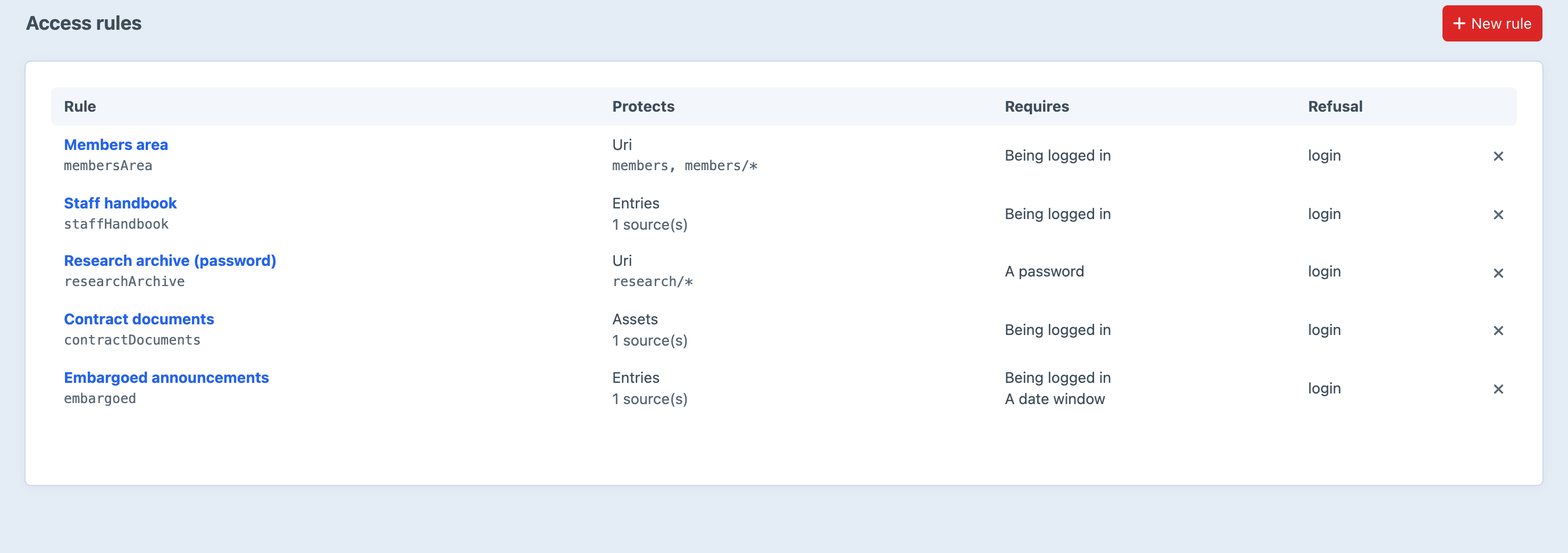
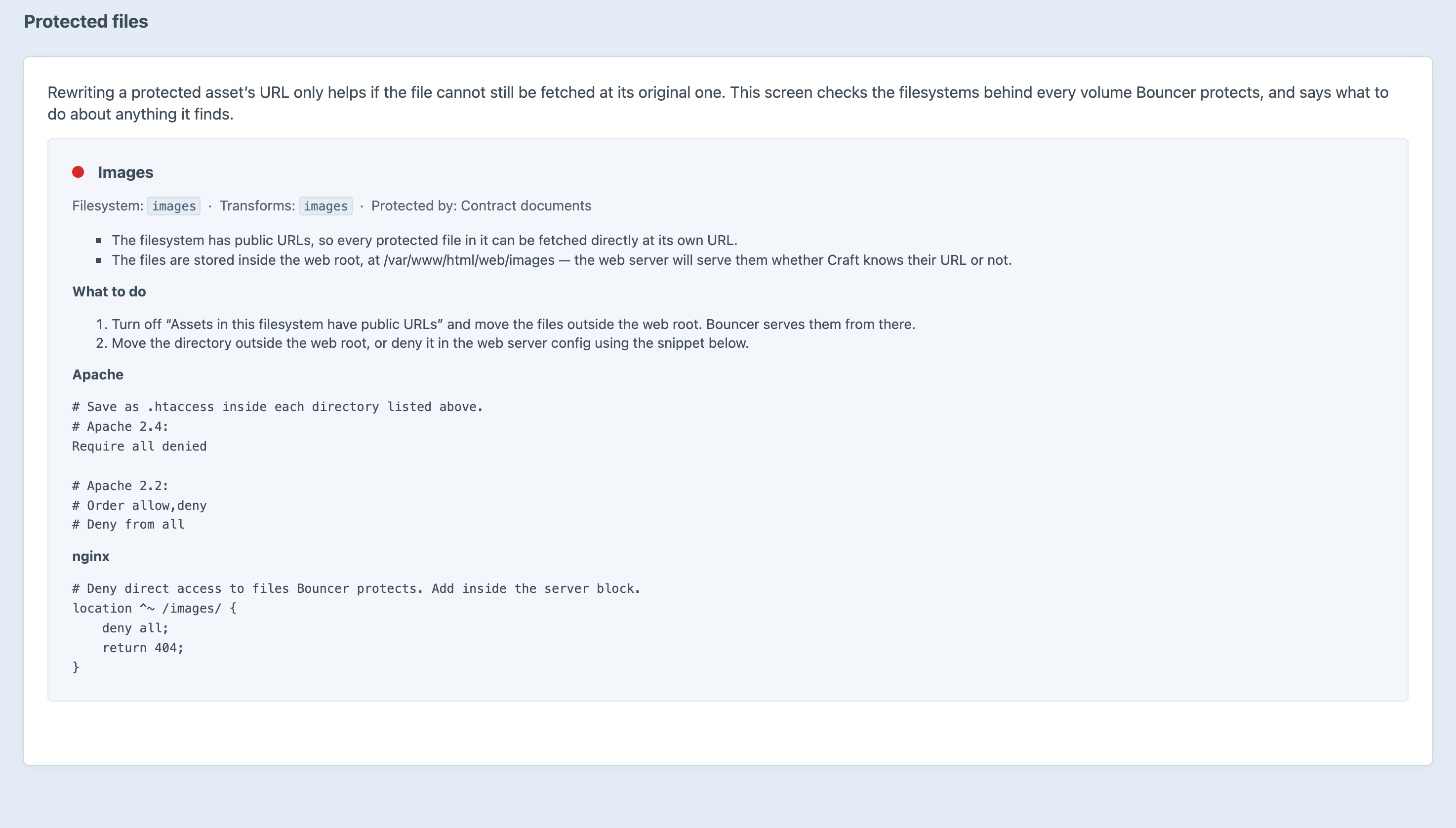
Screenshots from a live install, not mockups.
Frequently Asked Questions
Questions worth answering before you install it.
They gate elements. The entry stops rendering, but its title stays in the index page, its excerpt in search results, its URL in the sitemap, and the attached PDF at /uploads/2026/contract.pdf for anyone who guesses the path. Bouncer covers all four.
Both must pass. Rules combine with AND, so adding a rule can only remove access. Order only decides which rule's response a refused visitor gets. For "editors or subscribers", put both groups in one rule and match any.
Bouncer fails closed. Pro-only conditions aren't evaluated on Lite, and a rule with nothing left to evaluate denies everyone. That's deliberate: a lapsed licence that opened a members area would be far worse than one that locked it. The control panel names every affected rule, and bouncer/audit exits non-zero.
Only if the web server can't still reach them. Bouncer rewrites URLs and checks every request, but no plugin can stop a web server serving a file it can see on disk. The exposure audit finds those volumes and gives you the .htaccess or nginx block that seals each one.
No. A protected asset's getUrl() returns the guarded route, transforms included, so existing {{ asset.url }} calls keep working and are now checked. You only need the Twig API if you want to gate part of a page.
Yes. Range requests get a proper 206 with Content-Range, and conditional requests get a 304. On remote filesystems, ranged requests take a local copy first, because seeking a remote stream can send the wrong bytes.
Admins are exempt by default. Guard front-end requests is a master switch you can turn off to stage rules or get back in. The Bypass all access rules permission lets editors past your rules without making them admins.
No, deliberately. Previews, share tokens and the control panel are Craft's own ways of showing content to someone who already has access. Gating them would make the plugin look broken without making the site any safer.
Lite is free, and it's real access control: entries, categories and URIs, plus the query filter and the full Twig API. Pro is $59 one-off, with an optional $29/year renewal for updates. Pro adds protected files, signed links, the exposure audit, passwords, date windows, IP rules and the condition builder.
Craft CMS 5.3+ and PHP 8.2+. There's no build step and no runtime dependency beyond Craft.
Write one rule, then run the audit
Lite is free and covers entries, categories and URIs. Pro is $59 one-off with a $29/year renewal, and adds protected files, signed links, the exposure audit, passwords, date windows and IP rules.