Free · Craft CMS 5
Some fields belong on the right
Craft's entry editor has two columns and hands you one of them. The author, the post date, the slug and the status get the sidebar, arranged the way somebody scanning an entry actually reads them. Every field you define gets the content pane, at the same width as the body copy — so a one-line “Featured?” switch takes the acreage of a paragraph, and the writing gets pushed below the fold by four things nobody is writing. Sidepipe lets the field layout say which of your fields belong on the right instead.

You arrange it where you arrange everything else
There is no per-field setting and no screen to keep in sync. Drag a Sidebar element into a tab in the field layout designer, and everything else in that tab renders in the sidebar. The tab disappears from the tab bar once it has nothing left to show, so authors never see an empty one.
Field layout                     Entry editor
───────────────────────────      ────────────────────────
Content                          ┌ Content pane ────────┐
├── Title                        │ Title                │
├── Summary                      │ Summary              │
└── Body                         │ Body                 │
                                 └──────────────────────┘
Publishing
├── ▣ Sidebar  “Publishing”      ┌ Sidebar ─────────────┐
├── Featured                     │ PUBLISHING           │
├── Content Type                 │   Featured       [on]│
├── Review Date                  │   Content Type  [   ]│
└── Reading Time                 │   Review Date   [   ]│
                                 │   Reading Time  [  4]│
                                 ├──────────────────────┤
                                 │   Slug               │
                                 │   Author             │
                                 │   Post Date          │
└──────────────────────┘Features
One idea, and five things that make it safe to leave switched on.
Declared in the field layout
A Sidebar element in the UI elements library, next to Heading and Tip. Drag it into a tab and you are done. The arrangement lives with the layout in project config, so it deploys the way the rest of your content schema does, and it is editable in the same place you decide the tab order.
One tab, two columns
Set the marker to “everything below this marker” and the fields above it stay in the content pane. Put a second marker further down and it ends the first one's run, so a single tab can send one group to the top of the sidebar and another to the bottom, each with its own heading.
Above or below the dates
Each group chooses whether it sits above Craft's own author, post date and slug block or below it. Editorial state at the top where an author looks first; syndication and housekeeping at the bottom, out of the way.
Or just name a tab “Sidebar”
If you would rather not touch the UI elements library at all, a tab whose name is in the settings pipes with no marker. Matched without regard to case or spacing, so you can add whatever your team already calls it — Meta, Options, Publishing.
It is Craft's own field, moved
The inputs are the ones Craft's form would have produced, with the same names and the same delta registration, in the same form element. Sidepipe has no save handler, no database table and no data of its own — turning it off changes where a field appears and nothing else.
Nothing is moved without somewhere to put it
Sidepipe engages only where a sidebar exists: the element editor, full page or slideout. An inline Matrix block, a content block, a global set, the user profile screen — all of them render exactly as they would without the plugin. Conditions on a marker choose a column, never hide a field.
Sidepipe in the control panel
Fields defined in a schema file, grouped and labelled, sitting in the entry sidebar where the publishing decisions belong.
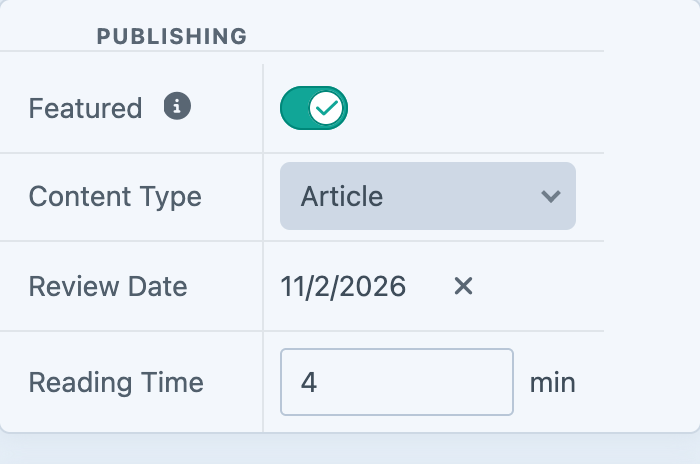
Screenshot from a live install, not a mockup.
Frequently Asked Questions
The questions worth answering before you rearrange an editor your team uses every day.
Entirely, permanently, with no editions and no licence key. Every feature on this page is in the one version there is.
No. The piped fields render with the same call Craft would have made, produce inputs with the same names, and sit inside the same form. There is no save handler, no table and no migration. If a piped field ever failed to save, an unpiped field in the same layout would be failing too.
Every field goes back to the content pane and the field layouts are otherwise untouched. The Sidebar markers disappear along with the plugin that owns them — Craft drops layout elements whose plugin is gone — so what is lost is the arrangement and never a field. That is exactly why the marker is a separate element rather than a checkbox on each field.
You can. You shouldn't. The sidebar column is about 240 pixels wide, and Matrix, CKEditor, Redactor and wide tables need room. Sidepipe renders piped fields full width and keeps oversized content scrolling inside its own box rather than dragging the editor sideways, and that is as far as it can help. Lightswitches, dropdowns, dates, short text, colours, money and small relations are what this is for.
Yes — anything edited through Craft's element editor: assets, categories, addresses, and nested Matrix entries in cards view. Global sets, tag groups and the user profile screen have editors of their own that never build a sidebar, so a sidebar tab in those layouts stays in the content pane, and the settings screen says so next to the layout rather than letting it look broken.
Element and user conditions are honoured in the sidebar exactly as in the content pane. One difference worth knowing: Craft re-renders the content pane as you type but does not re-render the sidebar, so a piped field whose condition changes mid-edit settles on the next page load rather than instantly. Keep fields whose visibility changes under the author's hands in the content pane.
Yes. The Sidebar element carries Craft's own visibility conditions, and they decide whether the move happens at all. A marker that does not match this user or this element leaves its fields in the content pane, in the tab they live in — a condition on a marker chooses a column, it never hides a field.
Yes, unchanged. Piped inputs are registered for delta tracking like the ones in the content pane, and autosave posts the whole form either way.
By no measurable amount. Resolving a layout is a walk over its tabs, memoized per request. Rendering is the same call Craft would have made in the content pane — the same fields, rendered once, in a different place. The one stylesheet loads only on pages that actually pipe something.
Not at all. Sidepipe is a control panel plugin and does nothing on the front end. Templates read fields exactly as before — where a field renders in the control panel has no bearing on entry.myField.
No. No outbound requests of any kind, no telemetry, no cookies, no build step and no runtime dependencies beyond Craft's own.
Free, and it stays free
No editions, no licence key, no trial. Install it, drop a Sidebar element into a tab, and your authors get their content pane back.