Lite free · Pro $129
The whole return, not just the refund
Craft Commerce can refund a payment. That is all it can do about a return. Everything else — the customer asking, the merchant deciding, the goods coming back, the stock going back on the shelf, the money going back as cash, credit or replacement goods — is left to a shared inbox and a spreadsheet, or to a developer building the same half of it again. Boomerang is the loop around the refund.

One verdict, everywhere
Whether an order can be returned is decided in exactly one place, and the portal, the control panel, the console and your templates all read the same answer — so the sentence a customer is refused with is the one the merchant sees on the RMA.
{# Can this order be returned, and which of it? #}
{% set verdict = craft.boomerang.eligibility(order) %}

{% if verdict.isEligible %}
    <a href="{{ craft.boomerang.portalUrl }}">Start a return</a>
    <p>{{ verdict.daysRemaining }} days left</p>
{% else %}
    {# The same sentence the merchant sees, not a second implementation of it #}
    <p>{{ verdict.firstMessage }}</p>
{% endif %}

{# The signed-in customer's returns and balance #}
{% for return in craft.boomerang.myReturns() %}
    {{ return.reference }} — {{ return.state.name }}
{% endfor %}

<p>Store credit: {{ craft.boomerang.balance|commerceCurrency(cart.currency) }}</p>

{# Returns are elements, so the usual query methods work #}
{% set open = craft.boomerang.returns().isOpen(true).all() %}Features
Everything between a customer wanting to send something back and the money or the goods moving.
A customer returns portal
At /returns on the day you install it. A signed-in customer sees their own orders; a guest looks one up by number and email together — never the number alone.
- A wrong number and a wrong email get the same sentence, so the form is not an order-number oracle
- Rate limited per IP per hour, and status pages sit behind a 32-character token compared in constant time
- Every page is an ordinary Twig template you can copy out and restyle, without the URLs moving
States are yours to name
Requested → approved → received → resolved is the shape, not the vocabulary. The plugin reads each state's kind, so renaming one is a rename and not a bug.
- Each state can email the customer, restock the goods, carry out the resolution and offer a label
- Leave a transition list empty for “anywhere” — the escape hatch a returns desk needs on a Friday
- An append-only history of who moved it, when, and everything the move did
Store credit that spends
A Commerce payment method with its own gateway, not a discount that lies about the subtotal. The customer sees “Store credit — $40.00” beside the card at checkout.
- Partial payment is the normal case: $40 against a $95 order pays $40 and the card pays $55
- Issued in lots with their own expiry, spent oldest-expiry first, allocated under SELECT … FOR UPDATE
- A balance is a sum over unexpired lots, never a stored number somebody has to keep correct
Back on the right shelf
Restocking into Commerce 5 inventory locations, with the shelf chosen by the condition the goods came back in.
- Resellable goods to available, damaged to damaged, anything questionable to quality control
- An inventory adjustment rather than a restock movement, so fulfilled stock never goes negative
- Idempotent per item, however many times a transition is retried
Money, credit or goods
What the customer gets back is chosen per RMA and carried out once, on arrival at a state that resolves.
- Refunds run through Commerce's own gateway transactions, and a partial success is recorded before it throws
- creditBonusPercent turns a $50 refund into $55 of credit — the lever that makes customers pick it
- Exchange and replacement orders carry a credit for what came back, so the customer pays the difference
Which ones were your fault
A return rate that mixes “we got it wrong” with “they ordered two sizes on purpose” tells you nothing, so the reason carries which it was.
- Return rate against what was actually sold in the same period, per reason and per SKU
- Median days to settle, and what proportion of the goods went back on the shelf
- Credit issued, spent, expired, outstanding and redeemed — redeemed is a customer who came back
Boomerang in the control panel
The returns desk, one return with everything that happened to it, what the store owes in credit, and which returns were the store's own fault.
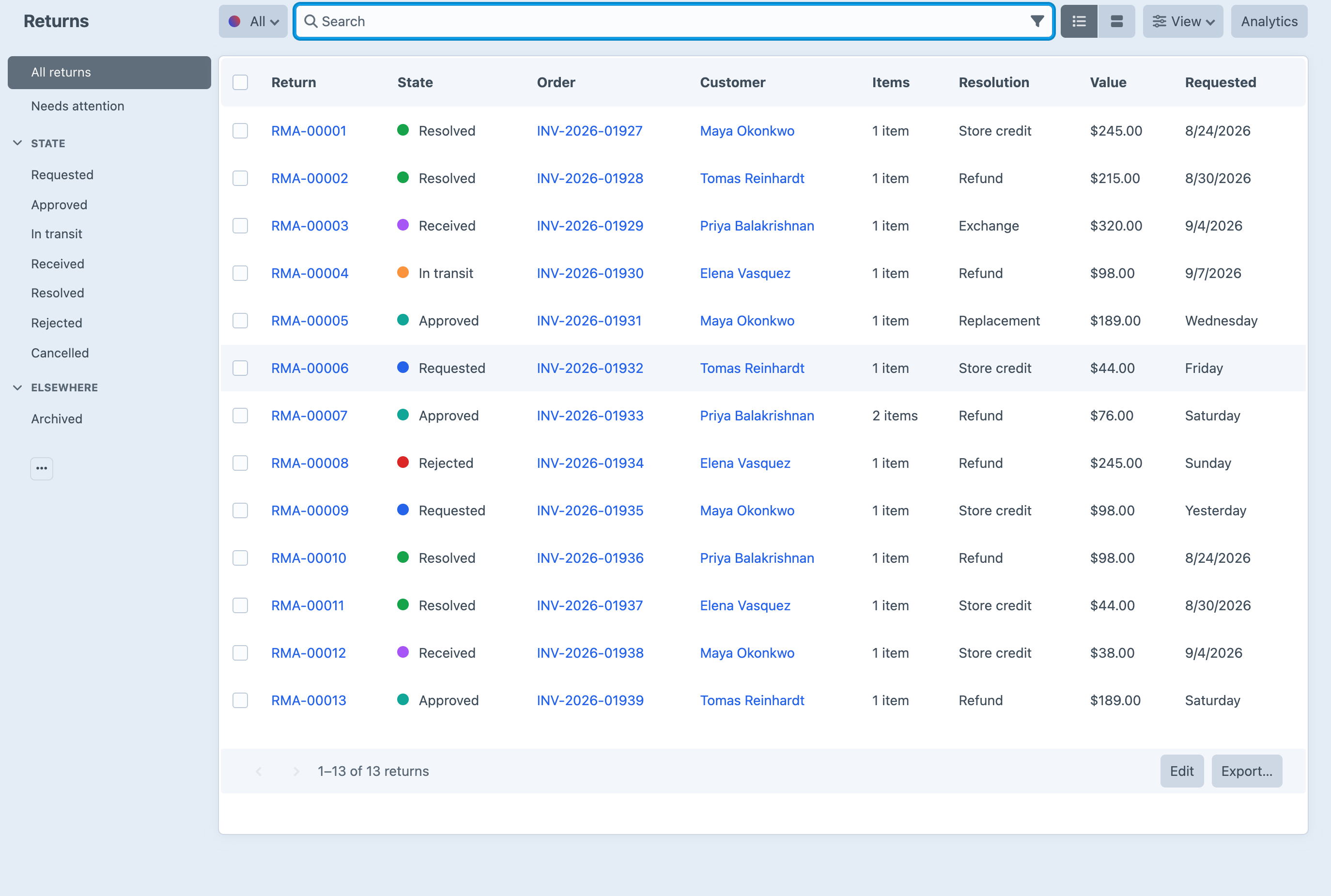
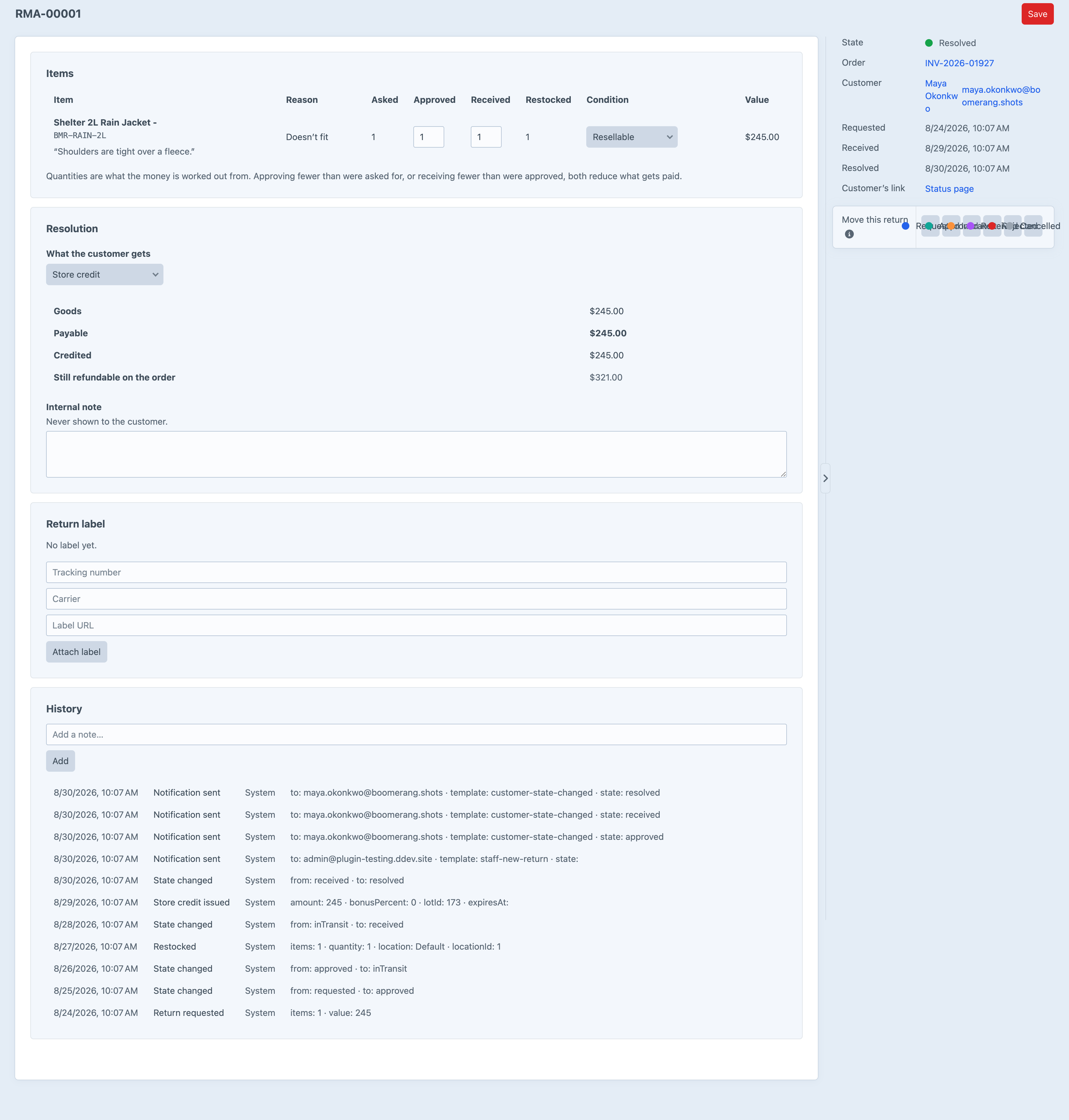
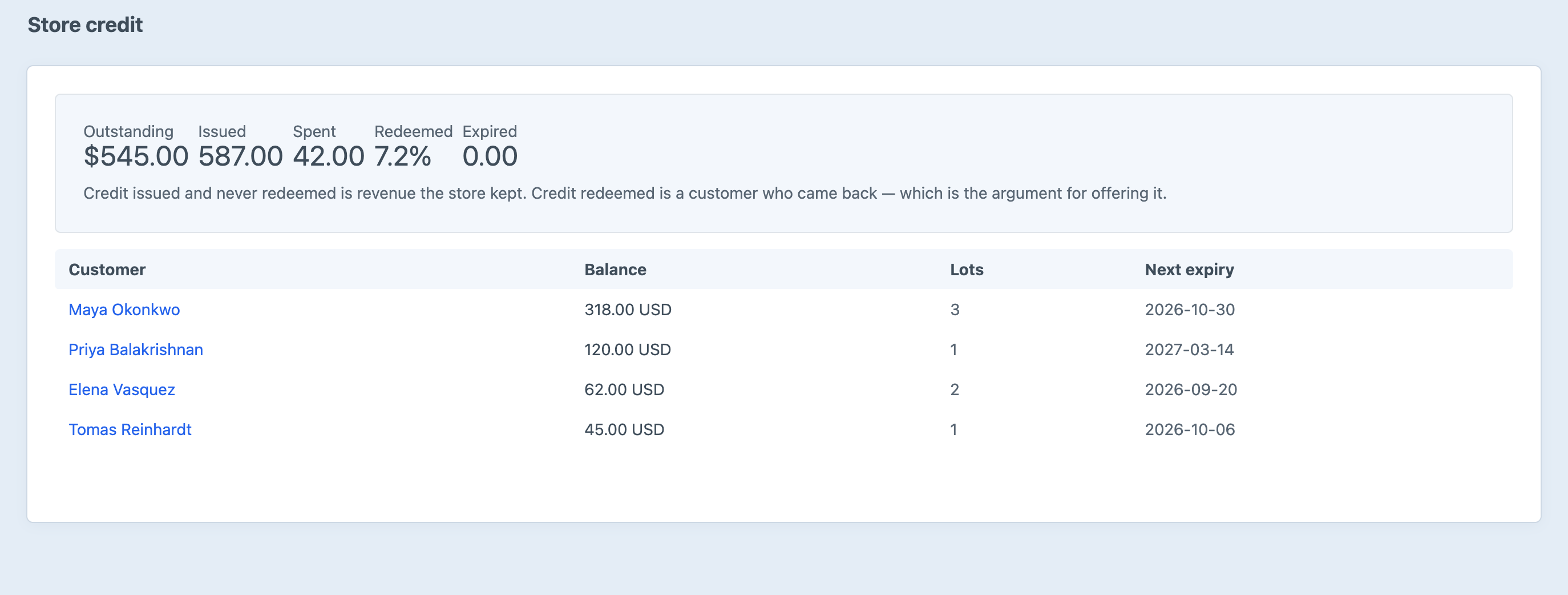
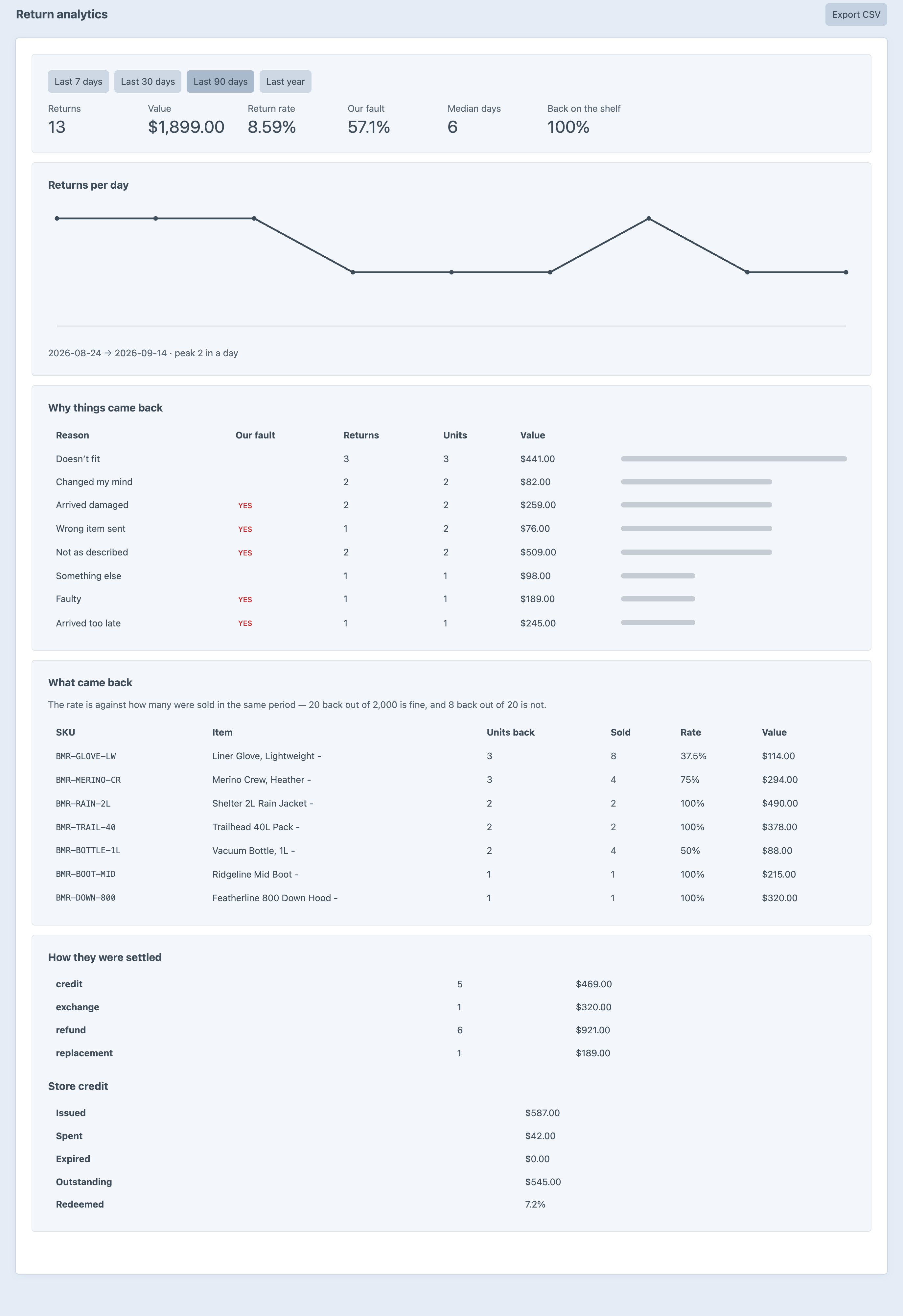
Screenshots from a live install, not mockups.
Frequently Asked Questions
The questions worth answering before you install it.
It refunds payments. Payments::refundTransaction() against a transaction is the whole of it — there is no request, no approval, no receipt, no restock, no exchange and no credit. Everything between a customer wanting to send something back and the money or goods moving is left to a shared inbox and a spreadsheet, or to a developer building the same half of it again.
The whole loop, minus the money-adjacent extras: the customer portal, the RMA state machine and its history, reasons and eligibility and the return window, refunds through Commerce, restocking fees and notifications. Pro adds the store-credit wallet and its gateway, exchange and replacement orders, restocking into Commerce 5 inventory locations, carrier return labels and the analytics screen.
No, and that is the point. It is a Commerce payment method with its own gateway. The customer sees “Store credit — $40.00” beside the card at checkout, and the merchant sees a real transaction against a real gateway. A discount standing in for credit lies about the subtotal, and every report downstream — tax, revenue, the order itself — inherits the lie.
That is the normal case. A $40 balance against a $95 order pays $40 and the card pays the other $55. Nothing needs configuring for it.
Because it expires. A single running balance cannot answer “how much of this $60 lapses at the end of the month” without re-deriving which dollars came from which issue — and that is exactly the question a service desk gets asked. Lots make it a lookup. Spending consumes them oldest-expiry first, so the money about to lapse is always the money spent first.
The refund goes back into the exact lots it came from, unless one of them has expired in the meantime, in which case a fresh lot is issued for that portion. Refunding a customer into money they cannot spend is not a refund.
Yes. The plugin reads each state's kind — requested, approved, awaiting, received, resolved, rejected, cancelled — not its label. Rename “Approved” to “Authorised”, or run three separate states of kind awaiting because your warehouse has three waiting rooms, and nothing breaks.
Through boomerang/config export and import, as one JSON file, using handles rather than IDs throughout. They are deliberately not in project config: a returns desk edits states and reasons the way it edits content — at five o'clock, in production, because something changed — and project config makes that either impossible or a deploy.
The transition aborts. Side effects run before the state is written, so the RMA stays exactly where it was and the gateway's reason goes on its history. An RMA is never marked resolved with no money having moved.
Every portal page is an ordinary Twig template under boomerang/_portal/, and Craft looks in your own templates folder first — so copy the file you want to change and edit it. The URLs do not move and nothing has to be configured. The emails work the same way. You can also unmount the portal entirely and post to the action endpoints from your own front end.
A guest needs the order number and the email together, never the number alone, and a wrong number and a wrong email are answered with the same sentence — telling them apart would turn the form into an order-number oracle. It is rate limited per IP per hour on top of that, and a return's status page sits behind a 32-character token compared in constant time and served noindex, nofollow.
No. Everything on craft.boomerang is a read. Nothing in Twig can move a return, spend credit or issue a refund — a template that could write would be a template that does, the first time somebody cached a page.
A manual provider, which makes no outbound request at all and is what most stores will actually use, and ShipStation v2 REST. You can register your own by implementing LabelProviderInterface. The ShipStation integration's base URL and API-Key header are verified; the label request and response shapes are implemented from ShipEngine's published contract and have not been exercised against a live account, and boomerang/labels/preview prints exactly what would be sent so you can check it before spending anything.
It survives. orderId is SET NULL, and the order's number, reference, date and email are copied onto the RMA when it is created — because in several jurisdictions “what did we do about this return” is a question a merchant has to be able to answer after the order itself has aged out.
Nothing is lost either way. Pro settings that survive a downgrade are ignored, not obeyed, and the control panel says which ones. A store that lapses and upgrades again finds its credit lots and its label history exactly where it left them.
Install it and open the portal
The install seeds a working state machine and eight return reasons, so the first screen you open already does something. Lite is free and covers the portal, the state machine, eligibility, refunds and notifications — the whole loop except the wallet, exchanges, inventory restocking, labels and analytics.