Lite free · Pro $99 · Craft Commerce 5
Your store, in your books
Waver records each completed Craft Commerce order in Wave as one balanced entry. Included tax comes back out of income, discounts land on a contra account, and no order is posted twice.

One order, one entry
A Wave money transaction: the deposit into the account the money actually reached, split across the accounts it belongs to. You map the accounts once; Waver works out the lines for every order, and they add back up to the order total without a fudge line.
Order #A1B2C3                          DEPOSIT  178.45  →  Business Checking

  Items       Sales              credit  150.00   included tax already taken out
  Shipping    Shipping Income    credit    9.95
  Sales tax   Sales Tax          credit   30.50   a liability, not revenue
  Discounts   Discounts          debit    12.00   contra-income account

150.00 + 9.95 + 30.50 − 12.00 = 178.45 drift 0.00Features
What Waver does after an order completes, and what it refuses to do.
Tax inside the price, handled
When tax is included in the price, Commerce keeps it inside the item subtotal. Push that subtotal across as sales and the tax you owe shows up as income. Waver books sales as the subtotal minus included tax, and tax to your sales tax account.
- A £200 line at 20% VAT books 166.67 sales and 33.33 tax
- Stores that add tax at checkout get the same entry
Never the same money twice
Wave's API can't read a money transaction back, so Waver writes its record before calling Wave, keyed on an id derived from the order with a unique index behind it. A retried job, a second completion event or a backfill finds that record and stops.
- A send that never got an answer stays pending
- It is never re-sent automatically — a person checks Wave first
The preview is the payload
Every Commerce order screen gets a Preview entry button. It builds the entry with the same code the real sync, the console dry run and every retry use, so the rows you approve are exactly what Wave receives.
Refusals, not surprises
When an order can't be recorded correctly, Waver says why before it calls Wave: an account this order needs isn't mapped, only part of the total was captured, or the lines are further from the total than the rounding tolerance.
- Sub-cent drift goes to a rounding account, up to 0.05 by default
- Beyond that, the entry is refused and the difference saved
Automatic, off the request
When an order completes, Waver queues a job and checkout carries on, so a customer never waits on Wave and an outage at Wave can't block a sale. Pro can trigger on an order status instead, such as shipped.
Customers matched by email
Email is the only way Wave can look up a customer, so that's the key. Matches are cached, a missing customer can be created, and an order with no email is recorded without one rather than creating a blank customer every time.
Invoices and refunds (Pro)
Create a Wave invoice instead of a ledger entry, optionally approved and emailed by Wave. A successful Commerce refund becomes its own withdrawal; the original sale is never edited.
- Invoice lines need a Wave product, so Waver maps one per SKU
- Wave invoices can't hold shipping — such orders are refused, not shortened
Routing for bigger stores (Pro)
Map each Commerce gateway to its own payment account and each store to its own Wave business. Anything unmapped uses the default.
A log of every call
Wave reports business-rule failures as an HTTP 200 with didSucceed: false, so Waver reads the body rather than trusting the status code, and logs a refusal as an error with Wave's reason. Lite keeps seven days without payloads; Pro keeps the full request and reply for as long as you choose.
Waver in the control panel
The preview on an order, the records screen, a record in doubt and the connection log, from a Craft 5 install running Commerce.
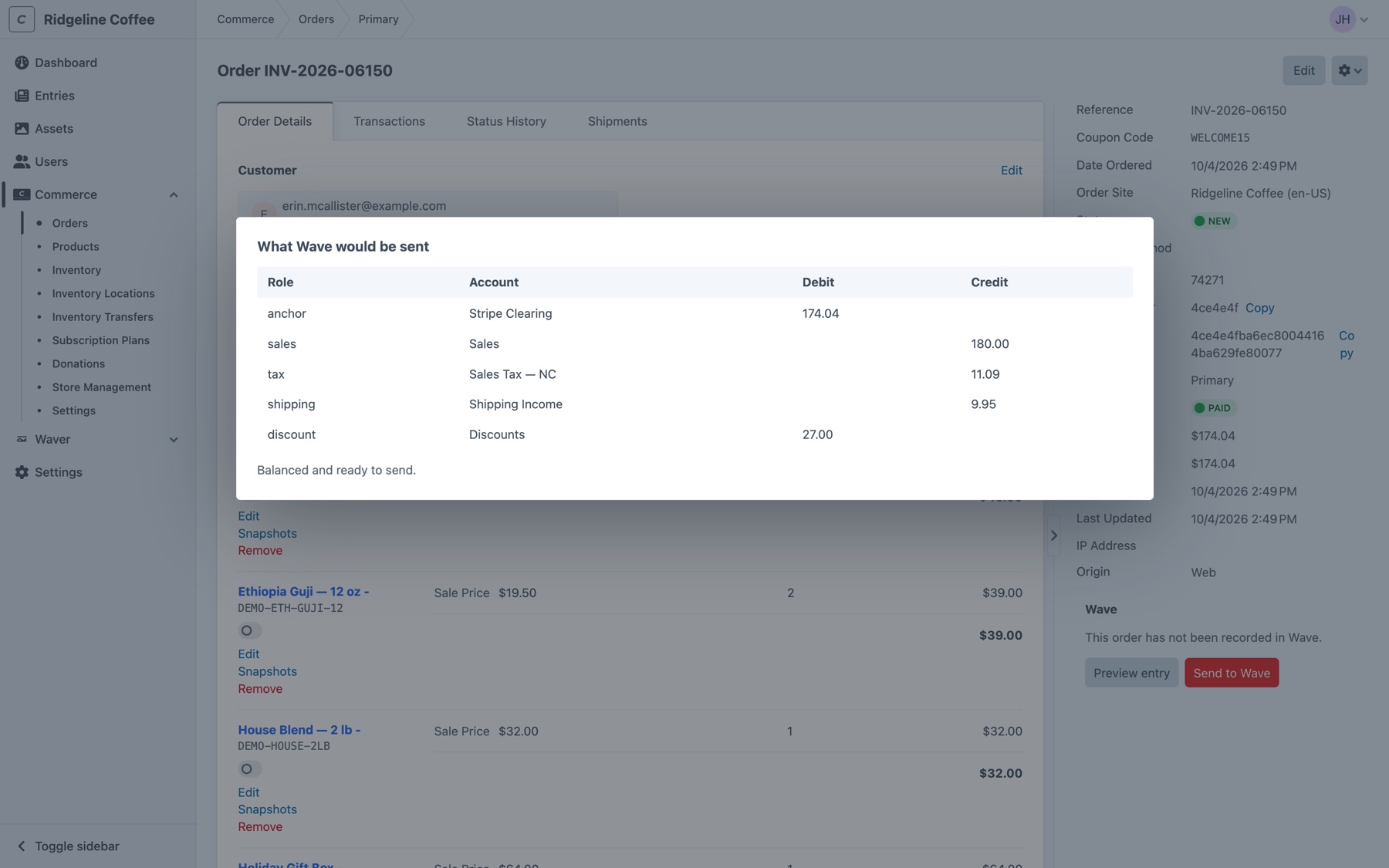
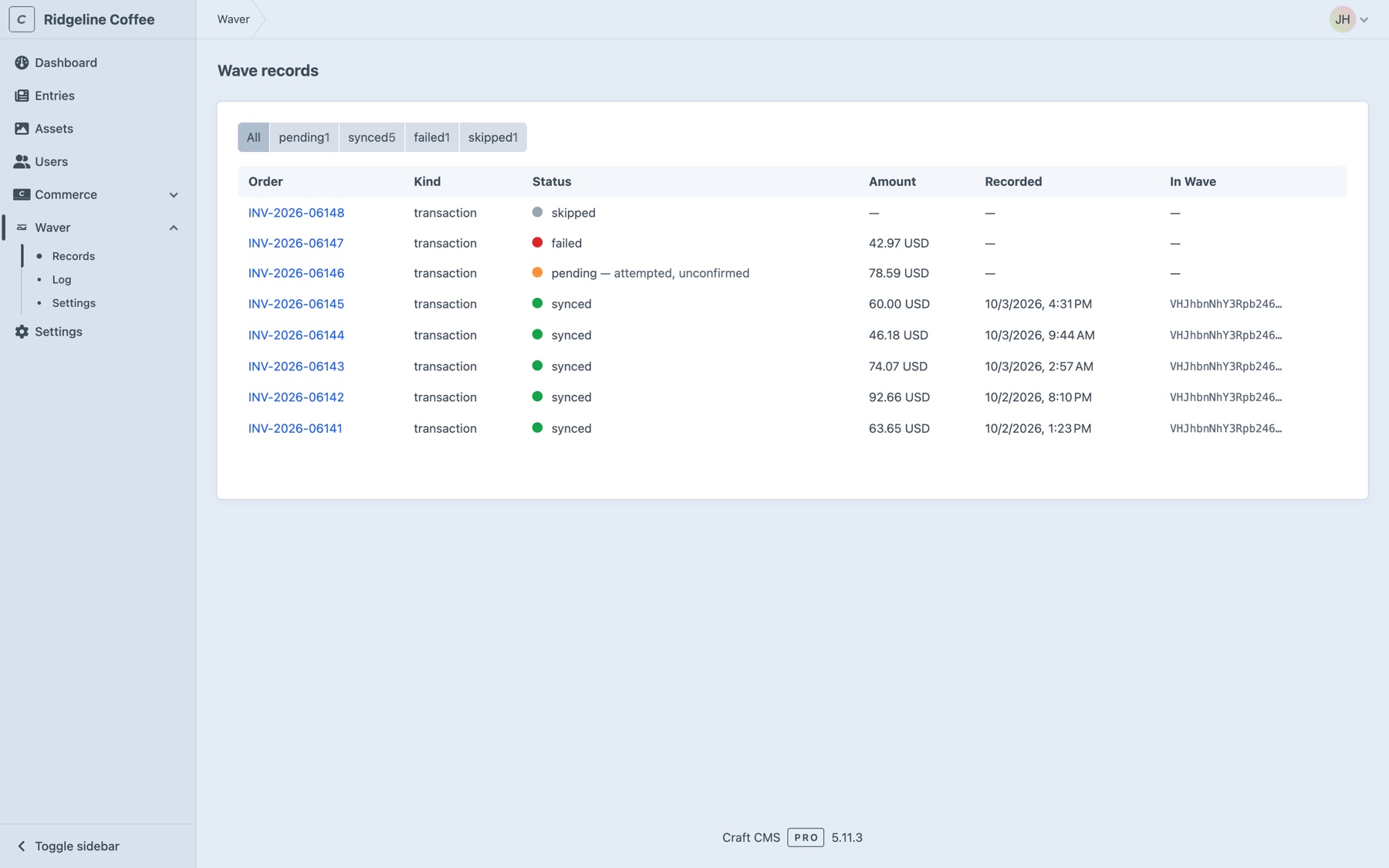
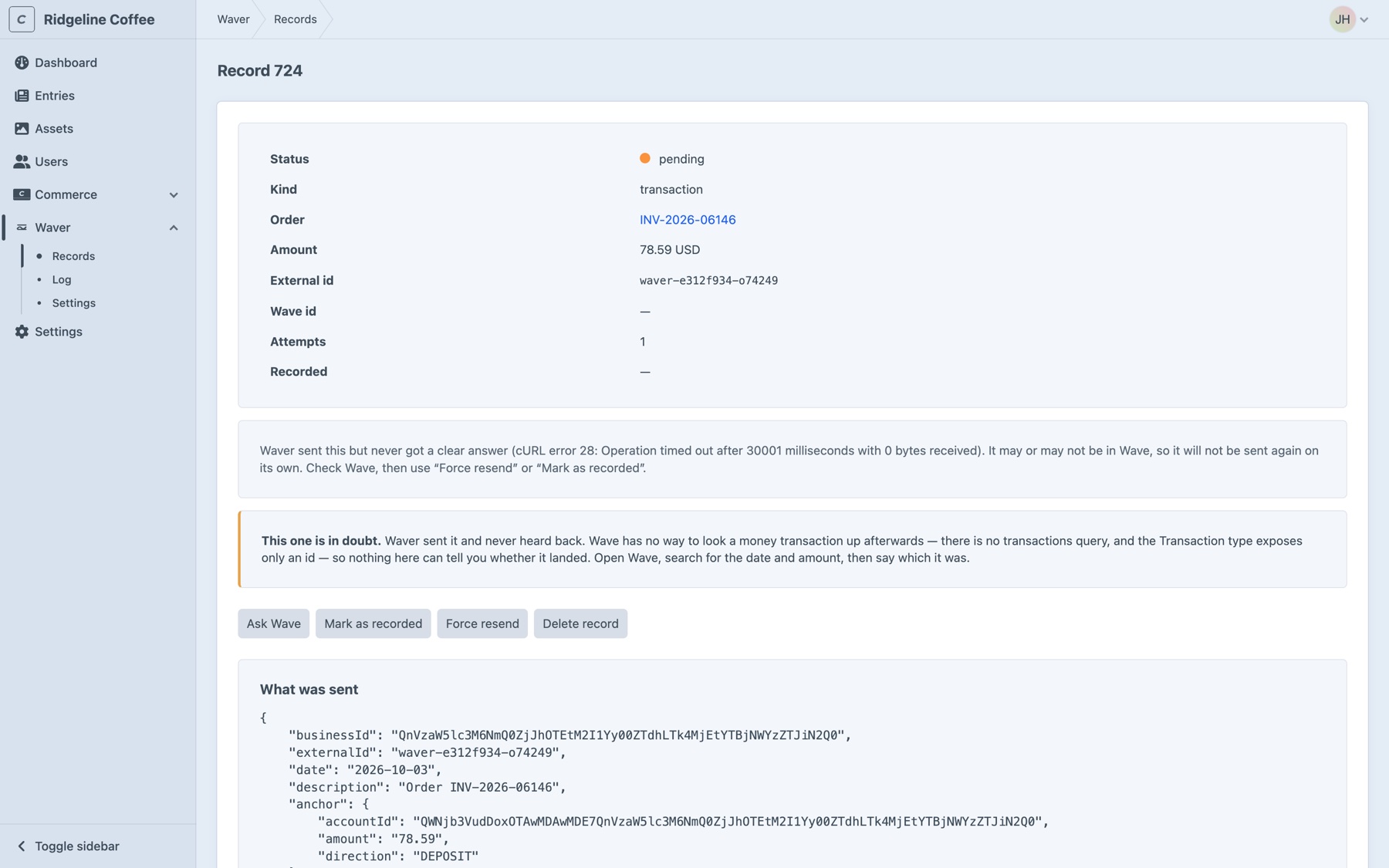
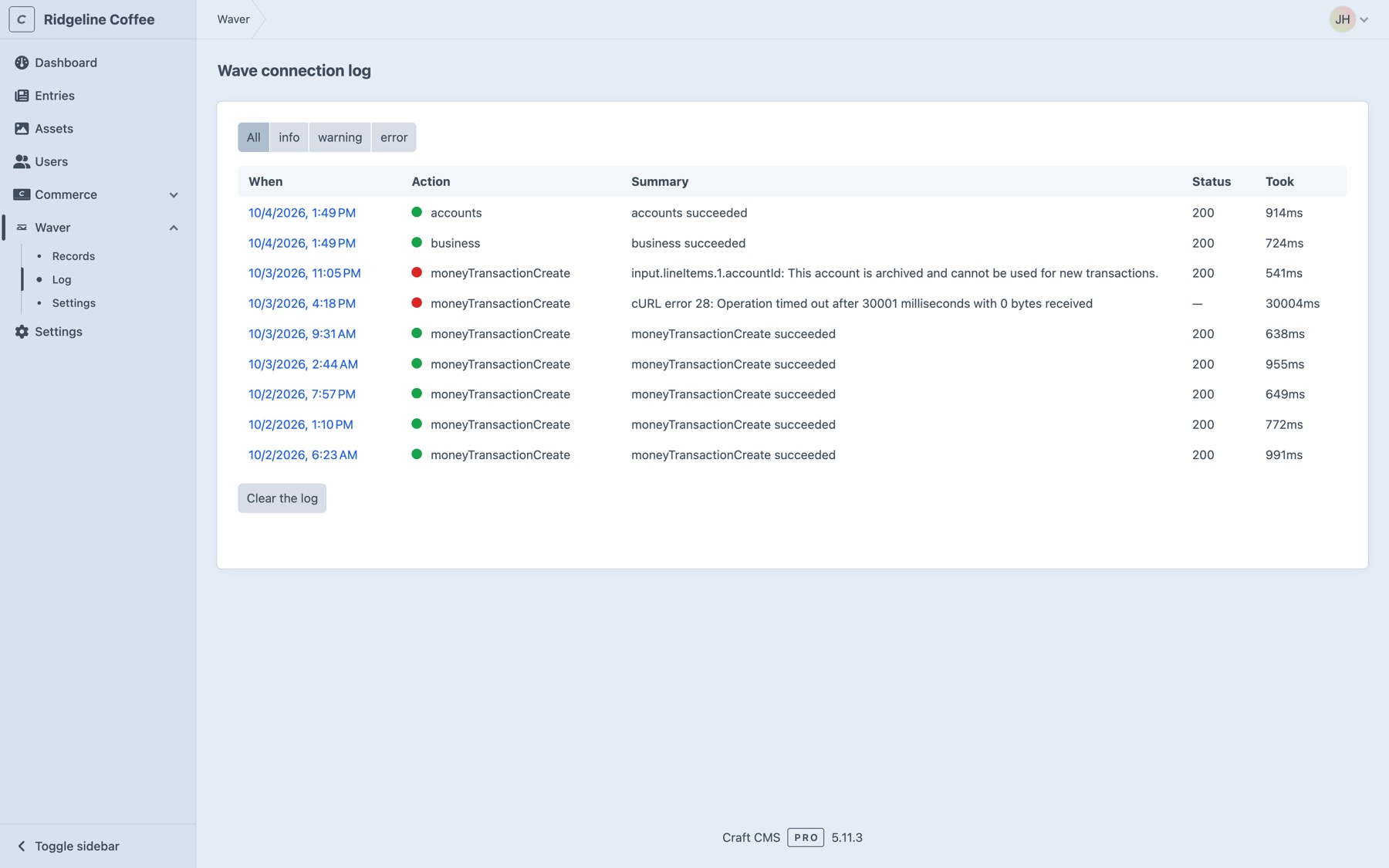
Screenshots from a working install with a demo store, not mockups.
Rehearse before you send
The console dry run prints the entry the real sync would send, and backfill shows every older order it would record before it writes anything. Accounts appear as the Wave ids you mapped.
$ php craft waver/sync/order 1042 --dry-run
Order A1B2C3 — Order A1B2C3
  anchor DEPOSIT 178.45 QWNjb3VudDozOTQ1
  sales        QWNjb3VudDo0MT dr            cr 150.00     Items
  tax          QWNjb3VudDo0Mj dr            cr 30.50      Sales tax
  shipping     QWNjb3VudDo0Mz dr            cr 9.95       Shipping
  discount     QWNjb3VudDo0ND dr 12.00      cr            Discounts

$ php craft waver/sync/backfill --dry-run --since=2026-01-01Frequently Asked Questions
Common questions about recording Craft Commerce orders in Wave.
Zapier can move an order across. It can't account for one: taking tax back out of income when the price included it, booking a discount to a contra account so it reduces income, balancing the entry to the cent, and making sure a retry doesn't post the same money twice.
No. Waver uses a full access token, which any Wave account can create in Wave's developer portal.
Not on its own. Every record carries an external id derived from the order, with a unique index on it, so a retried queue job or two workers racing for the same order can't both insert. Sending twice takes a deliberate Force resend from someone with permission to do it.
The order completes normally — Waver records in a queue job, outside checkout. If Wave couldn't be reached at all, the record is marked failed and waver/sync/retry sends it later. If the call timed out or Wave returned a server error, the sale may already be in Wave, so the record stays pending and is never re-sent automatically. You check Wave, then choose Mark as recorded or Force resend. Invoices can be found again by number, so Ask Wave settles those for you.
Transaction mode, unless you want a document to send. It's one API call, needs no Wave catalogue and books the money exactly. Invoice mode (Pro) needs a Wave product for every SKU, can't represent shipping, and lets Wave compute its own tax.
Transaction mode doesn't — Wave's moneyTransactionCreate requires a business that isn't on classic accounting. Check business on the settings screen tells you when you connect, before your first sale fails.
No. Waver reads orders and writes to Wave. It adds its own tables and a panel on the order screen, and never changes an order, its status or its totals.
Lite is free, with no order limit, and it isn't a trial: balanced money transactions, automatic on completion, the records screen, preview and backfill. Pro is a one-off $99 with a $49/year renewal, and adds invoice mode, refunds, an order-status trigger, per-gateway and per-store routing, the sales tax map and the full connection log.
Craft CMS 5.3+, Craft Commerce 5.0+, PHP 8.2+, and a Wave business that isn't on classic accounting for transaction mode.
Start free, upgrade when you need to
Lite is free and records every completed order as a balanced Wave transaction. Pro is $99 with a $49/year renewal, and adds invoices, refunds, routing and the full log.