Free for Craft CMS 5 · Works on Solo
Hand over a scope, not a login
You need a bio from a new hire, a paragraph from a client, next month's opening hours. Penny gives you a third option between making them a Craft account and chasing it over email: pick the entry, tick the fields they may touch, and send a link. They fill it in, send it back, and the link is spent.

Features
Modelled on WordPress's One Time Login, except that plugin hands over a whole admin session and Penny hands over only the fields you ticked.
One link, one use
Keys are 32 random bytes and only their SHA-256 is stored, so a database dump holds no working link. Once the recipient submits, the link is dead.
- Deadlines, revoke and re-issue
- Wrong guesses rate-limited per IP
The scope is the boundary
The fields you tick are the only fields Penny renders and the only fields it writes. A posted value for anything else is dropped, whatever arrives in the request.
- Admin, email, password and permissions are never writable
Nothing live until they submit
Entries and categories are edited on a draft, so a half-finished session never shows on your site and closing the tab loses nothing.
- Hold for review keeps it a draft until you approve (Pro)
No account for the recipient
The Penny page renders Craft's real field inputs, Matrix and CKEditor and uploads included, without creating a user. It works on a Solo licence and nobody walks away with a login.
The full editor, when they need it
For a recipient who needs the whole control panel, Pro creates a temporary account limited to the invite's elements and fields. They hand the work in from a bar on every page, and the account is deleted there and then.
A trail for every invite
Created, sent, opened, saved, submitted: each step is recorded with when and from which address. The key itself is never logged.
- Email delivery, reminders and submission notices (Pro)
Penny in use
Real screens from a Craft 5 install: the invite, with the fields ticked, and the page the recipient lands on.
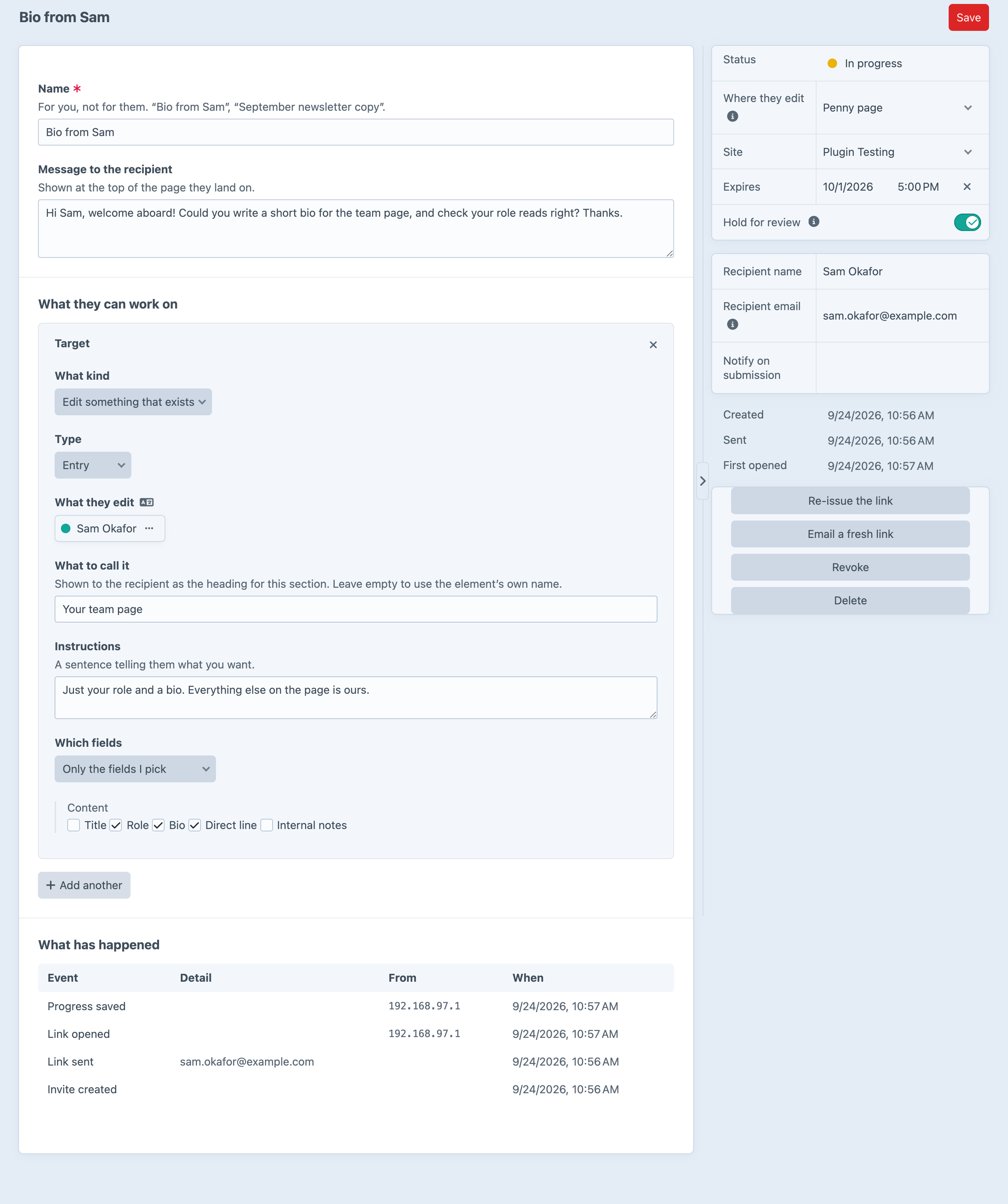
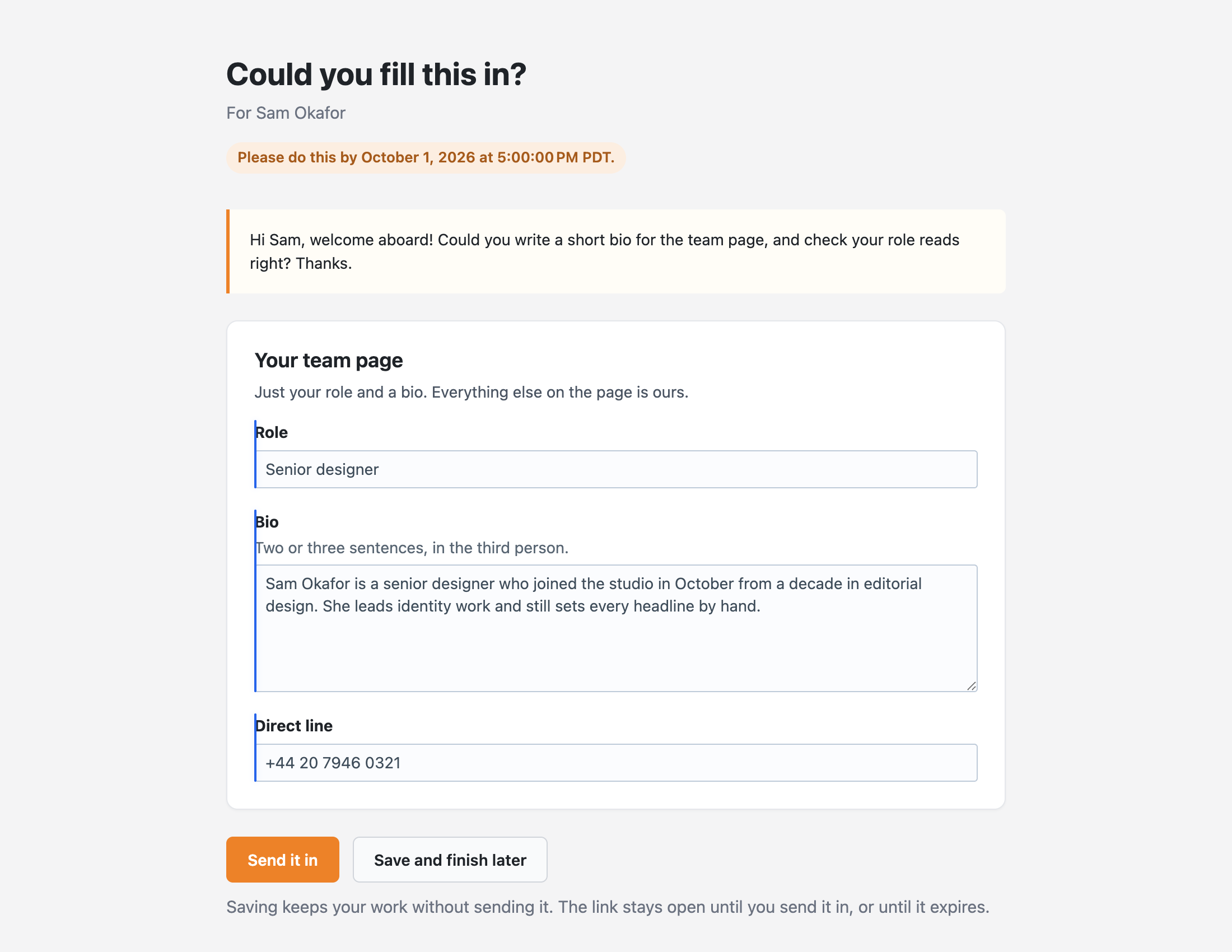
Screenshots from a live install, not mockups.
Know what's out with a client
A Twig variable tells your templates which pages somebody is working on right now, and console commands handle the chasing.
{# Is this page out with a client right now? #}
{% if craft.penny.isOut(entry) %}
    <p>Waiting on the client.</p>
{% endif %}

{# Every live invite covering this entry #}
{% for invite in craft.penny.invitesFor(entry).all() %}
    {{ invite.recipientName }}, due {{ invite.expiryDate|date('j M') }}
{% endfor %}Frequently Asked Questions
The questions worth answering before you install it.
Lite is. It covers the Penny page, entries and globals as targets, field-level scoping, deadlines, revoke, re-issue and the audit trail, one target per invite. Pro is $79 with a $59/year renewal and adds multiple targets, new-entry, category, asset and user targets, temporary control panel sessions, email delivery and reminders, and hold for review.
Not on the Penny page. It borrows an identity for the one request without writing a session or issuing a cookie, so their browser never holds a login to your site. Only the Pro control panel surface creates a real, temporary user.
Yes. The Penny page creates no user, so Solo's one-account limit never comes into it. The Pro control panel surface does create a user for the length of the session, which Solo counts.
No, and that's deliberate. Only a hash of the key is stored, so there's nothing to show. Re-issue the invite instead: that mints a new link and turns the old one off.
An existing entry, a new entry in a section, a global set, or (with Pro) a category, an asset or a user. Anything with a field layout.
They're written once, at submission. Penny says so on the invite screen rather than pretending a draft exists.
No. Scope is checked on the way out and on the way back in. The page only renders the ticked fields, and the save only writes them, whatever the POST contains. On the control panel surface, changes to out-of-scope fields are put back before the save reaches the database. The temporary account can save drafts but never publish them itself, so hold for review can't be skipped from the editor.
Start free, upgrade when you send a lot of them
Lite is free and covers one target per invite with the full scope, expiry and audit trail. Pro is $79 with a $59/year renewal, and adds more targets, temporary control panel sessions, emails and review.