Free for Craft CMS 5
Iframes that behave
An iframe in a CMS goes wrong four ways: it's the wrong size, it loads before anyone scrolls to it, it hands your reader to a third party before they asked, and sometimes the other site refuses to be framed and only tells the browser console. Eye deals with all four.

Build it once, use it anywhere
An embed is a library element with a handle. Craft already parses reference tags in every rich-text value, so the same tag works in CKEditor, Redactor and plain HTML fields with no template changes. The editor buttons only write the tag for you.
{# In any rich-text field #}
{eye:promo-video:render}
{eye:promo-video:render(click,height=600)}

{# In a template #}
{{ craft.eye.render('promo-video') }}
{{ craft.eye.url('https://youtu.be/dQw4w9WgXcQ') }}
{{ entry.video|eye({ align: 'full' }) }}Features
Each one fixes a specific way iframes go wrong.
27 providers, already configured
Paste a YouTube, Vimeo, Loom, Spotify, Google Maps, Figma, Calendly or Typeform link and Eye writes the real embed URL with the right aspect ratio and allow tokens, and uses the provider's cookie-free host where there is one.
- Anything else is framed as-is
- Ten pastes of the same URL make one library entry
The right size, every time
Five modes: a responsive aspect-ratio box, a fixed height, auto height that the frame reports itself, proxy, and inline. A 1 KB child script handles auto height across origins when you own both pages.
Consent that actually waits
Click-to-load keeps the iframe inside a <template> element, so nothing is requested until the reader asks. A hidden iframe still loads, which is the mistake most consent banners make.
- Provider name and poster on the card
- The reader's choice can be remembered for each host
Know before you publish
A page that refuses to be framed leaves a blank rectangle and gives the browser no signal. Eye reads X-Frame-Options and frame-ancestors when you save and explains the result in plain language, on the URL that actually goes in the frame.
- A status column on the embed index
- eye/embeds/check --failOnProblem for CI
A proxy that isn't an open proxy
Proxy mode fetches a page on the server and serves it from your own domain, which gets past X-Frame-Options and makes CSS injection and content extraction reliable. It's off by default and needs an explicit host allowlist.
- Every resolved address must be public, and the connection is pinned to it
- The public route never accepts a URL, only a uid or a signed payload
Every third-party frame in one place
A pasted URL becomes a library element, so every embed on the site ends up in one index. You can audit them, switch one off, or move it behind a consent card.
Eye in the control panel
Real screens from a Craft 5 install: the embed library with its framing column, an embed that refuses to be framed, and a click-to-load card on the front end.
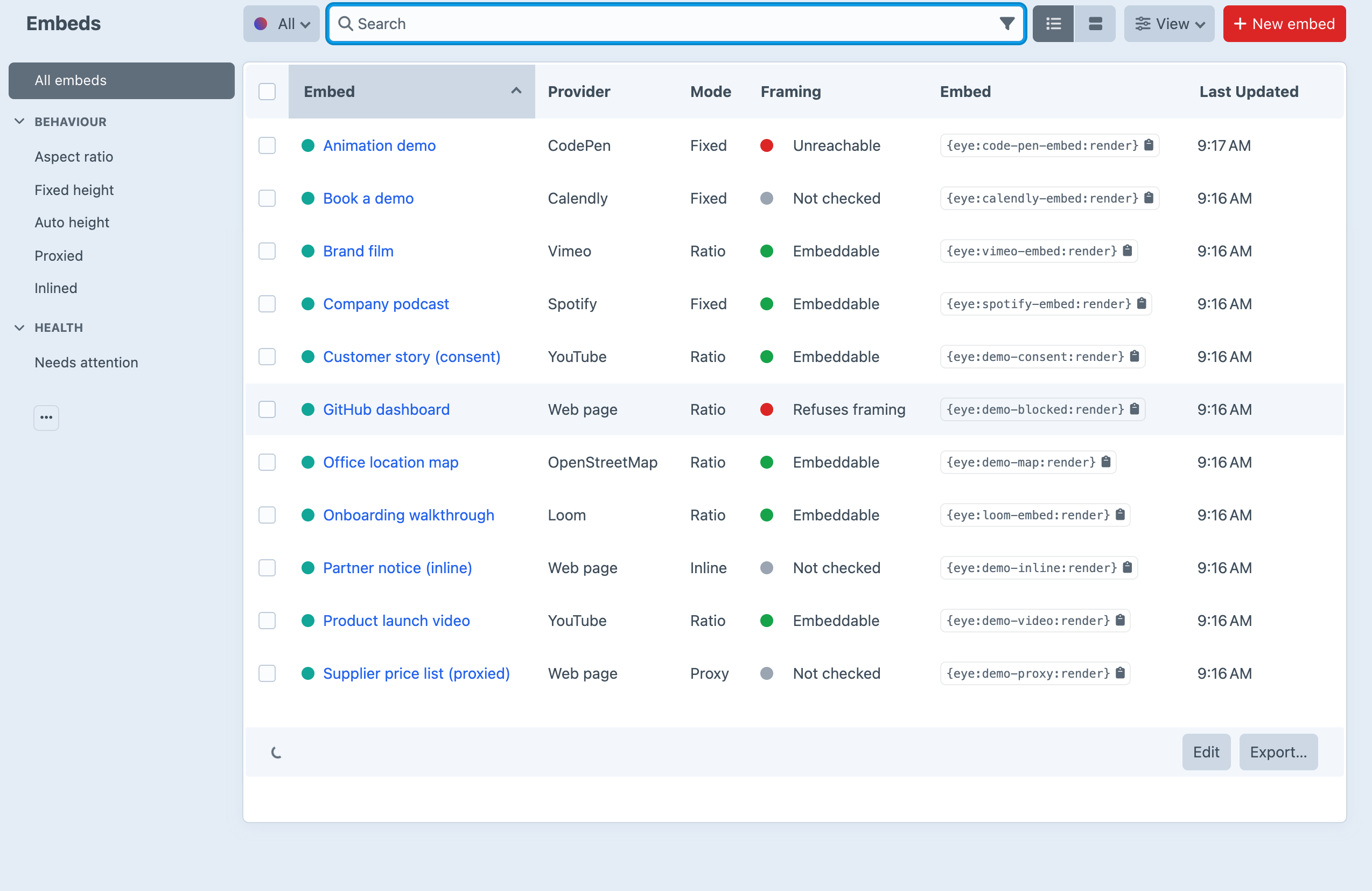
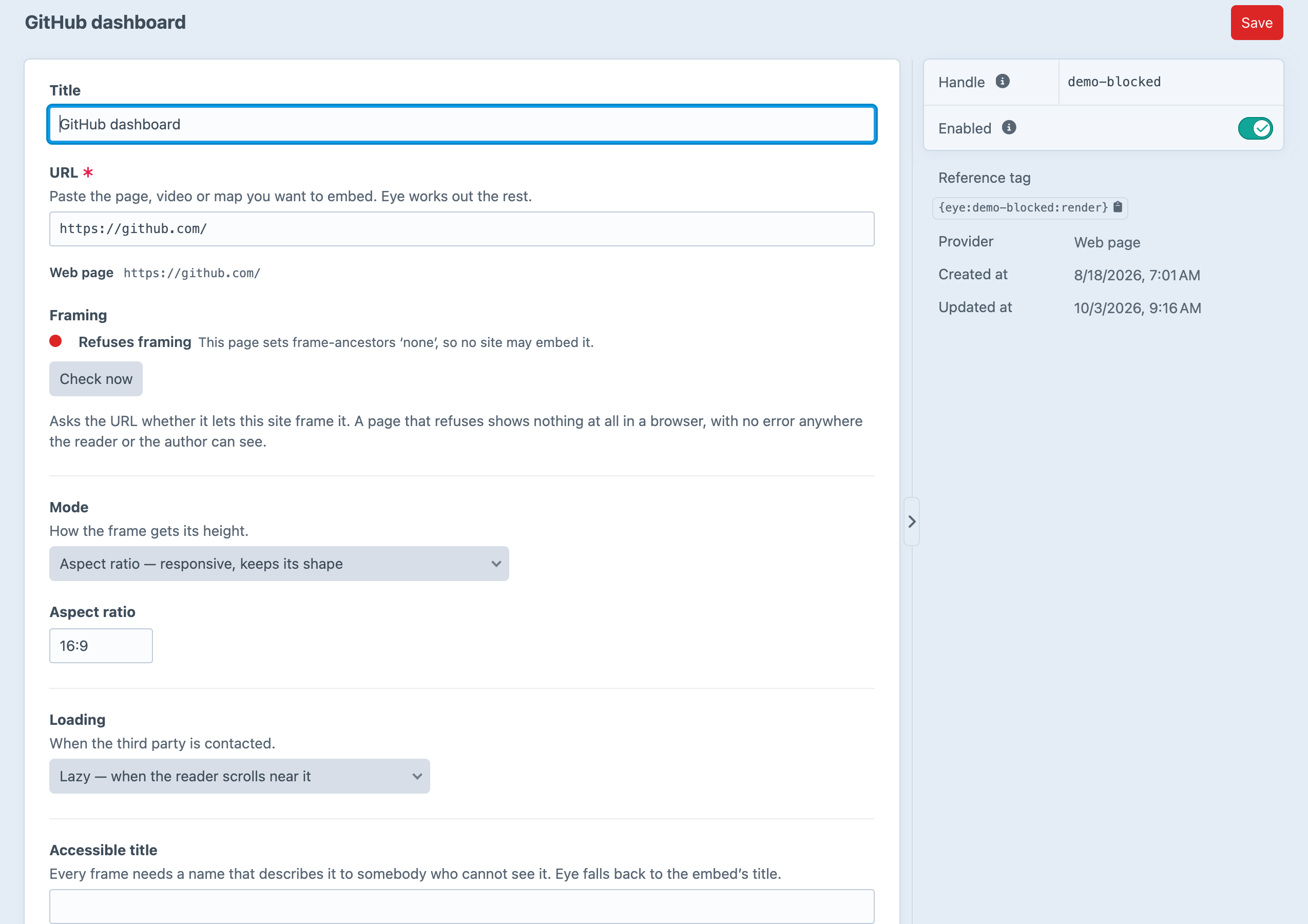

Screenshots from a live install, not mockups.
Frequently Asked Questions
Worth knowing before you install it.
Yes. There are no editions and no licence key.
No. Rendering uses Craft's own reference-tag parsing, which doesn't depend on any editor. The toolbar buttons are a convenience. Remove them, switch editors, or type {eye:handle:render} by hand, and every embed still renders.
A reference tag needs an element to point at. It also means every third-party frame on the site ends up in one auditable index. Quick-create dedupes by URL, so pasting the same link ten times makes one entry.
Not at runtime, and nothing else can either. A cross-origin page blocked by X-Frame-Options still fires load in most browsers and gives the parent page no signal. That's why Eye checks framing when you save, and why php craft eye/embeds/check --failOnProblem exists for CI.
It's built for it, but it is a server-side HTTP client, so it's off by default and needs a host allowlist with no allow-everything value. Every resolved address must be public, the connection is pinned to it, redirects are re-checked at every hop, nothing of the reader's is forwarded, and the public route never takes a URL.
It gives you the tools: click-to-load cards that genuinely request nothing until the reader agrees, a cookie-free host for YouTube and Vimeo by default, and one index of every third-party frame on the site. Whether that makes a site compliant is a question for your own advice.
Yes. Put a template at _eye/embed.twig and it replaces Eye's own, with the same variables. Or keep Eye's markup and change the colours with custom properties such as --eye-accent, --eye-radius and --eye-bg.
Craft CMS 5.3+ and PHP 8.2+. Eye has no build step and no runtime dependencies beyond Craft's own.
Embeds that work
Free for Craft CMS 5, with no editions and no licence key.