Free · no editions, no licensing code
One sentence, two deploys
A sale that ends Friday. A shipping cut-off. A maintenance window on Sunday night. Every one of them is a line of text that needs to be on every page for four days and then gone — and every one of them ends up as a template edit, a deploy, and a second deploy to take it down again. Blaster makes it a thing you write in the control panel and schedule.

Two commands, then nothing
Install it and write a bar. There is no third step — matching bars are spliced into front-end HTML responses before the closing body tag, so no template is touched. If you would rather place them yourself, one tag does that and stands the automatic injection down for that request.
composer require justinholtweb/craft-blaster
php craft plugin/install blaster

{# Nothing needs to go in a template. But if you want it somewhere
   specific, this places the bars and turns injection off for the request: #}
{{ craft.blaster.render() }}

{# And the rest of what Twig gets: #}
{% set bars   = craft.blaster.bars() %}        {# matching this request #}
{% set bar    = craft.blaster.bar('spring-sale') %}
{% set totals = craft.blaster.stats(bar) %} {# views, clicks, dismissals #}Features
Everything WPFront Notification Bar keeps behind a licence, and the privacy it does not have.
Targeting, split down the middle
Page, section, entry, site, sign-in state, user group and query string are decided on the server. Device width, referrer and first-versus-returning are decided in the browser.
- A bar that fails a server rule never reaches the page
- The browser half is settled after a cached page lands
Your page cache keeps working
Nothing that varies per visitor is decided on the server, so one cached page serves everybody. The server sends every candidate hidden and the browser picks the winner.
- No cache-busting, no per-visitor render, no session
- Blitz, Varnish and Cloudflare are all fine with it
Scheduled to the hour
Start and end dates, days of the week, and a daily time window that may run past midnight — all read in the site's own time zone, because that is the one the author was thinking in.
- The element index shows live, pending, expired or disabled
- A bar for Friday can be written on Monday and forgotten
Editing it brings it back
Every save bumps the bar's version, and a dismissal is recorded against the version it dismissed. So a change re-shows the bar to everyone who had closed the old wording.
- Editing a bar is how you say "this is a new thing to say"
- A stale dismissal is the failure nobody notices in time
Yours to style, down to the CSS
Colours, type size, height, alignment, width, border, shadow and button styling — with a live preview drawn by the same code that serves the front end, and per-bar CSS with a {selector} token for the rest.
- The preview and the page cannot drift apart
- Top or bottom, pinned or in-flow, pushing or overlaying
Numbers that describe nobody
Views, clicks, dismissals and a click-through rate — three integers per bar, per site, per day. No event rows, no identifiers, no addresses, no sessions and no cookies.
- Which answers how many times, never how many people
- Dismissals live in the visitor's browser and stay there
Blaster in the control panel
Real screens from a Craft 5 install running five notification bars — one live, one waiting on its start date, one already finished, and a cookie notice pinned to the bottom.
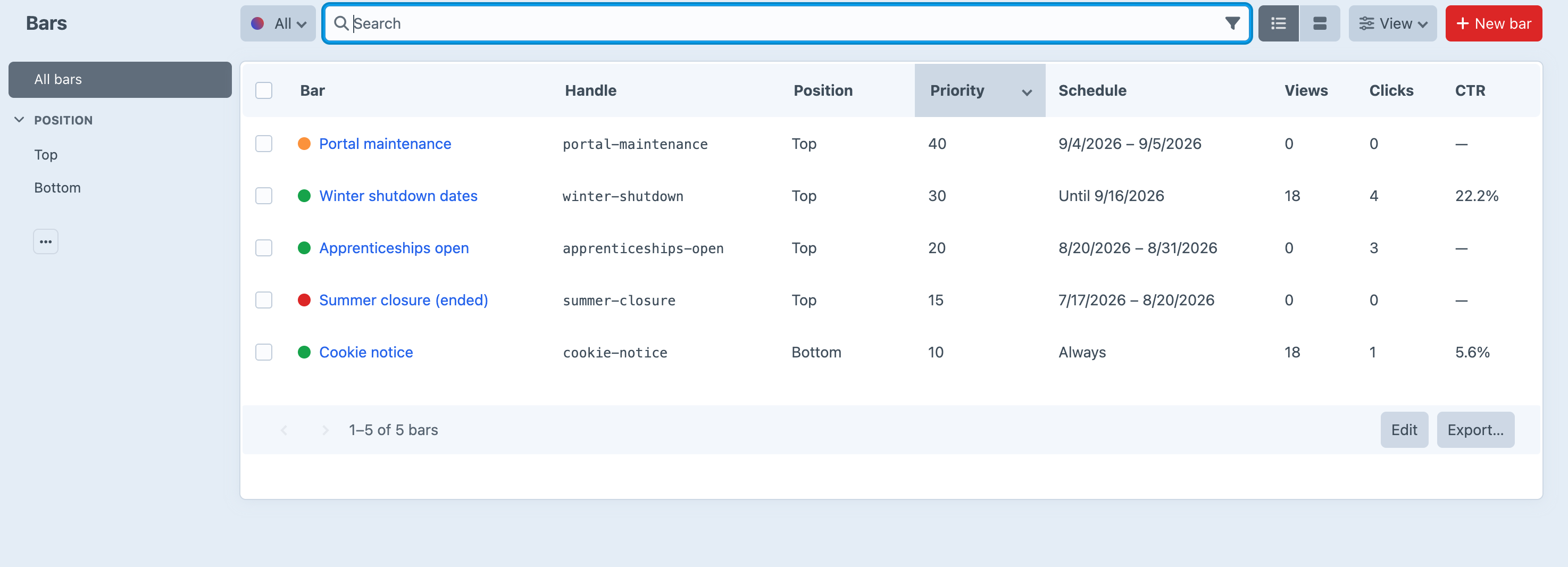
Screenshots from a live install, not mockups.
Frequently Asked Questions
The questions worth answering before you install it.
Yes. One edition, everything switched on, no licence key and no licensing code in the plugin. Scheduling, targeting, multiple bars and statistics — the things the WordPress original keeps behind a licence — are simply the plugin.
No. Matching bars are spliced into front-end HTML responses just before the last closing </body> tag. It hooks the response rather than the template layer on purpose: hooking {{ endBody() }} would only work for templates that actually call it, and plenty of real sites do not. If you would rather place bars yourself, {{ craft.blaster.render() }} puts them exactly where you call it.
Three integers per bar, per site, per day: views, clicks and dismissals. No event row, no identifier, no IP address, no session, no cookie and no fingerprint — nothing stored can be joined back to a person, because nothing stored describes one. A visitor's own state, which bars they have closed and how often they have seen one, lives in their browser's localStorage and is never sent anywhere.
Yes, and this is most of the reason the design is what it is. Everything that varies per visitor is decided in the browser precisely so that one cached page can serve everybody. The one thing to watch is server-side targeting by user group, which varies per visitor despite being decided on the server — a full-page cache will serve whichever version it cached first. Target by sign-in state instead, or exclude those routes.
Because two stacked announcements are not twice the message — they are half the attention each. Where several bars match, the one with the highest priority takes the position, and top and bottom are scored apart so each gets its own winner. If two things need saying at once, say them in one bar.
Because that is what editing a bar means. Every save bumps the bar's version and a dismissal is recorded against the version that was dismissed, so a change re-shows the bar to the people who had closed the old wording. A stale dismissal quietly suppressing a new announcement is the failure nobody notices until the announcement matters. There is no switch to turn it off.
Not measurably. A request with no matching bars costs one indexed element query and a pattern match against the exclusion list. A request with one adds the bar's markup and a small inline stylesheet. The runtime is a plain IIFE inlined into the page — no external script, no request, no framework, no build step and no dependency.
Yes. A bar exists on every site, its wording is translatable per site, and its colours, targeting, display and schedule are shared — so one announcement is one bar to keep in step, rather than one per language. The Sites targeting option keeps a bar off the sites it does not belong on.
Blaster sets no cookies. It writes to localStorage, which never leaves the visitor's browser, and what it writes is a bar handle, a version number and a count. Whether your jurisdiction treats that as requiring consent is a question for whoever advises you — what is safe to say is that there is no identifier to consent to sharing and no third party to share it with. If you would rather be conservative, the settings can honour Do Not Track or stop counting altogether.
No. There are no outbound HTTP requests anywhere in the plugin. The only request the runtime makes at all is the counting beacon, and that goes to your own site.
Craft CMS 5.3+, PHP 8.2+. No runtime dependencies beyond Craft's own, and no build step.
Write it once, schedule it, forget it
Free, for Craft CMS 5.3 and later. Install it, write a bar, and it is on every page of the site — with no template change and nothing to deploy when it is time for it to go.