Free · Pro $49, $29/year renewal
A list of dates is not a history
Craft stores a complete copy of your entry every time you save it — and then shows you four columns: number, date, author, notes. To find out what actually changed you open two revisions in two tabs and read. To put back the one paragraph somebody broke, you revert the whole entry and lose everything else that was fixed since. Visorr turns that list into something you can read, act on, and keep under control.

Two commands, and your existing history is readable
There is nothing to backfill and no waiting for new saves. A revision in Craft is a complete duplicated element rather than a delta, so a comparison is "load two elements and walk one field layout" — which works just as well on history written years before Visorr was installed.
composer require justinholtweb/craft-visorr
php craft plugin/install visorr

{# Nothing needs to go in a template. The comparison screen and the sidebar
   panel are there as soon as it is installed. But if you want the history: #}
{% for revision in craft.visorr.history(entry, 10) %}
  {{ revision.label() }} — {{ revision.dateCreated|datetime }} by {{ revision.creatorName }}
{% endfor %}

{% set diff = craft.visorr.compare(entry, revisionId) %}
{{ diff.changedCount() }} fields changed

{# craft.visorr is read-only by design. Nothing on it deletes, restores or pins:
a template rendering a page is not the place to change history. #}Features
Everything Craft's revision screen leaves you to work out for yourself.
Compare any two versions
Field by field, with word-level highlighting — including a revision against what is currently live, which Craft cannot do at all. The screen opens on that comparison, because it is the one you almost always wanted.
- Only the fields that moved, biggest change first
- A forty-field entry with one edit is one row, not forty
Matrix blocks, aligned by content
A revision owns copies of its blocks with brand-new IDs, so there is nothing to match two revisions' blocks on. Visorr aligns them by content instead, in three passes.
- An edit reads as changed, a reorder as moved
- Without the third pass a rotation reads as delete plus insert
Restore one field, not the entry
Tick the fields you want and Visorr writes only those onto the live element. Everything you leave unticked stays exactly as it is — including the six things somebody else fixed this morning.
- Previewed as what will be overwritten, before it writes
- An ordinary save, so the restore is itself undoable
Retention as policy, not one number
Craft has a single global maxRevisions. Visorr resolves policy across element type, section and site, most specific first — and stores it in project config, so it deploys with the site and can be reviewed in a pull request.
- A minKeep floor, so an untouched entry never empties out
- No policy matching means Craft's own default, untouched
Pins that outlive every policy
Pin a revision and no prune will remove it — not Visorr's, and not Craft's own PruneRevisions job. Retention policy and editorial value are different things, and a tool that only understands the first will eventually delete the second.
- Re-checked on every batch, so a late pin still wins
- "Keep the last twenty" is storage; "keep the relaunch" is not
A preview that is the deletion
One resolver decides what gets pruned, and apply() deletes exactly the list it was handed — a preview that built its own query would be a preview of a different deletion. Every run is recorded with what it planned alongside what it did.
- Drift is visible in the ledger rather than absorbed
- A storage report showing which two sections are the problem
Visorr in the control panel
Visorr lives in the entry sidebar, where the revisions already are — every revision listed, pinned ones kept out of the prune, and one click to compare.
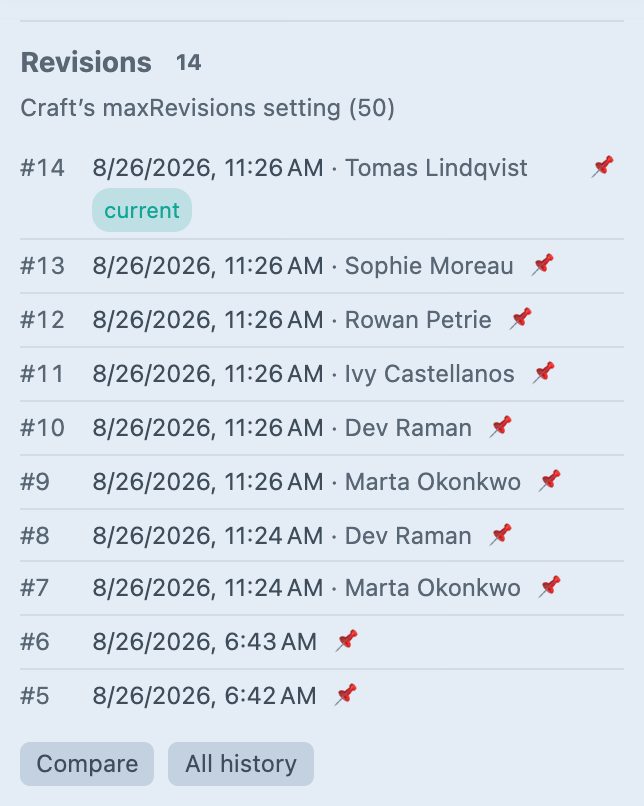
Screenshot from a live install, not a mockup.
Pick any two versions
This is the screen, and these are real diffs — change either dropdown and the comparison recomputes. Note what it opens on: the last revision against what is live, which is the one comparison Craft cannot do at all.
Tick the fields you want to put back. Everything you leave unticked stays exactly as it is now.
Ticking a field and pressing Restore writes only that field onto the live entry. Because a restore is an ordinary save, it leaves a revision of its own — which is why a restore can itself be undone.
The hard part, made visible
A revision owns copies of its Matrix blocks with brand-new IDs, so there is nothing to match two revisions' blocks on. Flip the toggle to see what that costs, and what aligning on content instead buys you.
The third alignment pass — a global reconciliation of identical leftovers — is the one that turns a rotation into “moved” rather than a deletion plus an insertion.
Policy, resolved in front of you
Craft has one global maxRevisions. Visorr resolves across three axes and takes the most specific match: element type beats section beats site. Change any of the three and watch which policy wins.
Policies live in plugin settings and therefore in project config, so they deploy with the site and can be reviewed in a pull request. With no policy matching, Craft's own maxRevisions applies exactly as before.
A preview that is the deletion
One resolver decides what gets deleted and apply() deletes exactly the list it was handed — a preview that built its own query would be a preview of a different deletion. Change the scope, then apply it.
Prune history — what each run planned, beside what it actually did.
| Run | Scope | Planned | Deleted | Notes |
|---|
Every run is recorded with the IDs it planned to delete alongside what it actually deleted. Apply “Everything” to see drift: four revisions were pinned mid-run, and the ledger says so rather than absorbing it.
Frequently Asked Questions
The questions worth answering before you install it.
Yes, and this is rather the point. Visorr stores no revision data of its own — it reads Craft's own revisions, elements and elements_sites tables. A revision in Craft is a complete duplicated element rather than a delta, so a comparison is "load two elements and walk one field layout". A fresh install has a full comparison screen immediately, over history written years before Visorr existed. There is nothing to backfill and no waiting for new saves.
The one exception is the authoring site of a revision, which Craft never recorded. Visorr starts recording it on install, and visorr/sites/backfill assigns the older ones when you know where they belong.
Seeing versus governing. Lite is the comparison screen Craft should have shipped: any two revisions, field by field, word level, including a revision against what is live. Plus pinning, and purging one element's history.
Pro adds policy across the whole site — retention rules, scheduled pruning, pruning by section or element type, selective field restore, the storage report, and per-site history filtering.
Lite never takes away anything Craft already gave you. Whole-element revert stays Craft's own, in both editions.
Lite is free. Pro is $49, with a $29/year renewal for continued updates. The plugin keeps working if you stop renewing — you stop receiving updates, not the features you paid for.
No — on every element type whose class reports hasRevisions(). Retention policies are keyed on element type, with sections as a finer grain for entries.
Drafts are deliberately out of scope. A revision is written when something is saved; a draft is a different thing, and sweeping up stale drafts is a different plugin's job.
No. Visorr does two things on save: it records the authoring site of the new revision, which is one insert, and it decides whether to replace Craft's PruneRevisions job with its own.
That second decision is deliberately conservative. An element with no pins and no matching retention policy is left entirely to Craft, because there is no value in routing work through a plugin that would reach exactly the same answer.
It degrades rather than fails. Values over maxDiffLength — 200,000 characters by default — skip the word-level diff and fall back to a line-level comparison, and then to a plain side-by-side view. The field is still compared and still reported as changed.
The guard exists because a word-level diff is an O(n²) LCS: on a 400KB CKEditor field it would spend minutes producing a result nobody could read.
They are estimates, and the report labels them as such. A revision's real cost is spread across five tables and their indexes, and no single query prices that honestly.
What the numbers are reliable at is the ratio between rows — which section is generating ten times what another is — and that is what the report is for. It is a tool for writing your first retention policy, not a figure to quote at a hosting company.
The design goes out of its way to make that visible. One resolver decides what gets deleted and apply() deletes exactly the list it was handed, so a preview is never a preview of a different deletion. Every run is recorded with the IDs it planned to delete alongside what it actually deleted, so drift shows up in the ledger rather than being quietly absorbed. And pins are re-checked on every batch, so a pin added while a preview is sitting on somebody's screen still wins.
Yes, with protectPins on, which is the default. Craft queues a PruneRevisions job on every save and that job has never heard of a pin or a per-section policy — so Visorr intercepts it and substitutes its own, for the elements where that changes the answer. Turn protectPins off and a pin becomes a bookmark and nothing more.
Yes. A restore is an ordinary save, so it creates a revision of its own and the state you restored over is still there, one revision back. It is also why a restore fires the same events any other save fires — Visorr is not writing around Craft.
Yes, and it fixes a real problem there. An element shared across sites has one revision history, so every site's editors see every other site's work in one undifferentiated list — and reverting to any of it silently replaces content they have never seen.
Visorr records the authoring site of every revision in both editions, from the day it is installed, and Pro filters the control panel by it. Recording happens in Lite deliberately: a site that upgrades later should find its history already sorted, rather than starting from the day it paid.
Craft's revision history is untouched, because Visorr never owned it. Uninstalling drops Visorr's three small tables — you lose your pins, the record of which site each revision came from, and the prune ledger. The revisions themselves are Craft's and stay exactly as they are. Anything a prune already deleted is gone, the same as if Craft had pruned it.
Craft CMS 5.3+, PHP 8.2+. No runtime dependencies beyond Craft's own, and no build step — the diff is a few hundred lines of PHP in the package and the control-panel JavaScript is a classic script.
Read your history, then keep it honest
Free for the comparison screen Craft should have shipped. $49 for policy across the whole site. Both work on the history you already have, from the moment you install it.



