Free · Pro $79 · Craft CMS 5
Your contact form has no memory
Craft's Contact Form plugin is deliberately tiny: it takes a POST, checks an email address, and sends one message. That is the whole plugin. So a site running it has no record of what it received, no defence against the spam a public form attracts inside a week, no way to tell the sender it arrived, no way to send an enquiry anywhere but one fixed address — and no way to recover the fortnight that vanished while the mail server was down. Bandage adds all of it without changing your form.

One line, and it is the only one
Bandage never forks Contact Form. It attaches through the only three events Contact Form fires, so contact-form/send is still the action you post to, submission is still Contact Form's model, and getErrors() still behaves exactly as documented. Adopting it means adding a tag to a template you already have.
<form method="post" accept-charset="UTF-8">
  {{ csrfInput() }}
  {{ actionInput('contact-form/send') }}
  {{ redirectInput('contact/thanks') }}

  {# This is the only line Bandage needs. #}
  {{ craft.bandage.form() }}

  <input type="email" name="fromEmail">
  <input type="text" name="message[Phone]">
  <textarea name="message[body]"></textarea>

  <button type="submit">Send</button>
</form>

{# Per-field errors, keyed by the label you already know #}
{% set errors = craft.bandage.errors(submission) %}
{{ errors.Phone ? errors.Phone|first }}

{# The reference, on the thank-you page #}
{{ craft.bandage.reference() }} {# K4TP-9WQR #}Features
Everything a contact form needs on the second day, once the first enquiry has already been lost.
Every message, and its files, kept
Submissions are Craft elements, so the index, search, exporter, trash, per-user permissions and a field layout are Craft's own rather than a second implementation of each. Uploads are copied into a volume instead of dying with the temporary file.
- The field layout is where your team records what happened next
- A short reference — K4TP-9WQR — somebody can read down a phone
- Attachment records keep filename, size and kind after the volume is emptied
Spam that scores instead of vetoing
Honeypot, time trap, rate limit, word and pattern blocklists, sender and IP blocking, throwaway addresses, MX checks, link counting and CAPTCHA. Each contributes to a score; the threshold decides.
- A password manager filling a hidden field is not a bot — one hit alone is forgivable
- Quarantine, reject or flag, and all three store the message
Fields that actually get validated
Contact Form validates two things: that the sender's address is an email address, and that the message isn't empty. Every other field on your form is unchecked, and a visitor who mistypes a phone number finds out never.
- Required, email, URL, number, whole number, pattern, length, allow and deny lists
- Errors land under the name the input already has
Not always the same inbox
The most-asked-for thing Contact Form cannot do: its recipients come from one setting and are identical for every submission the site will ever take. Route To, Cc and Bcc on what the sender actually answered.
- One condition per line — paste it, diff it, review it
- A rule with no conditions matches everything: the catch-all Bcc
Everything after the send
A confirmation back to the sender with their own answers and their reference, and the same submission delivered to a signed JSON webhook, Slack or Microsoft Teams — all of it on the queue, so a dead endpoint never holds the visitor's browser open.
- The autoresponder is rate limited per recipient — it is a relay aimed by the request body
- X-Bandage-Signature: sha256=… is an HMAC over the exact bytes sent
- Endpoints are http(s) only, because a file:// endpoint with a settings screen is a forgery primitive
Export, retention and the quiet week
CSV from the control panel and the console, each submitted field expanded into a column of its own. Retention deletes after N days, spam sooner, and can blank stored IPs while keeping the message.
- Cells beginning = + - @ are neutralised. Every value in that file came from a stranger
- The digest exists because a broken form looks exactly like a quiet week
Bandage in the control panel
Real screens from a Craft 5 install running Craft's own Contact Form behind Bandage — a stored inbox, the spam it caught and why, and the form profiles that decide all of it.
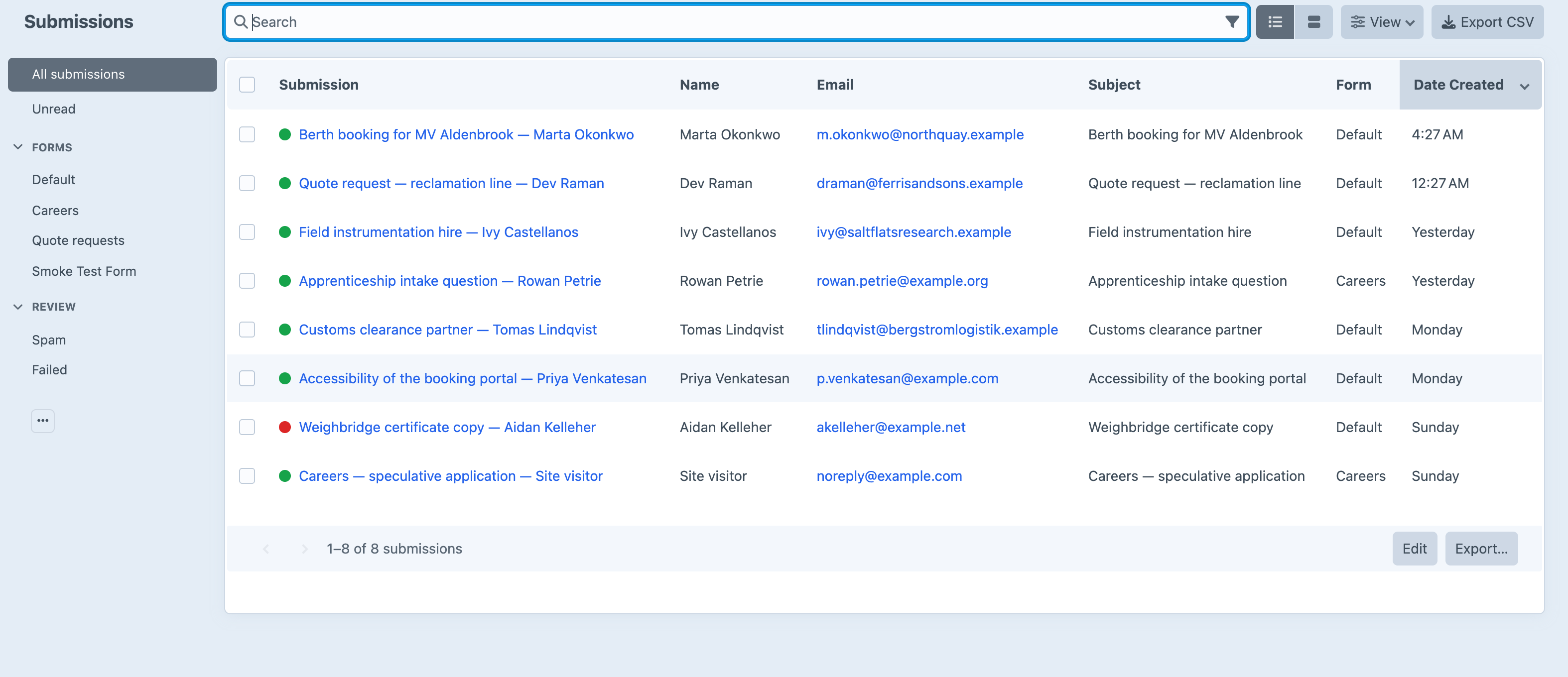
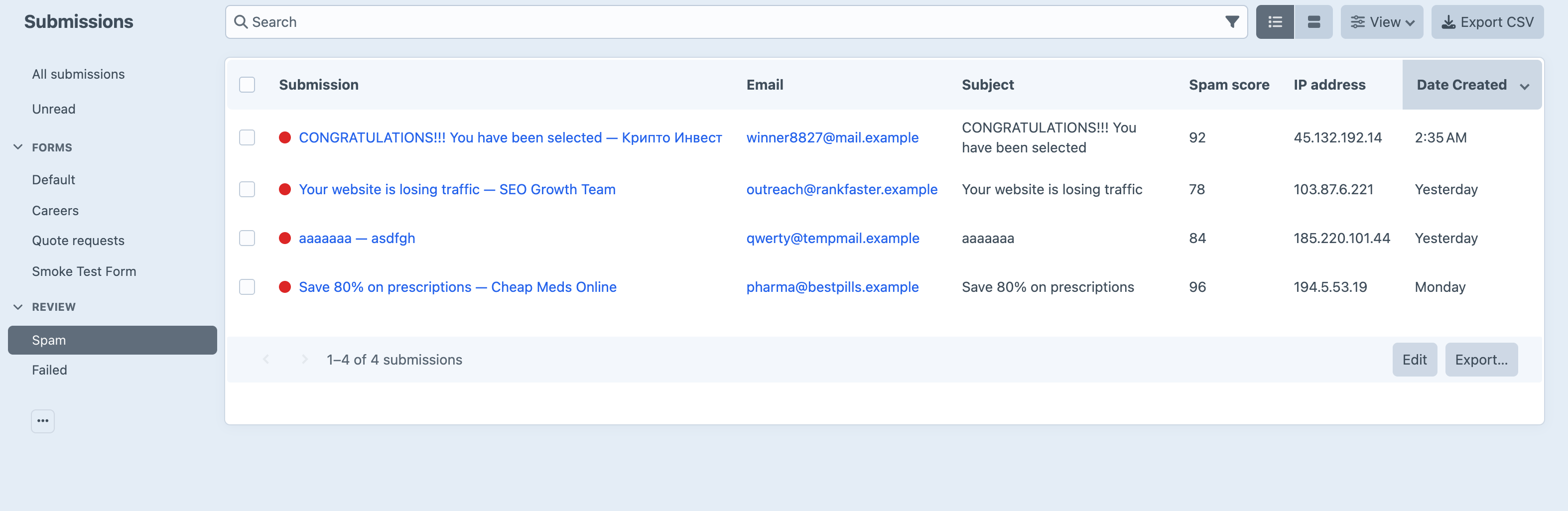
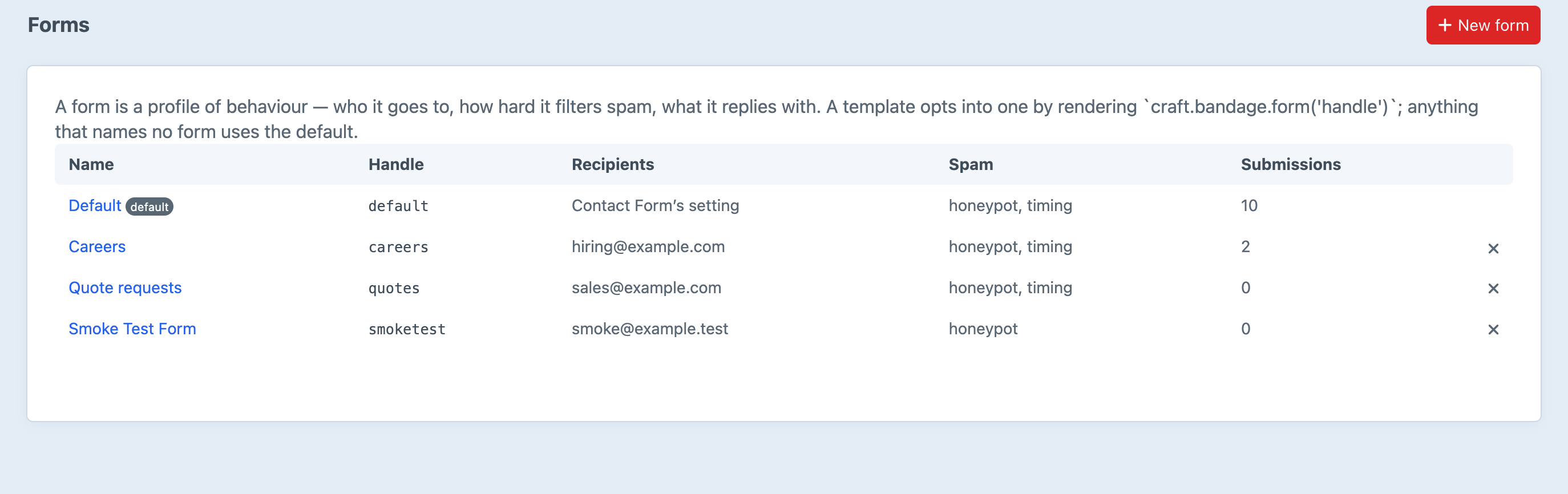
Screenshots from a live install, not mockups.
Frequently Asked Questions
The questions worth answering before you install it.
You add one line to it: {{ craft.bandage.form() }}, anywhere inside the <form>. Everything else stays — contact-form/send is still the action you post to, submission is still Contact Form's model, and submission.getErrors() still behaves as Contact Form documents it.
No, and that is the whole design. Contact Form is a dependency, not something to be superseded: it still takes the POST, still validates, still sends. Bandage attaches to the three events it fires and adds a record, a filter, and somewhere else for the message to go. Remove Bandage tomorrow and your form keeps working, because it is still Contact Form's form.
Lite is free, permanently: stored submissions, spam filtering, attachment validation, CSV export, retention and the digest. Pro is $79, with a $29 annual renewal for updates, and adds multiple form profiles, field validation rules, recipient routing, conditional redirects, the autoresponder and integrations.
Pro configuration stays exactly where it is and stops applying. Nothing is deleted. Your routing rules live in project config, they survive the downgrade, and they start working again the moment you upgrade. Stored submissions are untouched either way — they are a Lite feature.
It can, which is why nothing vetoes on its own. Checks contribute to a score, so a honeypot hit alone — a password manager filling a hidden field — is forgivable in a way that a honeypot hit plus a twelve-link body is not. The default action is quarantine: stored, not sent, and the visitor sees the ordinary success message. While tuning, use the flag action for a week: it sends everything and marks what it would have caught.
No. Quarantine, reject and flag all store the message. A spam folder nobody can review is deletion with extra steps, and the only way to find a false positive is to be able to look at it. Retention can clear spam on a schedule, and that is off by default too.
Not on the default action. A quarantined submission gets the ordinary success message, because a spam filter that announces itself is a spam filter that gets tuned around. The reject action does show an error, and exists for forms where a false positive needs to be told to try another way.
By default: the message, the sender's name and address, the extra fields your form posts, the IP address, user agent and referrer, and the delivery result. You can turn off metadata, turn off the body, delete after N days, delete spam sooner, or blank stored IPs while keeping the message. All of it is off by default — retention is a legal question with a technical answer, and quietly deleting somebody's correspondence is the worse way to be wrong.
On Pro, as many as you like, each with its own recipients, spam settings, rules and autoresponder — a template opts into one by name with craft.bandage.form('support'). On Lite there is one profile, default, and every form on the site uses it.
Verification fails open on an outage and closed on a genuine failure. A network error reaching Google is not evidence about the visitor; a returned “no” is. A CAPTCHA outage that silently blocked every enquiry would be worse than the spam it kept out. reCAPTCHA v2 and v3, hCaptcha and Cloudflare Turnstile are all supported.
Yes, with the cap left where it is — three per hour per recipient address by default. That is an abuse control rather than a nicety: an autoresponder is a mail relay whose destination comes from the request body, so without a cap anyone can submit the form in a loop with a third party's address in it and have your domain, with your real SPF record, mail-bomb them.
Craft CMS 5.3+, PHP 8.2+, and craftcms/contact-form 3.x. That last one catches people out: Contact Form 2.x is the Craft 3 line, and the Craft 4 and 5 line is 3.x. There are no other runtime dependencies.
One tag away
Install it, add the line, and the next enquiry your site receives is one you still have next year. Free for a single form; Pro is $79 when you need routing, rules and autoresponders.