Free · Craft CMS 5
Is anything still using this?
Craft knows exactly which entry uses which image. It just never tells you. There is no screen in the control panel that answers the question, and the answer matters most at the moment somebody is about to press Delete. Yarn reads the relations Craft already stores, plus the ones it doesn’t — reference tags in rich text, hard-coded links, relations buried in Matrix blocks — and shows you both ends of every one.

One element, both ends
This is Yarn’s element screen, with the Relations panel from the edit-screen sidebar beside it, running the plugin’s own rules against a small sample site. Pick another element, or switch roll-up off, and everything recomputes.
Points at
Pointed at by
Pick Careers or Our team to see a page from both ends, then pick open-studio-map.pdf: it is only reached by a reference tag, so the sidebar panel, which counts relation fields only, says nothing uses it while the full view says something does. Switch roll-up off and the Matrix blocks become elements of their own — which is accurate, and not what anyone opening the control panel means.
The panel reads the relations table directly, because it renders on every edit screen on the site and building a whole-site graph there would slow every edit form down. It counts relation fields only. The full view also counts reference tags, links and Matrix blocks, and it’s one click away.
Ask from a template, or from a deploy
The cheap calls read the relations table for one element and are fine on a front-end page. The whole-site ones belong in a report. And the findings command exits non-zero, so a pipeline can refuse to ship a page pointing into the trash.
{# cheap: one element, straight from the relations table #}
{% if craft.yarn.isUsed(asset) %}
  <p>Used on {{ craft.yarn.usageCount(asset) }} pages.</p>
{% endif %}

<h2>Also mentioned in</h2>
{% for other in craft.yarn.usedBy(entry) %}
  <a href="{{ other.url }}">{{ other.title }}</a>
{% endfor %}

{# and from the console #}
{# php craft yarn/element 1234 --depth=3     both directions, three hops of knock-on #}
{# php craft yarn/path 1234 5678             how one element reaches another #}
{# php craft yarn/findings --fail-on=error   the audit, with an exit code for CI #}
{# php craft yarn/export --format=dot | dot -Tsvg > site.svg #}Features
Four ways of looking at the same graph, and a panel that catches you before the delete.
A map of the whole site
Every element and every relation, laid out and colour-coded by kind. Click one to light up its threads, double-click to see only its neighbourhood, and drag one to pin it. The layout is about two hundred lines of hand-written arithmetic, not a graph library.
- Filter by kind, section, volume or group
- Unconnected elements hidden by default, and counted
- Says when it has trimmed to the busiest elements
Both directions for anything
What an element points at and what points at it, grouped by the field each relation came through, plus what else breaks at two and three removes. An asset in a hero field and in three Matrix blocks reads as used four times, because it is.
- Matrix and CKEditor relations rolled up onto the page
- Roll-up is a setting — switch it off to see the blocks
- The shortest path from one element to another
Asset usage and globals
Every asset with a use count and the pages that use it, filterable down to the ones nothing uses. And globals, which are the blind spot: nothing in Craft tells you the image you’re about to delete is in the footer of every page.
- Filter by volume, or to unused only
- Each global set, what it points at, and how far that reaches
- The “only what Yarn scans” caveat on every screen that says unused
Eight findings, each with a next step
Relations into the trash, relations to elements missing from the site, live pages pointing at things that aren’t live, reference tags that resolve to nothing, orphans, unused assets, circular relations and elements related to themselves. Every finding says what to do, not just what’s wrong.
- Sorted worst first: errors, warnings, notices
- Only ids and UIDs are resolved; other plugins’ ref grammars are skipped, not flagged
- The same checks from the console, with --fail-on
A panel on every edit screen
The sidebar of every element edit screen says how many elements point at this one and what deleting it will empty. It reads the relations table directly, so it adds nothing you’d notice to a page nobody opened Yarn to look at.
- Counts relation fields only, and says so
- “See the whole thread” opens the full view
- Can be switched off in settings
Nothing to install but the plugin
No database tables, no runtime dependencies, no build step. Settings live in project config, and the graph is built in memory and cached until any element is saved, deleted or restored. Export it as JSON, CSV, Graphviz DOT or Mermaid.
- Drafts and revisions excluded everywhere
- Other plugins can add their own relations through an event
- Uninstalling leaves nothing behind
Yarn in the control panel
The map with one entry selected, an element seen from both ends, the findings it raised, and the panel on an entry’s edit screen.
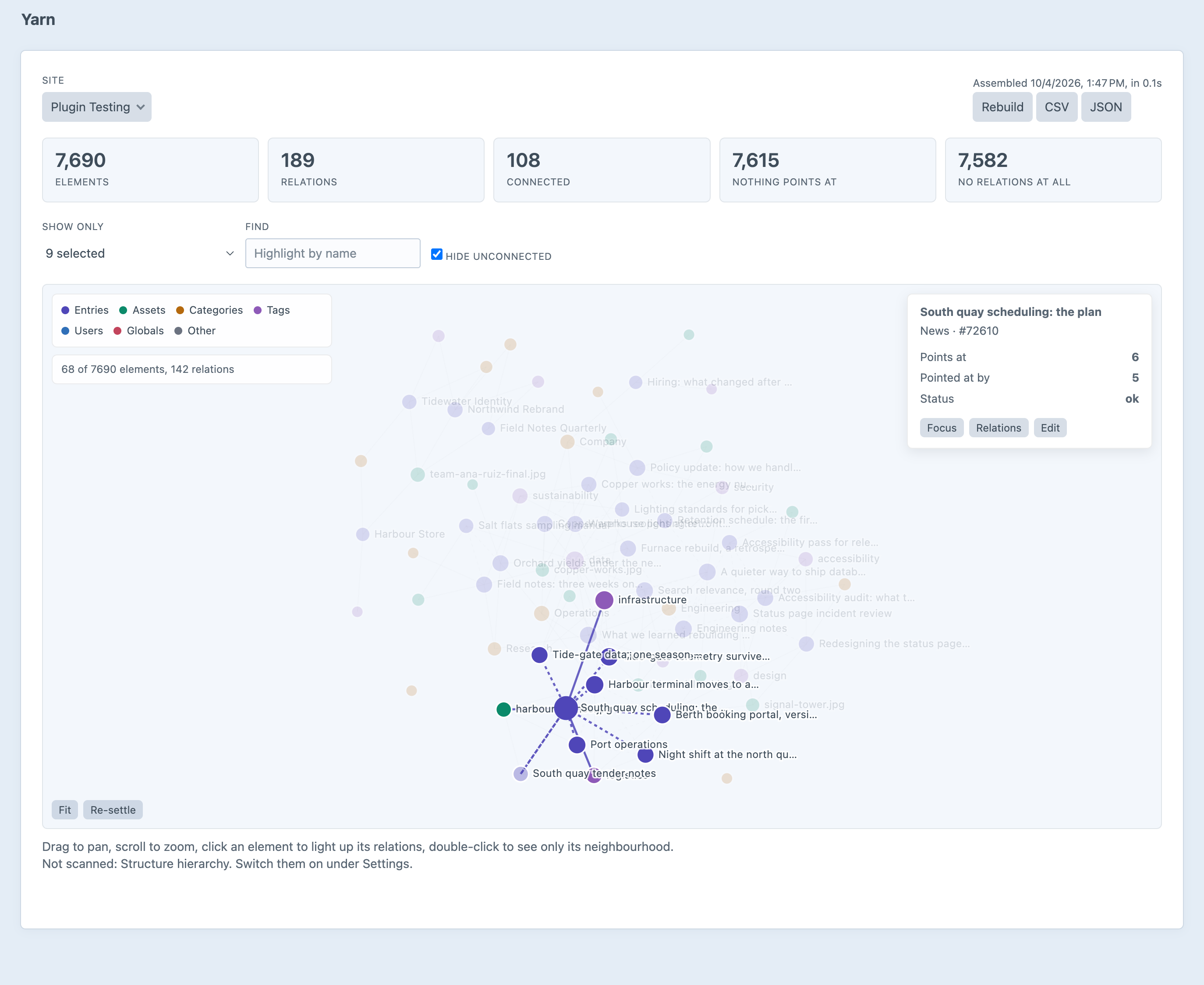
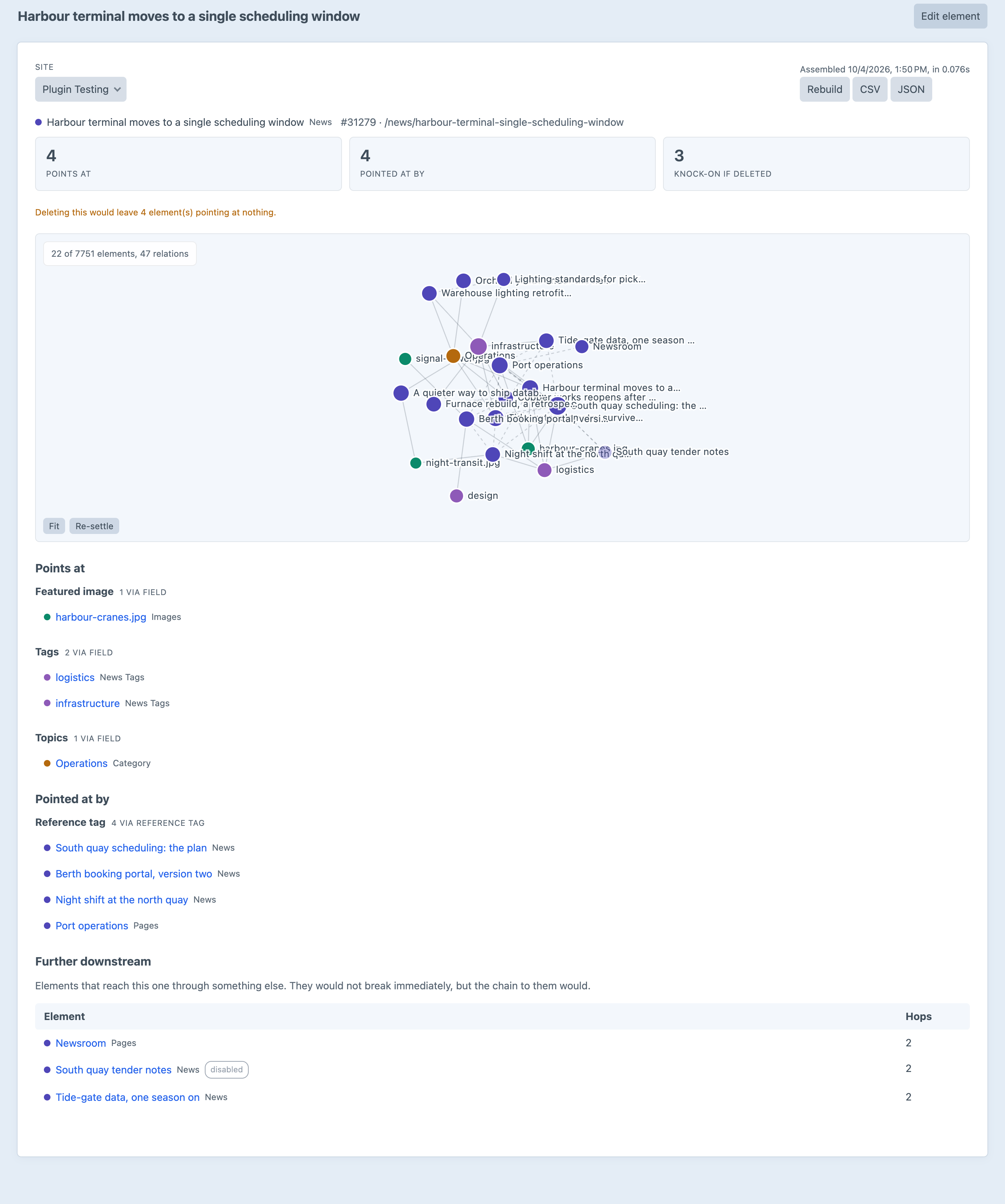
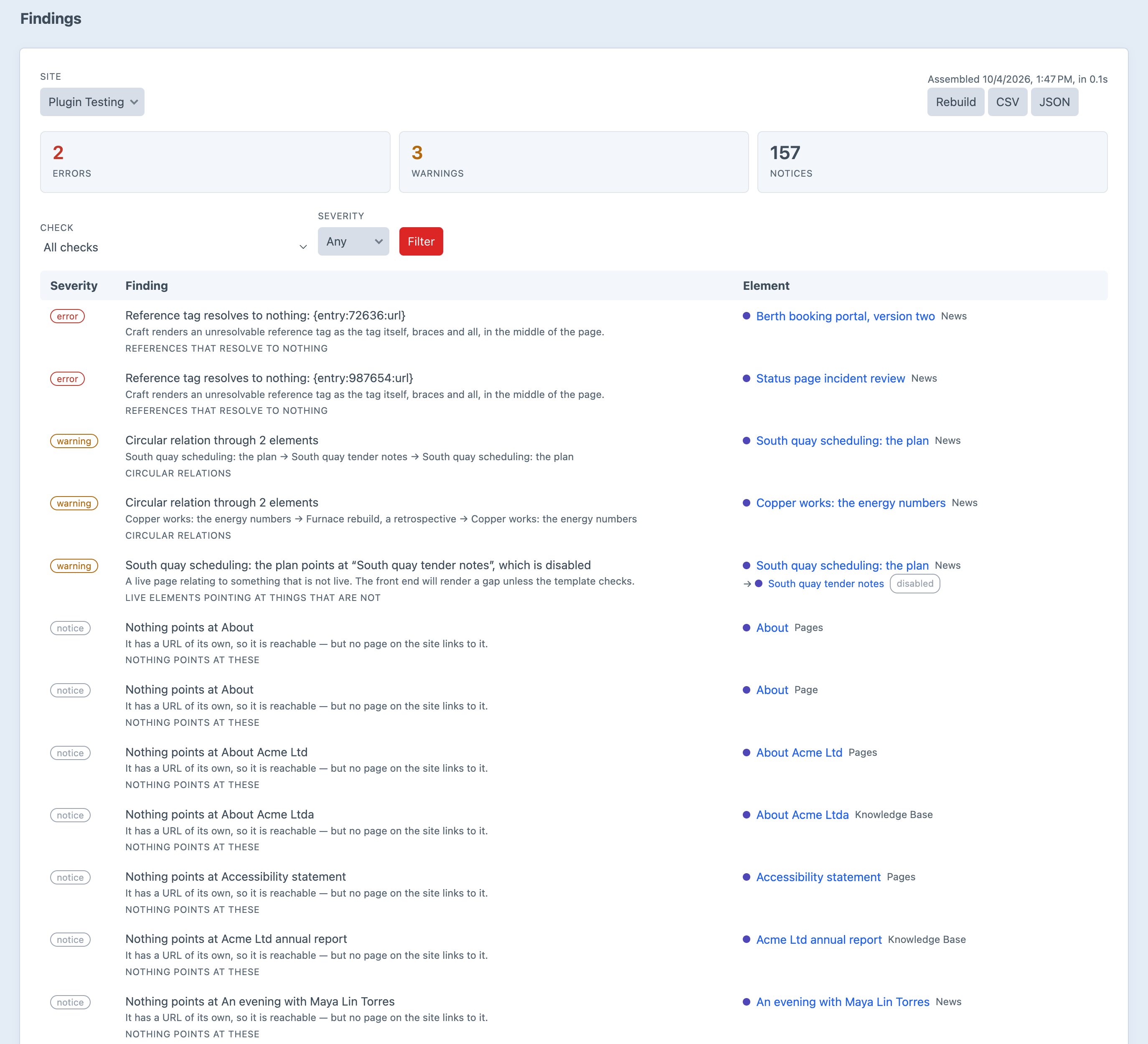
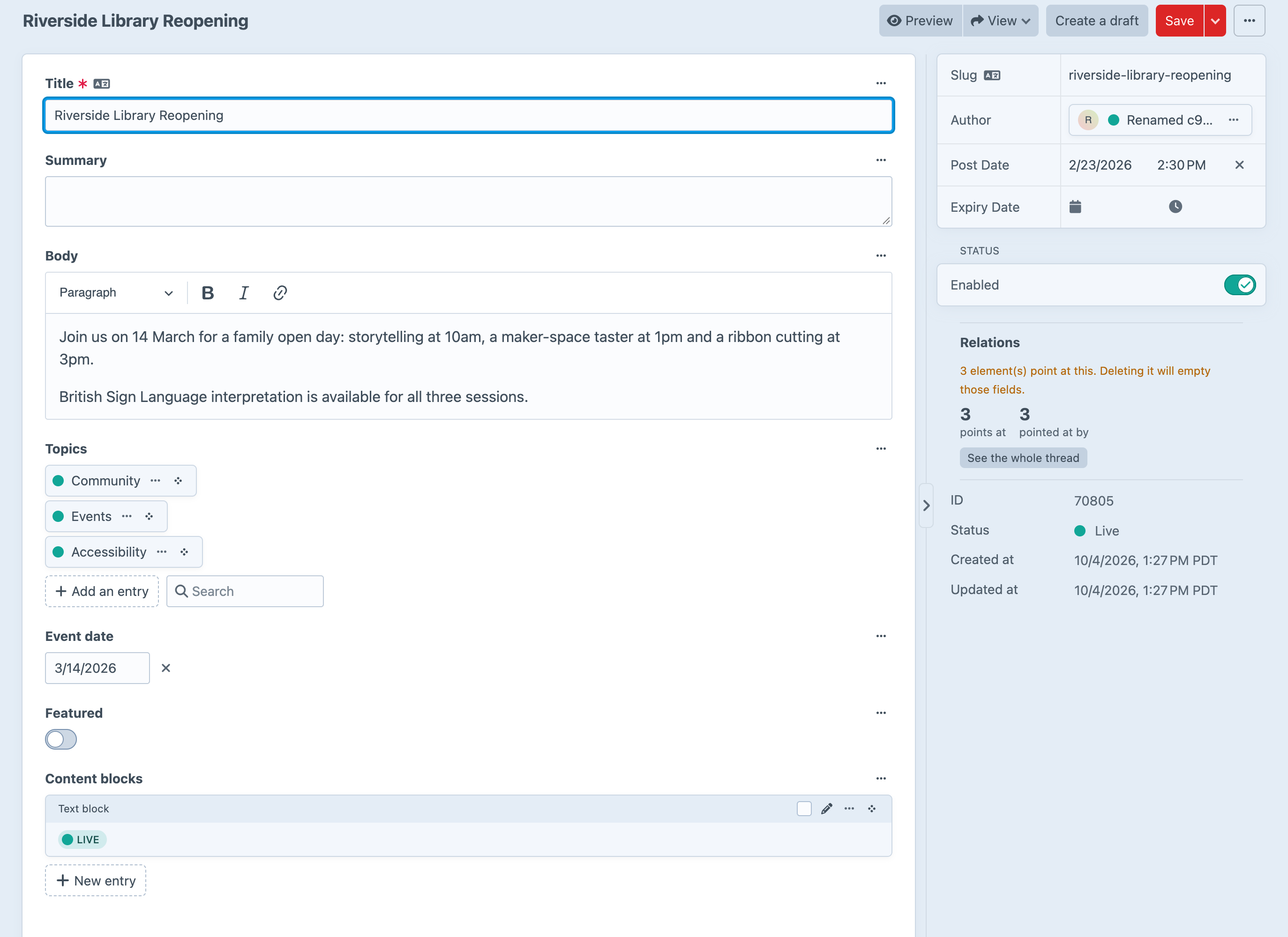
Screenshots from a live install, not mockups. The findings were planted on purpose: a dead reference tag, two cycles and a live page pointing at a disabled one.
Frequently Asked Questions
The questions worth answering before you trust it with a delete.
No, and nothing can. Craft has no safe hook for it: Elements::EVENT_BEFORE_DELETE_ELEMENT can’t be cancelled, and the event that can fires after Matrix has already deleted the element’s nested entries, so vetoing there keeps the element and destroys its content. Yarn tells you before instead, in the sidebar panel on the edit screen. With deleteGuard set to log, it also writes down what was still using an element at the moment it was deleted, so you can answer “why did this page go blank last Thursday?”
Not without checking. Yarn can only see what it scans. An asset used from a template, from a CSS background, from a plugin that keeps references in its own table, or from a source you’ve switched off is invisible to it, and it will show up as unused. Before a bulk delete, switch on the urls source, check your templates and take a backup. Every screen that says “unused” repeats this.
That’s roll-up, and it’s on by default. A relation held inside a Matrix block, or inside an entry embedded in CKEditor, is attributed to the page that owns it, along with the field it came through. That’s the page you would open, and the page that breaks. Switch it off and every block becomes an element of its own, which is accurate and, on a Matrix-heavy site, unreadable.
No, on purpose. A revision’s relations are a snapshot of what an entry used to point at. Counting them would mean every image ever swapped out still reads as in use, and that’s the one thing that would stop you cleaning up.
Craft’s relation fields always count: Entries, Assets, Categories, Tags and Users. Reference tags like {entry:42:url} anywhere in a field value are on by default. Structure hierarchy and hard-coded href and src links are off by default, because a hierarchy isn’t a dependency and the link scanner reads every field value on the site. Turn them on when the question is worth the scan.
Not the front end, and not the edit screens. The sidebar panel and the cheap Twig calls read the relations table for one element. The whole-site graph is only built when you open a Yarn screen or run a report, and it’s cached until something is saved. On a big site, the urls source is the expensive one. Leave it off, exclude sections you don’t care about, or raise cacheDuration.
No. It reads Craft’s own tables, builds the graph in memory and caches it in whatever cache Craft is configured to use. Settings live in project config. Uninstalling leaves nothing behind.
Anything that stores relations in Craft’s relations table works without help, and that covers most plugins. Entries embedded in CKEditor are rolled up like Matrix. A plugin that keeps references in its own table is invisible until someone writes a source for it, which is what RegisterEdgeSourcesEvent is for. Its documentation is in Extending.
Yes. There’s one edition with everything switched on, and no Pro tier waiting behind a feature you need.
Find out what’s holding on
Install it, open Yarn → Map, and the first load builds the graph. After that, every edit screen has a Relations panel, and the findings list will tell you what was already broken.