Free for Craft Commerce 5
Tracking numbers your customers can actually follow
Commerce knows what was bought and where it is going. It has nothing to say about the parcel. Trackr records what actually went out the door — from your order screen, a supplier's spreadsheet or your 3PL's API — and turns it into a link in the order email, a page the customer can open without an account, and an order status that moves on its own.

One line in your order email
The widget is table markup with inline styles, because its main home is an email client that strips style blocks and will not load an external sheet. Colours, layout and fields are settings, with a live preview on the settings screen.
{{ craft.trackr.widget(order) }}

{# Or build your own from the same data #}
{% for shipment in craft.trackr.shipments(order) %}
    {{ shipment.getProviderLabel() }} — {{ shipment.trackingNumber }}
    {{ shipment.getTrackingUrl() }}
    {{ shipment.getStatusLabel() }}
{% endfor %}

{{ craft.trackr.progress(order).percent }}   {# 50 #}
{{ craft.trackr.trackingPageUrl(order) }}Features
Carrier-agnostic on purpose. Trackr does not connect to one label service and lock you to it — it does not care where the tracking came from, only that a customer can follow it.
Four ways in, one way through
Tracking arrives by hand, by CSV, over the API or from a console command — and all four land in the same method.
- The same number sent twice updates one shipment instead of creating a second
- Which matters, because fulfilment services retry and merchants re-upload spreadsheets
130 carriers, already in
North America, Europe, Asia-Pacific, South America, Africa and the Middle East, plus LTL freight, print-on-demand and the aggregators. Switch off the ones you never use so the picker stays short.
- Rename one, point it at a different URL, or add your own (Pro)
- A carrier Trackr does not recognise is still recorded, just without a link
A tracking page with no account
Most Commerce stores take guest orders, and a guest who cannot log in still wants to know where the parcel is. Order number plus the email on the order — or a link from the email that skips the form.
- Failed lookups are throttled per IP and every failure answers identically
- Telling a stranger an order number exists but the email is wrong tells them it exists
Order statuses that keep up
Commerce has no shipped status of its own, so Trackr asks which of yours to use — and will create Shipped, Partially shipped and Delivered for you if you have not built them.
- Status changes go through Commerce, so your status emails fire normally
- When the status does not move, the carrier and number still reach the order history
CSV import that shows its working
Upload a supplier's file and Trackr reads the header row, works out which column is which, resolves every order and carrier, and shows you exactly what it would do. Nothing is written until you say so.
- Headers match loosely — Tracking No, tracking_number and TRACKING-NUMBER are one column
- Pro watches a folder on cron and moves each file aside once it is read
Item-level tracking
Pro lets a shipment name line items and quantities instead of covering the whole order, and holds it at partially shipped until every shippable unit is accounted for.
- Digital goods are excluded, or an order with a download could never finish
- The rollup is recalculated from the shipment rows on every write, never incremented
A push API for whoever fulfils
Point your 3PL, ERP or label service at one endpoint. 201 for a new shipment, 200 when it updated one that already existed — so a service that retries on timeout cannot double-ship an order.
- Bearer token, with X-Trackr-Token and trackr_token for servers that strip Authorization
- With no token configured the endpoint rejects everything
An activity log with the receipts
Pro records every write with the payload that produced it — the raw CSV row or API body — which settles most arguments about what a fulfilment service actually sent.
- Filterable, with a retention window and a prune command for cron
- Logging never throws: it may not lose a tracking number that is already recorded
Trackr in the control panel
Real screens from a Craft 5 install running Commerce — shipments across six carriers in every state a parcel gets into, and the carrier list behind them.
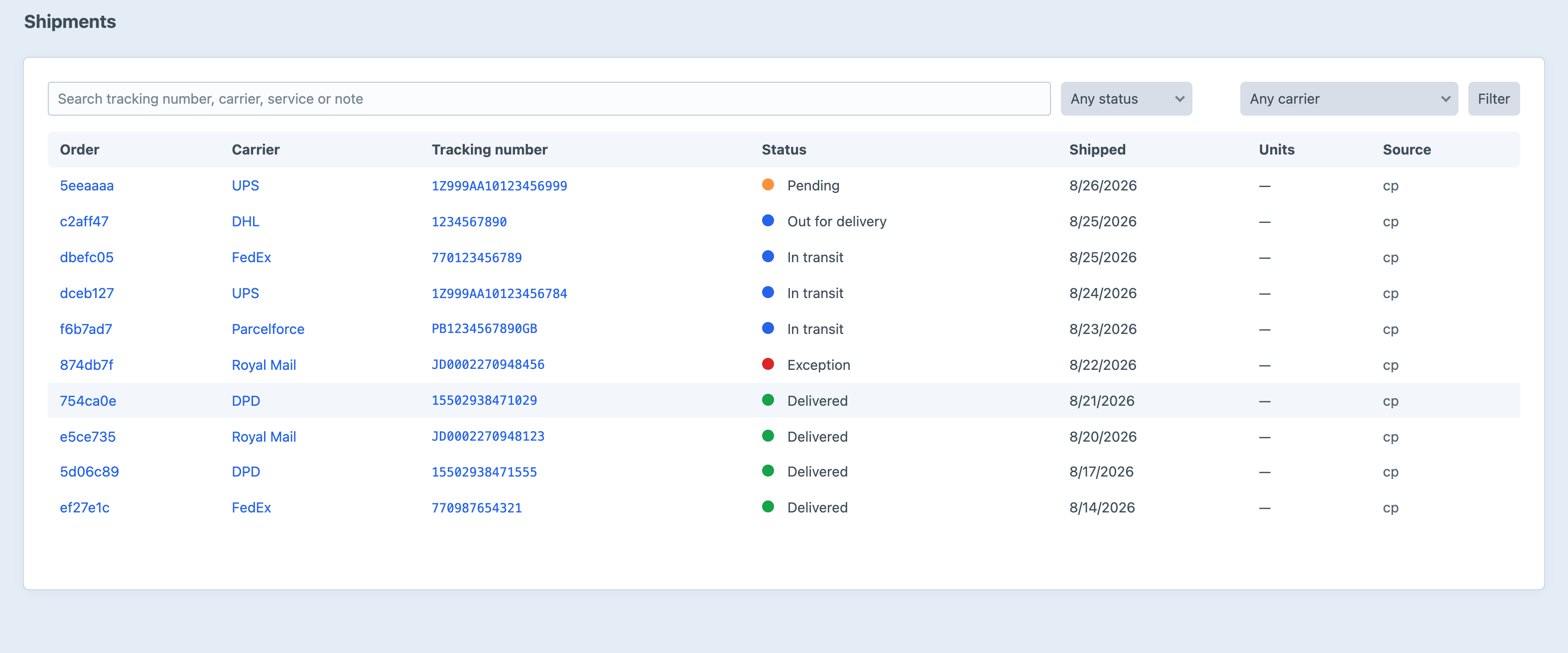
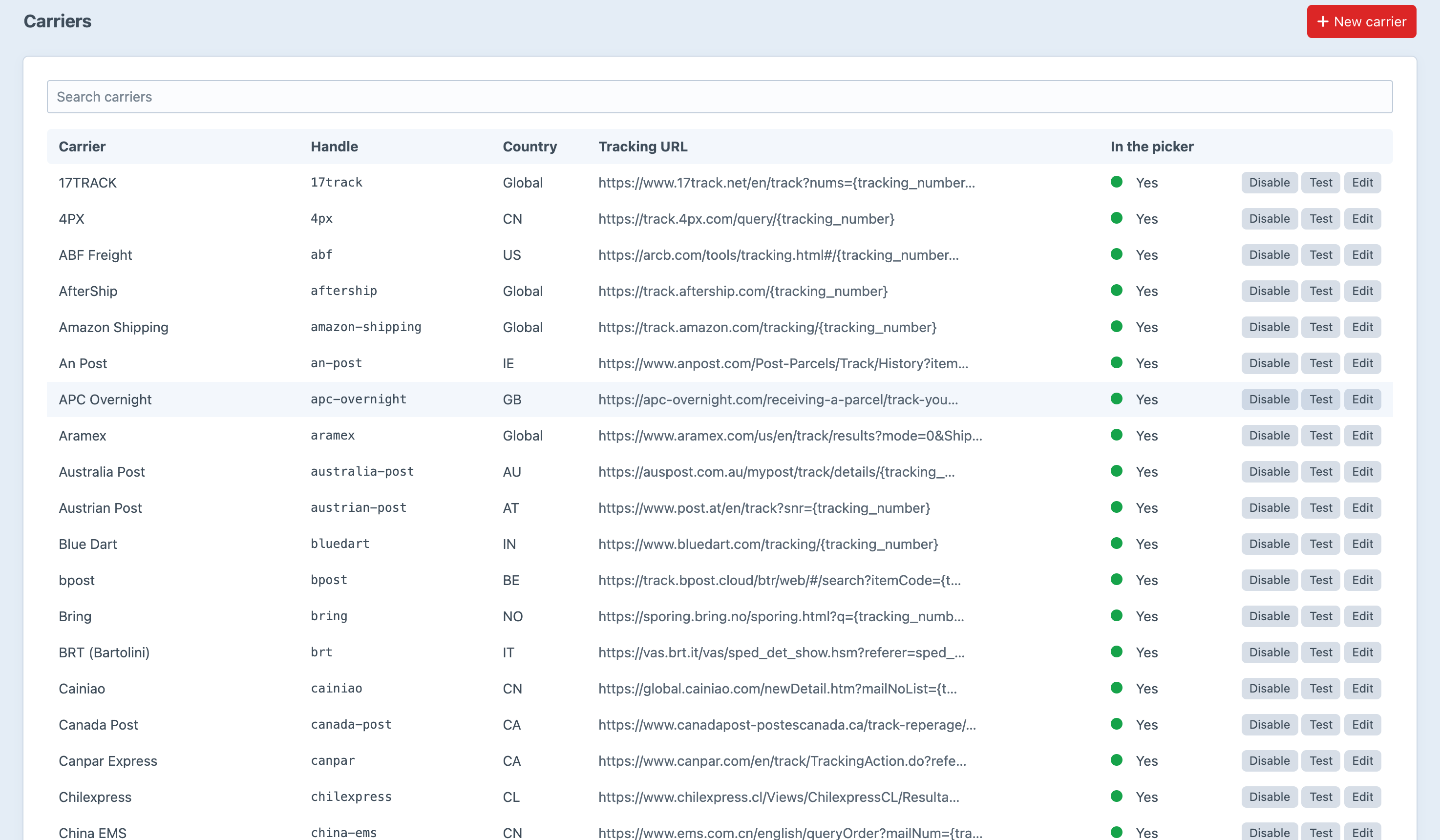
Screenshots from a live install, not mockups.
Frequently Asked Questions
The questions worth answering before you install it.
No, and that is the point. Trackr is carrier-agnostic: it does not care where a tracking number came from, only that a customer can follow it. Numbers arrive by hand, by CSV, over the API or from a console command, and 130 carriers' tracking URLs are already built in. It sits downstream of whatever you already use — including several at once.
No. Trackr records the status you tell it and shows it. Live polling would mean an API key and a rate limit per carrier, and a support burden every time one of them changes. Your label service already knows the status — push it to Trackr and it will show it.
One line: {{ craft.trackr.widget(order) }}. The widget is inline-styled table markup so it survives email clients, and its colours and layout are settings with a live preview. Point widgetTemplate at your own template if you would rather own the markup.
It updates the shipment you already have rather than creating a second. Carrier plus tracking number identifies a shipment, which is what makes retrying fulfilment services and re-uploaded spreadsheets safe.
Yes. The tracking page takes an order number and the email address on the order — no login. The link in the widget carries a token and skips the form entirely. Failed lookups are throttled per IP and answer identically, so the page cannot be used to work out which order numbers exist.
Yes, on both editions — a large order goes in more than one box. On Pro you can also say which line items and quantities are in each one, and the order holds at partially shipped until the units add up.
The number is still recorded; it shows as plain text with no link. On Pro you can add the carrier yourself with its URL template — including a white-labelled "Our delivery van" with no URL at all. A link that 404s is worse than no link, which is why an unknown carrier is never guessed at.
Lite is, and it is not a trial — tracking on the order screen, 130 carriers, multiple numbers per order, the widget, the customer tracking page, CSV import and the full Twig API, for nothing. Pro is a one-off $99 with a $49/year renewal, and adds item-level tracking, partial shipments, carrier auto-detection, custom carriers, the push API, watched-folder import, delivery notifications and the activity log.
Craft CMS 5.3+, Craft Commerce 5.0+, PHP 8.2+.
Start free, upgrade when fulfilment does
Lite covers a merchant fulfilling orders themselves. Pro is $99 with a $49/year renewal, and covers fulfilment that has become somebody else's job — item-level tracking, the push API, watched-folder import, delivery notifications and the activity log.