Free · Craft 5.3+
Hotjar on every page, and off the ones you meant
Paste the Site ID from your Hotjar account and every front-end page gets the tracking code, with no template change. That part is easy — the WordPress plugin does it in one field. Jarhead does it too, and then does the four things that go wrong on the day after you install it.

One field, or one config file
The Site ID is per Craft site and read from the environment, so production and staging can point at different Hotjar accounts — or staging at none at all. An environment variable that is not set here reads back as “not configured”, never as a literal string.
// config/jarhead.php
return [
    'siteIds' => ['default' => '$HOTJAR_SITE_ID'],
    'allowedEnvironments' => ['production'],

    'excludeAdmins'   => true,
    'excludedGroups'  => ['editors', 'staff'],
    'uriRules'        => [
        ['pattern' => 'checkout/*', 'mode' => 'exclude'],
    ],

    'consentMode'        => 'cookie',
    'consentCookie'      => 'cookie_consent',
    'consentCookieValue' => 'substring:analytics',
];Features
The tracking code is the easy part. These are the four things that go wrong afterwards, and the tools for when it looks like nothing is happening.
Not your own team
Hotjar bills by session, and an editor clicking through drafts is not a customer. Admins and previews are excluded out of the box; signed-in users, named groups and URI patterns are a setting away.
- Globs, or regular expressions with a re: prefix
- An exclusion always beats an inclusion, whatever the order
Staging stays out of it
One Site ID deployed everywhere is how a developer typing asdf into a checkout ends up in the same Hotjar account as your customers, with nothing in the data to tell them apart.
- A Site ID per Craft site, read from the environment
- jarhead/status --strict fails a deploy that would send nothing
Nothing until they say yes
Session recording is personal data — it is a video of somebody using your site. Under a consent gate there is no script element, no request to hotjar.com and no _hjSettings until the visitor agrees.
- Cookie, DOM event, dataLayer (Consent Mode v2) or a manual call
- Do Not Track and Global Privacy Control honoured on top
Recordings you can filter
Every Craft page already knows its section, entry type, template, site and language. None of it reaches Hotjar unless something sends it, so a recording with no attributes is a video you have to watch to find out whether it was relevant.
- Custom attributes too, read from the environment
- Never an email address and never a username, under any setting
Silence looks like success
Hotjar's CDN answers 200 for every numeric Site ID ever asked for — an ID that does not exist just gets an empty file. Jarhead reads the body, so a wrong ID is reported as wrong instead of ticked off.
- Also reports recording switched off, or sampling below 100%
- The real cause of most “installed but no recordings” tickets
Why is it not on that page?
Type a URI into the Hotjar utility and get back the first rule that applied, through the same code path a real request takes. The same answer is available in Twig and on the command line.
- php craft jarhead/explain checkout/cart
- {{ craft.jarhead.explain.message }} in a staging footer
Jarhead in the control panel
The whole plugin is one settings screen: a Hotjar Site ID per Craft site, an allowlist of environments, and an honest account of what the recording will and will not capture.
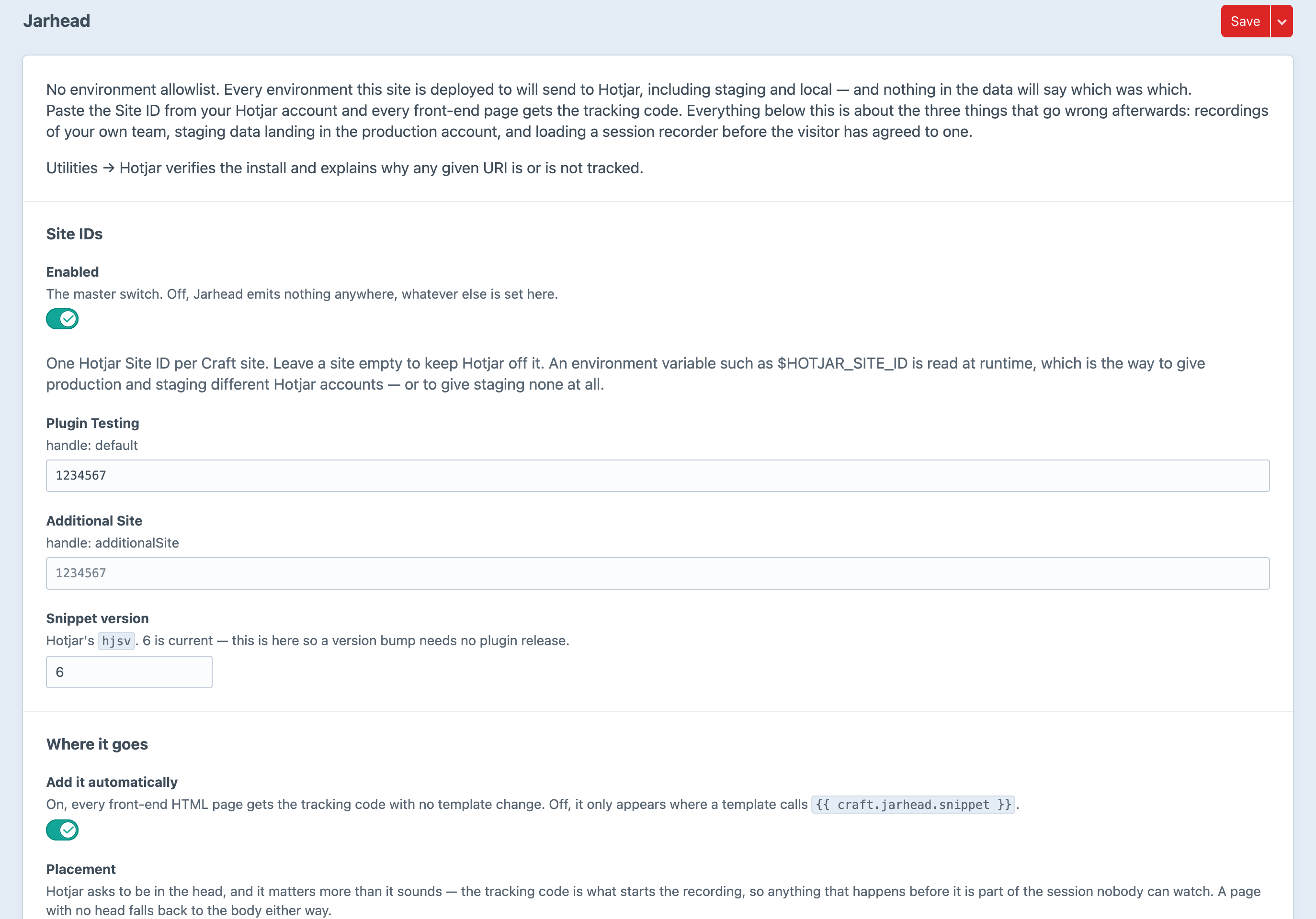
Screenshot from a live install, not a mockup.
Frequently Asked Questions
The questions worth answering before you install it.
Yes. One edition, everything switched on, no licence key and no licensing code in the plugin. You still need a Hotjar account; their pricing is between you and them.
You can, and for a single-site, single-environment marketing page that is genuinely enough — it is what Hotjar's own installer tells you to do. Jarhead exists for the day after: the recordings that are your own team, the staging data landing in the production account, the consent gate somebody asks for, and the recordings nobody can filter because nothing sends attributes.
No. The snippet is emitted character for character as Hotjar publishes it, with exactly three departures: hjid and hjsv come from your settings, and one line sets a CSP nonce when you have configured one. It is the documented integration surface — a plugin that tidies it up is a plugin whose bug reports all close as “not our code”.
Yes, and that constraint is what the whole design is built around. Anything that varies per request — site, environment, URI, signed-in state — is decided on the server before anything is emitted. Anything that varies per visitor — consent, Do Not Track, an automated browser — is decided in the browser, because a cached “yes” served to the next visitor is worse than having no gate at all.
Compliance is a property of your site and your processes, so no plugin can honestly answer yes on your behalf. What Jarhead gives you is the mechanism: under a consent gate nothing reaches Hotjar until the visitor agrees — no script element, no request to static.hotjar.com, no _hjSettings. The tracking code is created by the gate, in the browser, after consent.
Never, and there is no setting for it. A session recorder pointed at the control panel records other people's addresses, order histories and account details. That is a data breach with a subscription.
Only what you switch on, and never an email address or a username — there is no setting anywhere that sends either. The automatic attributes are facts about the page. Sending the Craft user ID as Hotjar's userId is opt-in and HMAC'd with your security key by default, because an identifier only has to be stable to be useful.
Not by default. Jarhead refuses to run when navigator.webdriver is set, which covers Playwright, Puppeteer, Selenium and most uptime checkers. That one is decided in the browser rather than from the user agent, because a user-agent test on the server would vary your page cache.
Yes. Turn on SPA support and route changes via history.pushState, history.replaceState or the back button are reported with hj('stateChange', …). Without it Hotjar sees one long page view, and every heatmap after the first route change lands on the wrong page.
No. Jarhead is not affiliated with, endorsed by, or sponsored by Hotjar Ltd. It installs the tracking code Hotjar publishes; everything else is Craft-side.
Craft CMS 5.3+ and PHP 8.2+. No database tables and no runtime dependencies beyond Craft's own.
Free, and about ten minutes to install
Paste a Site ID and you are recording. Set the environment allowlist and the consent gate before you deploy, and you are recording the right people.