For Craft Commerce 5
Every channel wants a feed. Give them one each.
Google wants g:availability to say in_stock. Meta wants in stock. Criteo wants true. Each has its own attribute names, its own required set, and its own opinion about namespaces — which is why the Twig template that worked for the first channel quietly rots on the third. Eat is an attribute map per channel, generated on a schedule, delivered wherever the channel wants it.

One map, the channel's own dialect
The same five mappings produce a Google RSS feed and a Meta CSV — including the bit hand-written feeds get wrong, where RSS's own title is written bare and everything else is namespaced.
<!-- Google Shopping · RSS 2.0 -->
<item>
  <g:id>QML-024</g:id>
  <title>Quayside mooring line 24m</title>
  <g:price>148.50 USD</g:price>
  <g:availability>in_stock</g:availability>
  <g:item_group_id>2841</g:item_group_id>
</item>

# Meta · CSV — same map, same products
id,title,price,availability,item_group_id
QML-024,Quayside mooring line 24m,148.50 USD,in stock,2841Features
A feed engine, not a template you maintain: channel templates, an attribute map, real filters, and a log that says why a product isn't in the file.
Fifteen channels, pre-mapped
Google Shopping and Local Inventory, Meta, Pinterest, Microsoft, TikTok, Snapchat, Criteo, Awin, idealo, Kelkoo, PriceRunner, Shopzilla, Rakuten — plus a custom builder for the one nobody has heard of.
- Each arrives with that merchant's attribute names and required set
- Adding a channel is a definition, not code
Six formats, one engine
RSS 2.0, XML, CSV, TSV, tab-separated TXT and JSON, gzipped if you like. Values with markup go in CDATA, and a value containing ]]> is split so it cannot corrupt the document.
Map from anything
Product and variant attributes, custom fields with dotted paths, static values, the taxonomy map, or a Twig template when the channel wants something only you can build.
- Variant fields win over product fields
- Fourteen chainable output modifiers on any row
Filters, and a reason for every exclusion
Product types, statuses, stock, price bounds, image requirements, SKU wildcards — and Craft's own condition builder on top. Every product left out is counted with a reason.
- missing:image_link: 412 is the answer to “why did Merchant Center reject those?”
Delivered, not just written
A public URL, an asset volume, FTP, SFTP, or pushed straight into Google Merchant Center with the Content API. No Google SDK and no runtime dependencies.
- The local file is always written first, so a dead FTP server can't take the URL down
- Staged and renamed into place, so a fetch mid-run never gets half a feed
Fresh without being fragile
An interval per feed, run from cron, from a web request, or when a product is saved — queued, debounced, and streamed in batches so a 200,000-product catalogue costs the same memory as a small one.
Eat in the control panel
Real screens from a Craft 5 install running Commerce — the feeds and their URLs, the attribute map, and a run that explains itself.
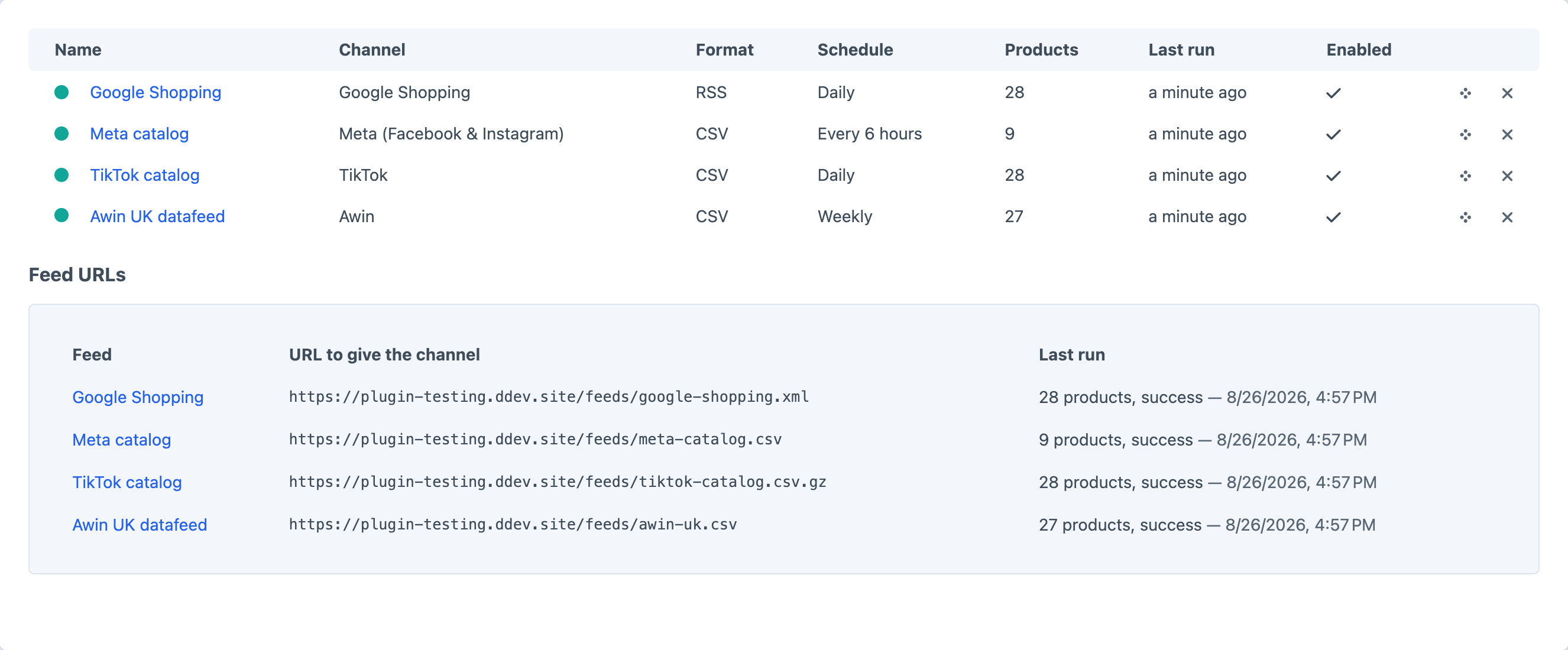
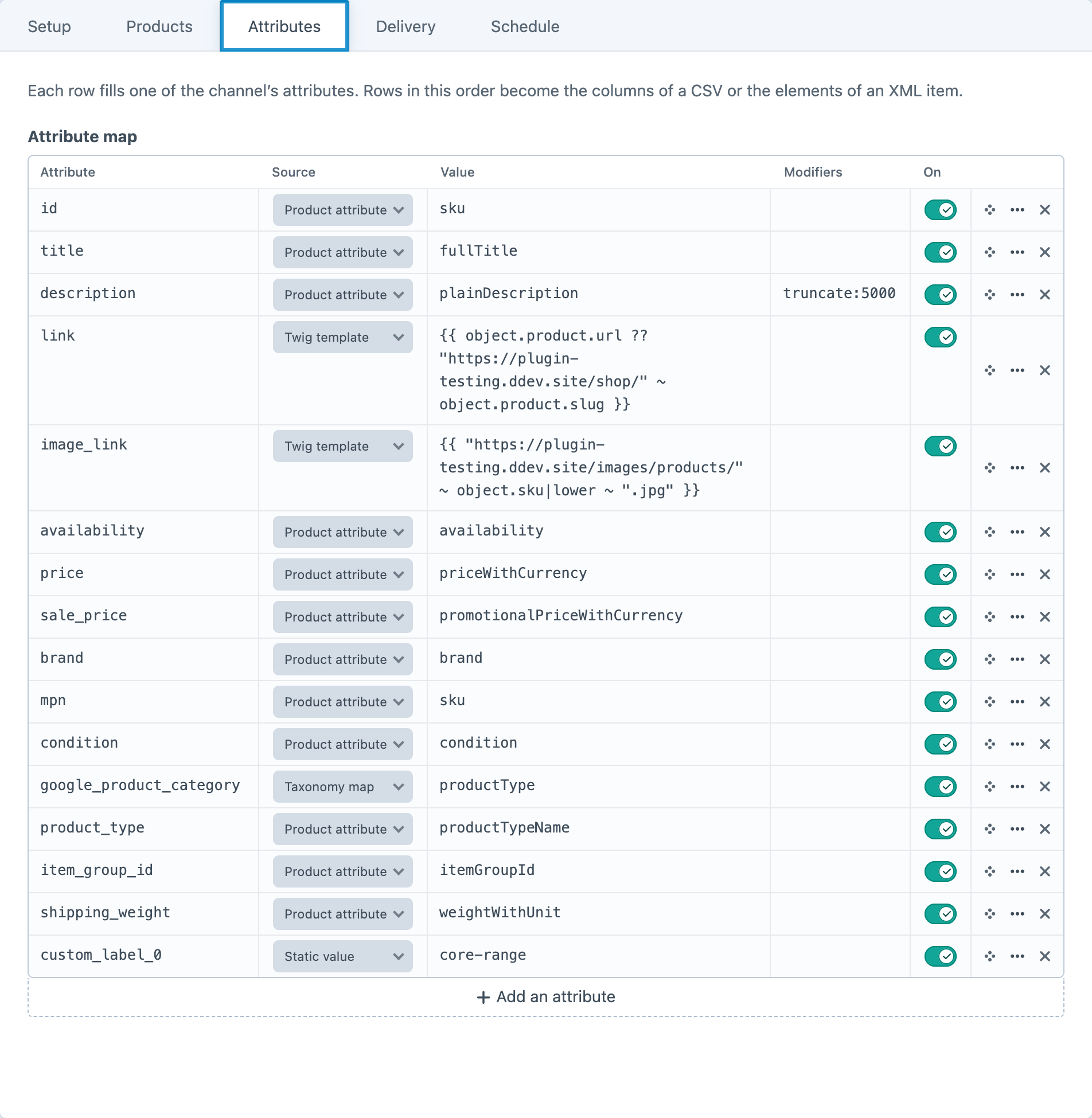
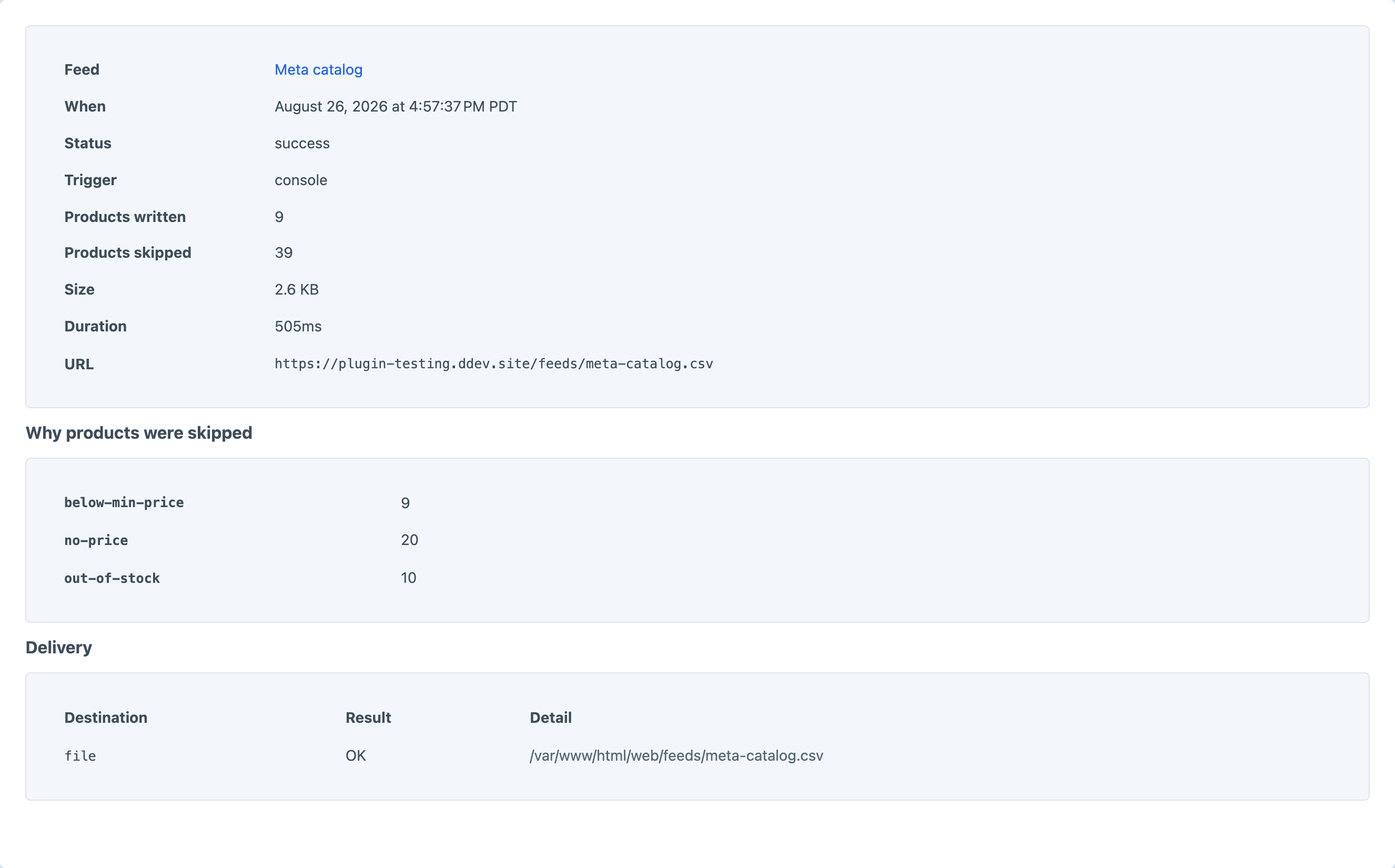
Screenshots from a live install, not mockups.
Frequently Asked Questions
The questions worth answering before you install it.
Lite is, and it is not a trial: two feeds on the Google and Meta channels, every output format, scheduled regeneration and a public feed URL, for nothing. Pro is a one-off $79 with a $59/year renewal, and adds the other thirteen channels and the custom builder, output modifiers, condition-builder matching, the run log, live URLs, asset volume / FTP / SFTP delivery, Merchant Center push and the console commands.
For one channel and a simple catalogue, do. It stops being cheap at the third channel, because each has its own attribute names, required set, availability wording and namespace rules. Add a scheduled file, gzip, a category taxonomy, “why did Merchant Center reject 400 items”, and a template that renders 50,000 products without running out of memory, and you have written this plugin.
No. Eat only reads. It writes files, and — if you ask it to — sends them to a channel.
Products are read in batches and streamed straight to the file, so memory is flat regardless of size. The practical limits are how long your queue worker may run and how patient the channel is. Turn gzip on above a few megabytes.
Yes. The custom channel lets you name every column or element yourself, in any of the six formats — which covers most affiliate networks and in-house systems. If a channel is common enough to deserve its own template, ask: a channel is a definition in one file, not code.
It gets the previous feed. The new one is written to a staging file and renamed into place, which is atomic on every filesystem Craft runs on.
The run is recorded as partial: the local file was written and the URL still works, and the log names the destination that failed and why. A remote failure never takes the public feed down with it.
Only for Content API push. The ordinary way to use Merchant Center — giving it a URL and letting it fetch on a schedule — needs nothing but the feed URL.
Craft CMS 5.3+, Craft Commerce 5.0+, PHP 8.2+.
Start with Google and Meta, for nothing
Lite covers two feeds on the two channels most merchants start with. Pro is $79 with a $59/year renewal, and opens the other thirteen, the modifiers, the run log and every delivery destination.