Free · Craft CMS 5
Find out what nothing is using
Every Craft site of any age accumulates content model it no longer needs — a field made for a section that got redesigned, a Matrix block type nobody has picked in three years, six entry types left behind by a plugin that was uninstalled. None of it does much harm, and none of it can be safely removed, because nobody can prove it isn't used. Joan proves it.

A verdict, not a number
Craft's field settings screen lists the field layouts a field appears in, which is a useful third of the answer. It doesn't know whether a single element has ever had a value in that field, and it doesn't look at your templates. Joan answers the whole question, and says which of six things is true.
In use           In a layout, and elements hold values for it.
Never filled in  In a layout, and not one element has ever been given a value.
Stranded         In no layout — but content rows still carry values.
Code only        No layout, no content, but the codebase still names the handle.
Unused           No layout, no content, named nowhere. Nothing would miss it.
Not counted Stored somewhere Joan can't measure — reported as unknown, never as zero.Features
Three passes over the database and one over your codebase, and then it stands out of the way.
Counts what's actually in each field
Not "is it in a layout" — how many elements hold a non-empty value, broken down by element type and by site.
- Drafts and revisions excluded by default, because fifty revisions per entry would call every abandoned field busy
- 0 and a switched-off lightswitch count: an editor made that choice
- A Table field of empty cells does not: something was stored, nothing was entered
Reads your codebase
A field can be in no layout and hold no content and still be referenced — by a template that populates it on save, by a module, by a migration. Joan looks, and shows you the lines.
- Every hit classified: entry.myField is worth more than the word in a comment
- File, line number and the source line, so "safe to delete" means something
- Every handle a field answers to, including the ones a field layout renamed
Three kinds of storage, counted three ways
Craft 5 keeps field values in three different places. Count one and miss the others and the report is worse than useless.
- Most fields: elements_sites.content, keyed by the field layout element's UID
- Relational fields also have rows in relations — both counted, the larger taken
- Matrix and nesting CKEditor own entries of their own and store nothing in the content column
Attributes every field layout
Including the ones no element type claims — Hyper's link types are the usual example — and the ones nothing claims at all, which are usually left behind by an uninstalled plugin.
- Craft says "1 unknown field layout" and leaves you there
- Joan names the owner, or says plainly that nothing claims it
Covers entry types and Matrix
Craft 5 turned Matrix block types into entry types, so they share a screen: which sections use each one, which fields nest it, and how many entries exist.
- And the question nothing else answers: which of the eight block types a Matrix field allows has anyone ever actually used
Finds content with nowhere to live
Craft 5 keys stored content by field layout element, not by field. Take a field out of a layout and its values stay behind under a key nothing will ever read again.
- Joan finds those keys and counts the rows carrying them
- Not a reason to delete faster — if the field was removed by accident, putting it back brings the content into reach
Joan in the control panel
Real screens from a Craft 5 install — the size of the content model, every field with its verdict, and the whole answer for one field.
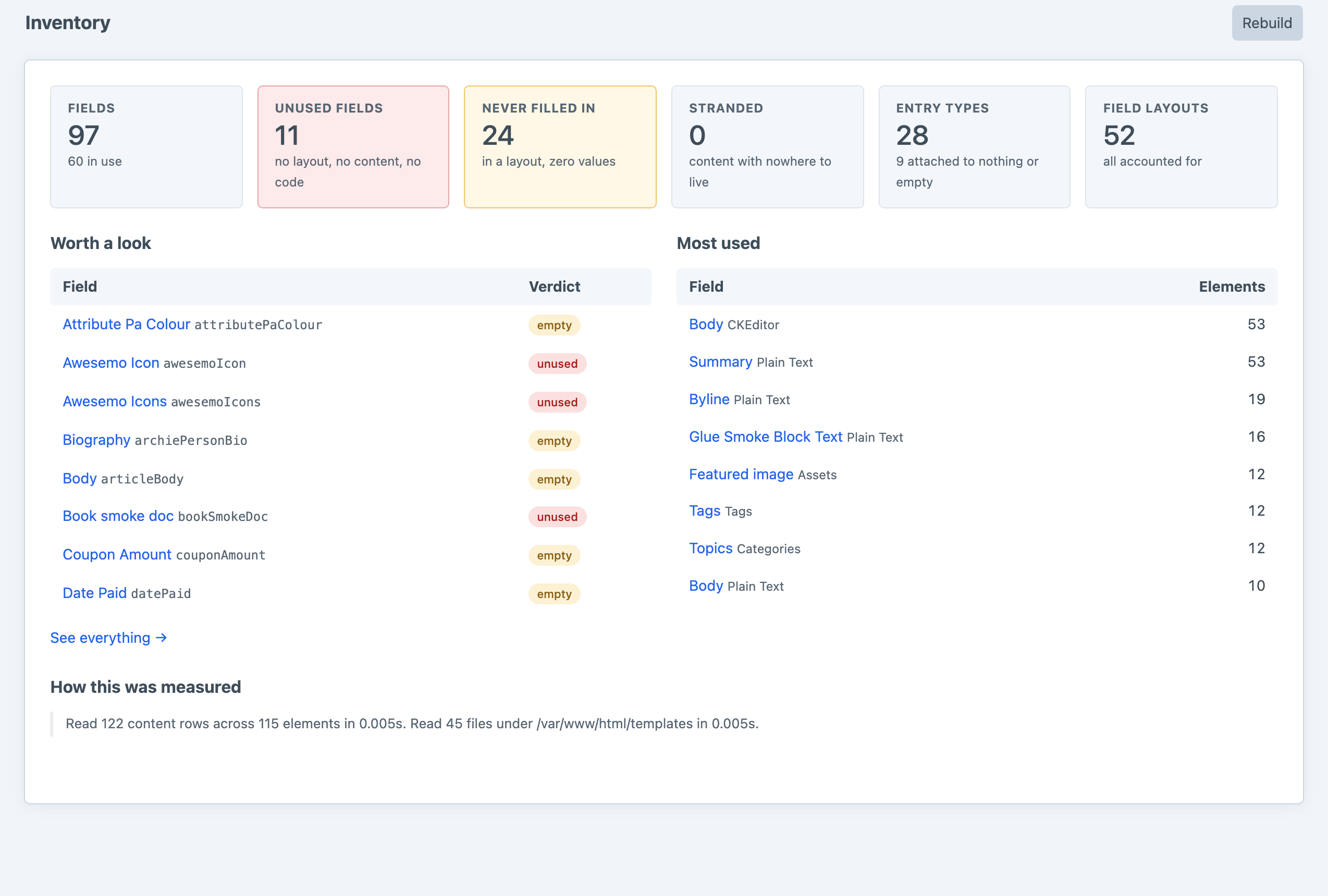
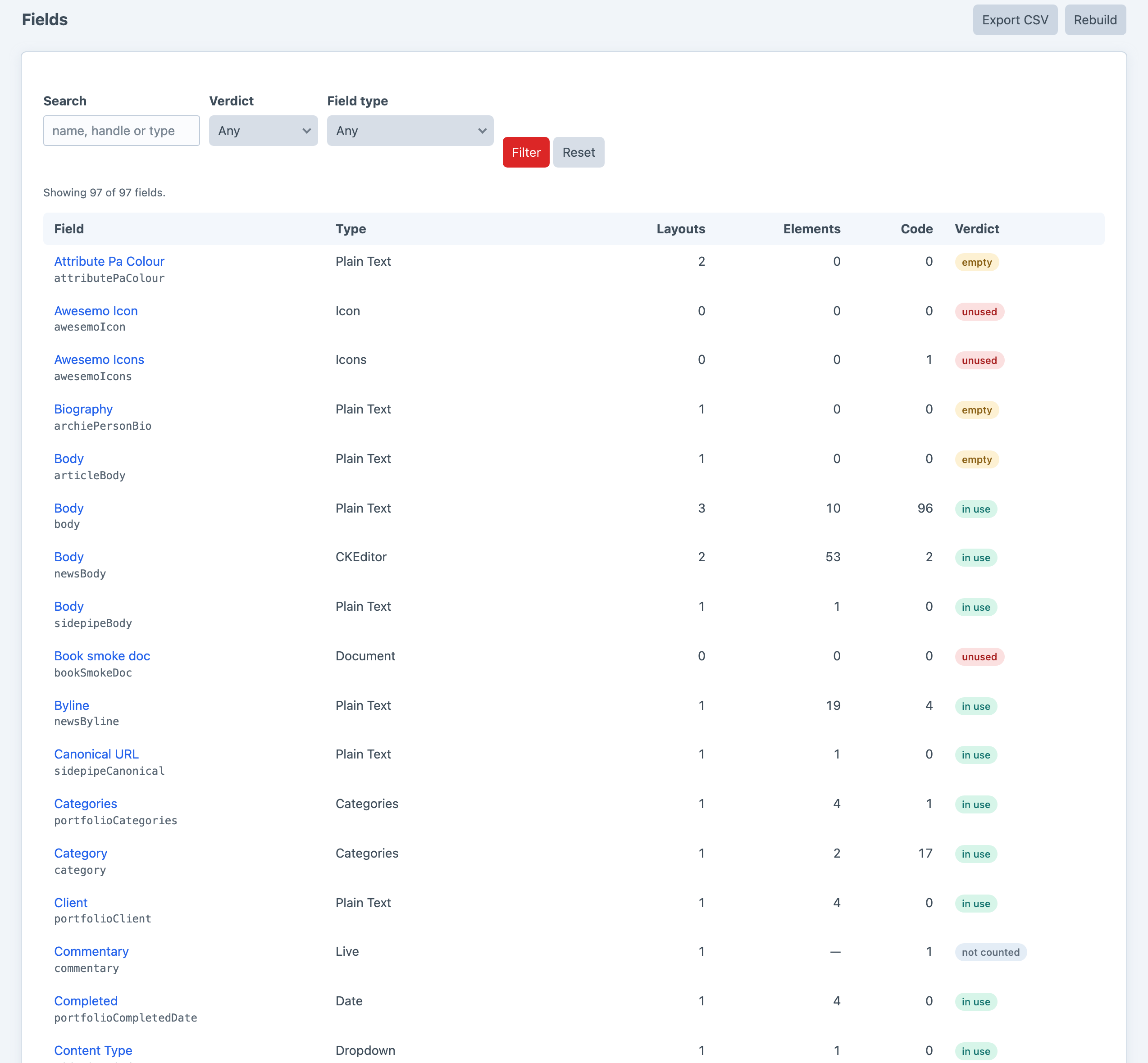
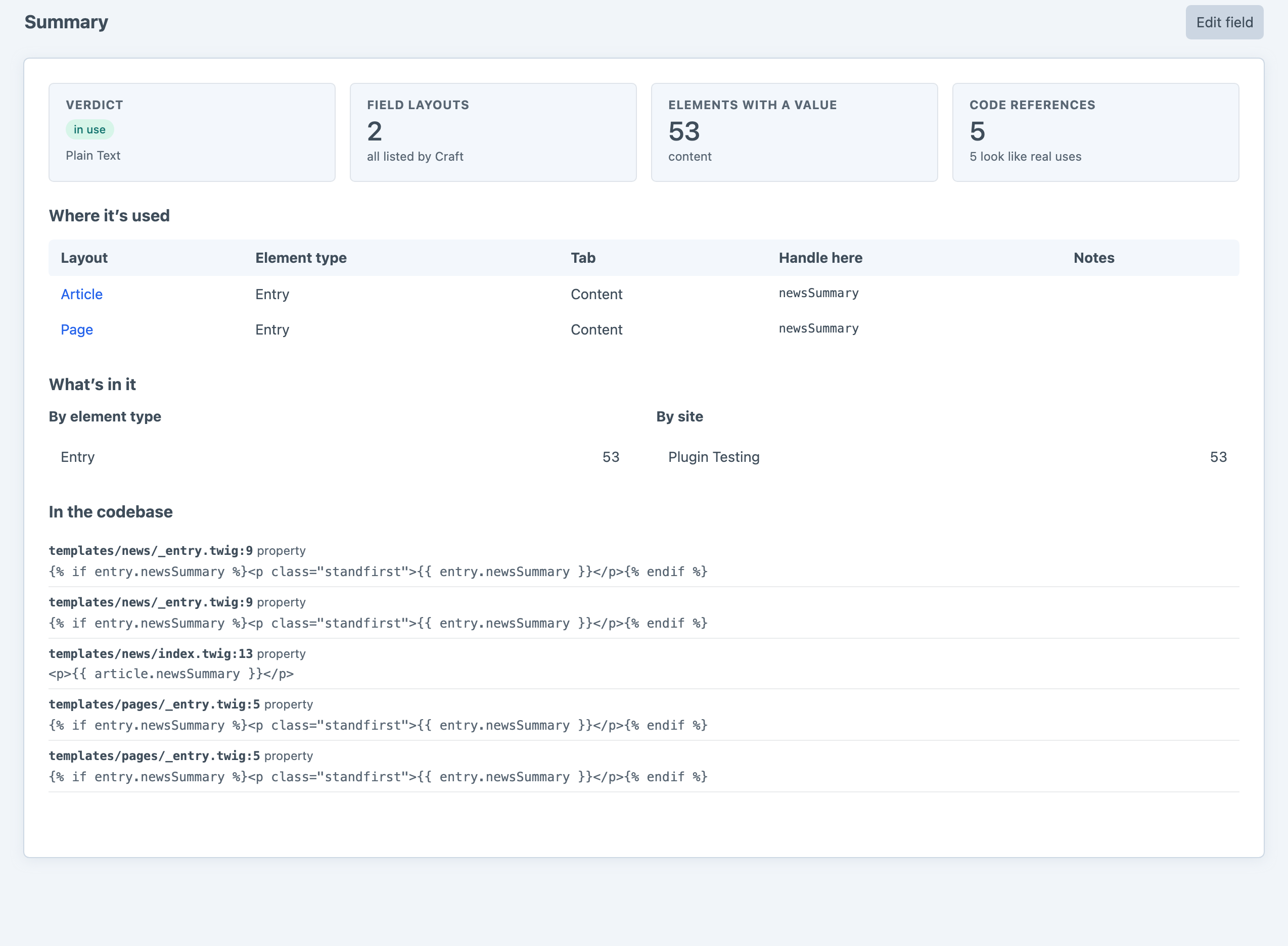
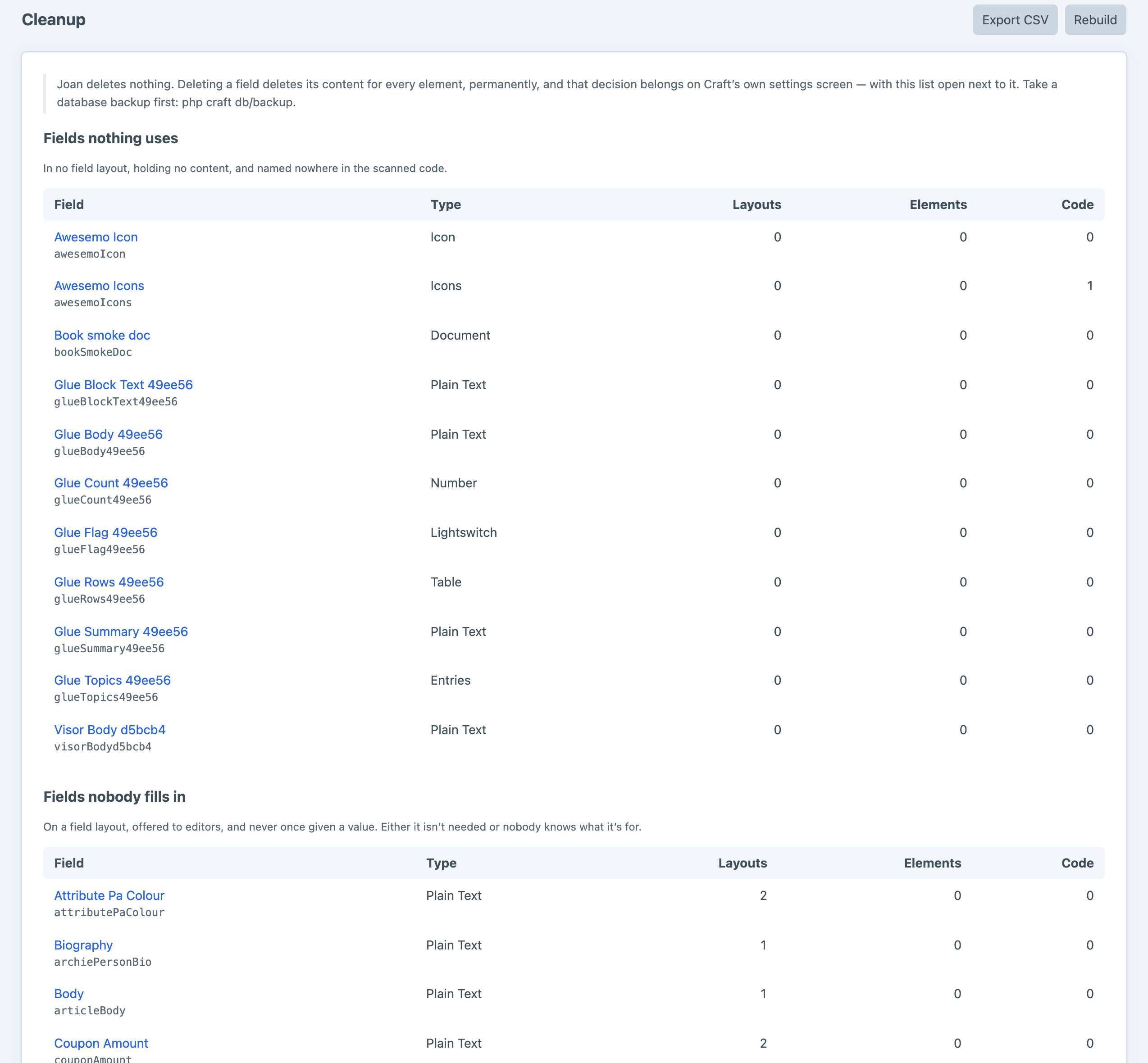
Screenshots from a live install, not mockups.
And from the command line
Everything the control panel shows, plus an exit code you can put in a build. Start with --fail-on=stranded on an existing site; unused is the stricter gate and is more useful once the first run's backlog is cleared.
php craft joan/fields                      # the inventory
php craft joan/fields --verdict=unused     # just the abandoned ones
php craft joan/fields/show heroImage       # everything about one field
php craft joan/entry-types/nested          # what's actually inside each Matrix field
php craft joan/export fields --format=json --path=storage/joan.json

php craft joan/unused --fail-on=stranded   # fail the build on content with nowhere to live
php craft joan/unused --fail-on=unused # …or on anything nothing references at allFrequently Asked Questions
The questions worth answering before you install it.
No. It installs no tables, writes nothing and deletes nothing.
Deleting a field deletes its content for every element, permanently, and that decision belongs on Craft's own settings screen — with Joan's cleanup list open next to it. A plugin with a "delete all unused" button would eventually be right about everything except the one field that mattered.
Nothing. One edition, everything included.
Joan reads. It cannot damage anything, which made it hard to argue that anyone should pay to find out whether it worked on their site.
It tells you a useful third of it. The field settings screen lists the field layouts a field appears in, and that is where Joan starts too.
What it does not do: count whether a single element has ever had a value in that field, look at your templates, or identify a field layout it cannot attribute to an element type. For that last one it says "1 unknown field layout" and leaves you there.
Never filled in means the field is on a layout, editors can see it, and not one of them has ever put anything in it. The field is reachable; nobody wants it.
Unused means it is on no layout at all, holds no content, and is named nowhere in the scanned code. Nothing can reach it and nothing would miss it.
The first is a content-model question. The second is housekeeping.
Craft 5 keys stored content by field layout element, not by field. Take a field out of a layout and its values stay behind in the content column under a key nothing will ever read again.
It is not a reason to delete the field faster — it is a reason to check whether the field was removed on purpose. If it wasn't, putting it back in the layout brings the content into reach again. Deleting the field destroys it.
Within what a text search can do, and Joan is clear about which is which. It classifies every hit — entry.myField is worth more than the word myField in a comment — and shows you the file, the line number and the source line, so you can read the evidence rather than the conclusion.
What it cannot see is a handle built at runtime. entry[someVariable] is invisible to any scanner, which is what the leave-alone list is for.
Yes, and this is the part most searches get wrong. Craft 5 lets a layout override a field's handle for itself, so heroImage in one section and image in another can be the same field. Joan reports every handle a field answers to and scans the codebase for all of them — a search for only the field's own handle would miss half its uses.
No. Joan runs in the control panel and in the console, and the inventory is cached against Craft's own field version, so any change to a field or a layout invalidates it the moment it is saved.
The one expensive thing is a rebuild — four passes over the database and the codebase — and it sits behind its own permission for that reason. Nothing in Joan runs on a front-end request unless you call craft.joan from a template yourself.
Yes, and there is a switch for when it doesn't. Count content usage can be turned off, which makes every rebuild cheap and every element count unknown, while the layout attribution and the code scan carry on working.
That is the honest trade, and most sites never need it.
Joan reports it as Not counted — never as zero, because a zero is what gets a field deleted.
The plugin that owns the field type can report the real number instead, through Inventory::EVENT_DEFINE_FIELD_USAGE. There is a second event, CodeScan::EVENT_REGISTER_SCAN_PATHS, for code that lives outside the configured paths. Both are documented in the repo.
Both.
Fine, and neither needs the other. Microscope has a check that counts unused fields as one line in a performance audit, and its own advice is to search the codebase before deleting anything.
Joan is that search, and the rest of the answer.
Nothing is left behind. There are no tables to drop and no content to migrate out, because Joan never put any in.
Take stock
One composer require, one page load, and you will know how much of your content model nothing is using. It's free, and it can't break anything.