Free for Craft CMS 5
One image in. Every favicon out.
A modern site needs nine icon files, a manifest and a tile config before every browser, phone and pinned tab is happy. Fav makes all of them from one square image in the control panel, and puts the tags in the head of every page without a template change.

What one image becomes
Each size is drawn the way the thing asking for it wants it. Tab icons keep their transparency, the iPhone icon is flattened onto your colour, and everything is fitted inside the square rather than cropped.
<link rel="icon" href="/fav/…/favicon.ico" sizes="32x32">
<link rel="icon" type="image/png" sizes="16x16" href="/fav/…/favicon-16x16.png">
<link rel="icon" type="image/png" sizes="32x32" href="/fav/…/favicon-32x32.png">
<link rel="icon" type="image/png" sizes="48x48" href="/fav/…/favicon-48x48.png">
<link rel="icon" type="image/png" sizes="96x96" href="/fav/…/favicon-96x96.png">
<link rel="apple-touch-icon" sizes="180x180" href="/fav/…/apple-touch-icon.png">
<link rel="manifest" href="/fav/…/manifest.json">
<meta name="theme-color" content="#e4486f">
<meta name="msapplication-config" content="/fav/…/browserconfig.xml">

{# Added before </head> on every page. Or place them yourself: #}
{{ craft.fav.tags() }}Features
Everything a favicon generator website does, without leaving the control panel or pasting files back.
The whole family from one file
A three-size favicon.ico, PNG favicons at 16, 32, 48 and 96px, a 180px Apple touch icon, 192 and 512px manifest icons and a Windows tile — plus the manifest and tile config that point at them.
No template changes
The tags are added to every HTML page just before </head>, including templates that never call {{ head() }}. A page that already declares its own icon is left alone.
- RSS, JSON and XML templates are never touched
- Or place the tags yourself with craft.fav.tags()
Drawn for where they go
Tab icons stay transparent and run edge to edge, because at 16px a margin costs a quarter of the logo. The iOS and Windows icons are flattened onto your colour and padded, because iOS turns transparency black.
One set per site
Every site in a multi-site install has its own image and colours. Settings live in the database, not project config, so the person who owns the brand can change it on the live site without a deployment.
Plays nicely with a PWA
Fav's manifest carries icons and colours only — no start URL, no display mode — so it can never make a site installable by accident. Already running a PWA plugin? Switch Fav's manifest off for that site.
Read-only deploys welcome
Icons are static files in web/fav when the web root is writable, and are served from storage when it is not. One console command rebuilds what a fresh deploy is missing.
- php craft fav/favicons/generate
- Replacing the source image rebuilds the set on the spot
Fav in the control panel
A real screen from a Craft 5 install: every file generated from one source image, beside the tags that go in the head.
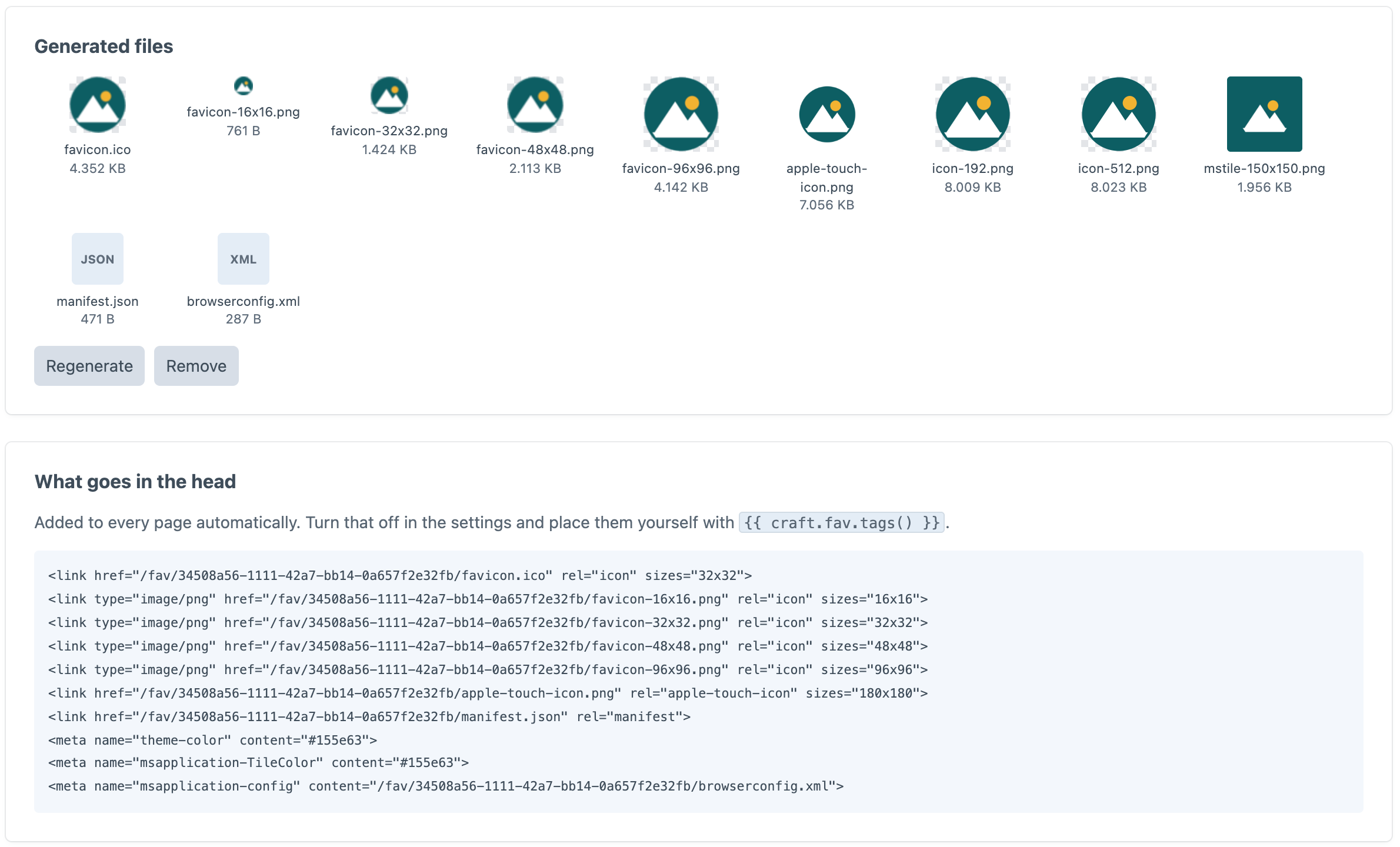
Screenshot from a live install, not a mockup.
Frequently Asked Questions
The questions worth answering before you install it.
Yes. One edition, everything switched on, no licence key and no trial.
No. Fav adds the tags to every front-end HTML page just before </head>. If you would rather place them yourself, call {{ craft.fav.tags() }} and the automatic injection stands down for that page.
A square PNG, 512×512 or larger, with transparency if the artwork has any. A wide logo is fitted inside the square, never cropped. SVG works too on servers with Imagick, and is sanitised before it is used.
Not if you switch Fav's web manifest off for that site. Fav's manifest never makes a site installable on its own, but two manifest links in one head is still one too many.
The settings arrive with the database, but the generated files do not. Add php craft fav/favicons/generate to the deploy script — it only rebuilds what is missing or out of date.
Yes, for the browsers, crawlers and link unfurlers that ask for it by name. Craft only sees that request when no real file is there, so a favicon.ico in your web root still wins.
Free, and it stays free
No editions, no licence key, no trial. Install it, choose one image, and the next page you load has every icon it needs.